

Key takeaways
- Use focused, versioned test sets. Keep the cases fixed during an offline experiment and scope them to the behavior the candidate is intended to improve. Use a separate CI suite to catch regressions elsewhere.
- Calibrate the measurement system first. Validate evaluators against a held-out, human-labeled set, version their configurations, and keep the same evaluator version throughout a comparison.
- Treat offline and online experiments as complementary. Offline tests provide control by comparing candidates on the same cases. Production A/B tests reveal whether those gains survive the variation of real usage.
- Design production tests before exposing traffic. Randomize assignment, keep users or sessions in the same arm, run control and treatment concurrently, and define the primary metric, guardrails, duration, and stopping criteria in advance.
- Trace experiment membership across the full request path. Record the experiment ID and variant on relevant spans so quality, latency, cost, tool behavior, and failures can be compared between arms.
- Carry the evidence into the next cycle. Turn reproducible production failures into new test cases, route questionable evaluator judgments to human review, and preserve the decision, results, and supporting traces.
- Automate execution without weakening the controls. Coding agents and repository-aware workflows can reduce the cost of running experiments, but datasets, evaluator versions, acceptance criteria, evidence, and human review should remain explicit.
Let’s say you changed one thing in your support agent.
The current agent retrieves policy documents, reranks them, and uses the highest-ranked context to answer refund, order, and escalation questions. You have a new reranking prompt, rerank_prompt_v3, that looks better in development.
So, should you ship it?
Looking at a few good traces will not answer that question. Neither will running an evaluator over yesterday’s production traffic.
To prove whether the change actually improved the agent, you need to answer a sequence of narrower questions:
- Does
rerank_prompt_v3improve the behavior you intended to change on a fixed set of cases? - Does it break capabilities you were not trying to change?
- Does the improvement survive real production traffic?
- Can you trace the treatment through the full request path and explain what changed?
- Can the failures you discover become better tests for the next candidate?
That sequence is an agent experimentation loop:
Versioned test set → calibrated evaluator → offline experiment → CI regression gate → production A/B test → trace analysis → next test-set version
The important part is the loop itself. Each experiment should leave your team with more than a winner or loser. It should produce better test coverage, a more trustworthy measurement system, and evidence that makes the next experiment easier to run.
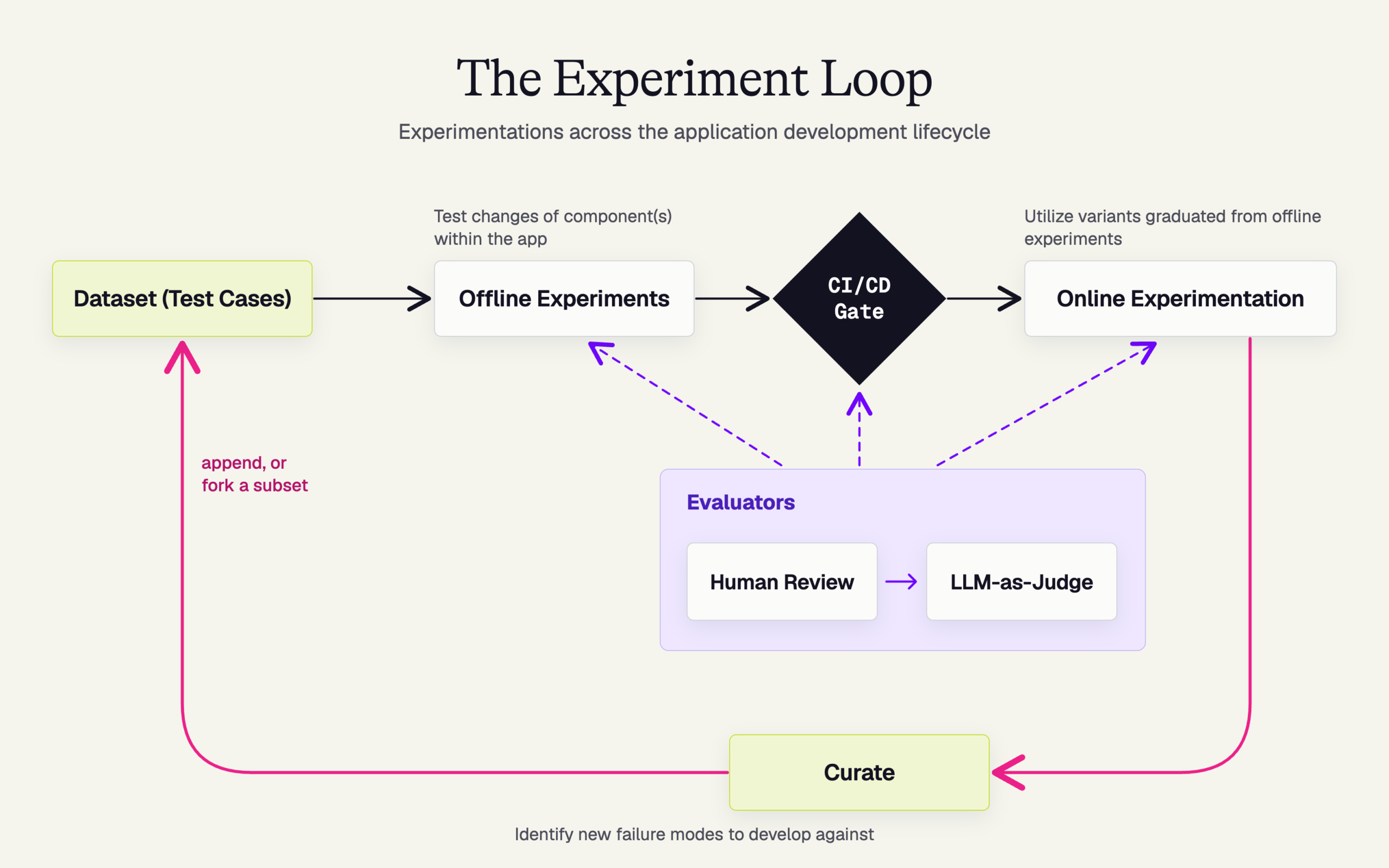
This guide follows one change through that entire process.
The running example: rerank_prompt_v3
Our example is a support agent that answers questions using retrieved policy documents. The current production configuration is the control. The only candidate change is a new reranking prompt called rerank_prompt_v3.
Everything else stays fixed.
| Experiment field | Running example |
|---|---|
| Agent | Customer support agent |
| Behavior to improve | Selecting the most relevant policy context |
| Control | Current reranking prompt |
| Candidate | rerank_prompt_v3 |
| Held constant | Model, tools, policy documents, orchestration |
| Optimization set | 40 frozen support cases |
| Primary metric | Faithfulness to retrieved policy |
| CI coverage | Tone, ticket lookup, refusal when docs are insufficient |
| Production assignment | session_id |
| Production guardrail | Escalation rate |
| Trace attributes | experiment.id, experiment.variant |
All numbers in this example are illustrative.
1. Freeze a test set around the behavior you want to improve
Before comparing two agent configurations, define the population on which you want to compare them.
For rerank_prompt_v3, we create a dataset of 40 support cases covering refund policies, incorrect orders, angry-user escalations, and questions the policy documents cannot answer.
Those 40 cases are frozen for the duration of the experiment.
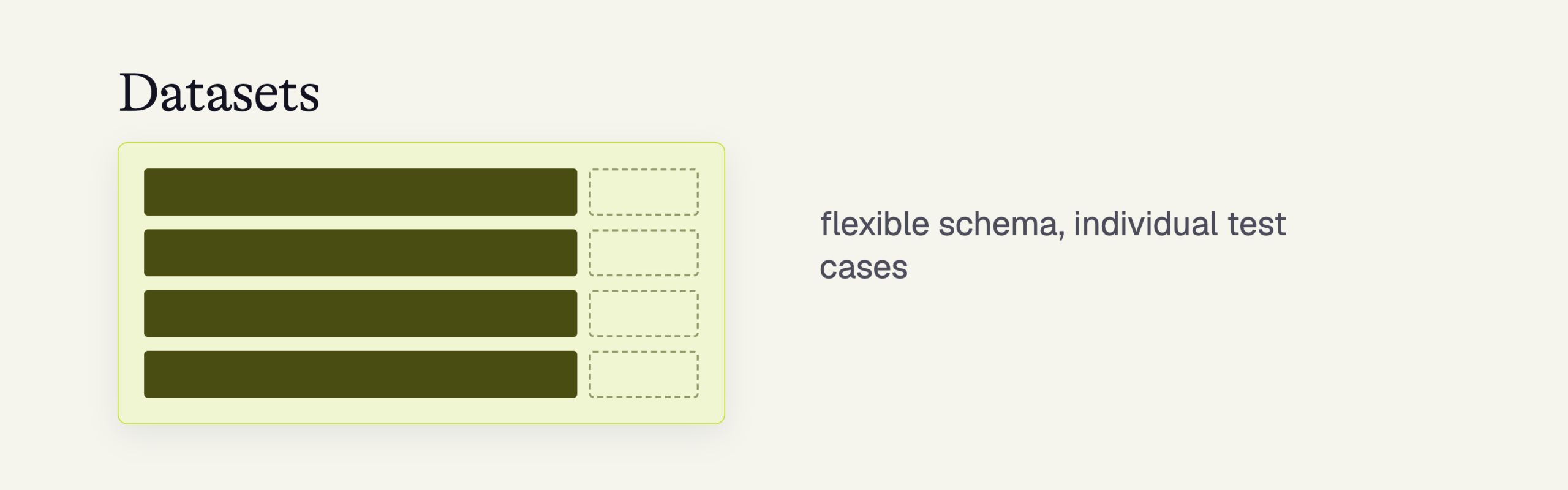
That constraint matters because a comparison only means something when the candidates face the same inputs. If you add an especially difficult case after seeing the control fail, then run only the candidate against it, you have changed the experiment.
A test case does not need to be a single prompt. Depending on your agent, it can include a multi-turn conversation, an initial state, a simulated user trajectory, or a captured production trace prepared for replay.
Here, you’ll want to ask yourself whether the test set represents the behavior this candidate is supposed to improve.
For our reranking experiment, that means concentrating on retrieval-sensitive support cases. It does not mean stuffing every known support-agent failure into the same dataset.
Regression coverage belongs somewhere else. We will get to that in CI.
Anti-pattern: Editing the dataset while the experiment is running
A new production failure should create the next dataset version. It should not change the population on which your current control and candidate are being compared.
This distinction becomes more important as your agent reaches production. Before you have traffic, you author cases from intended behavior, known risks, and expected paths. Once you have traffic, you can curate cases from what users actually do.
A mature test set needs both: authored examples give you coverage before experience while production traces show where your assumptions were wrong.
Keep optimization data separate from evaluator validation data
There are two different datasets hiding inside many evaluation workflows.
The first tests the agent. In our case, that is the 40-case optimization set for rerank_prompt_v3.
The second tests the evaluator. That is a human-labeled golden set used to determine whether your faithfulness judge agrees with informed human judgment.
A production trace can eventually contribute to either one, but for different reasons.
If the agent clearly failed and you can reproduce the behavior, turn that trace into a new agent test case.
If the questionable part is the evaluator’s judgment, send that example to human review and use the label to strengthen the evaluator-validation set.
Mix those two feedback paths together and it becomes difficult to tell whether you are improving the agent or simply changing how it is scored.
Build better agents with Arize
Trace, evaluate, and learn. Build agents that work with Arize AX and start tracing your runs today.
Prefer open source? Try Arize Phoenix for self-hosted, open source agent observability.

2. Calibrate the evaluator before you ask it to pick a winner
Our experiment needs a way to measure whether rerank_prompt_v3 actually improves the agent.
The primary evaluator is faithfulness to the retrieved policy context. It should answer the same basic question offline and in production: did the response make claims supported by the policy information available to the agent?
Before applying that judge to hundreds or thousands of runs, test the judge itself.
Build a human-labeled golden set that includes obvious successes, obvious failures, and difficult boundary cases. Develop the evaluator against one portion of those examples, then check it against held-out examples that were not used to tune it.
The goal is not to prove that the evaluator is universally correct. You need enough evidence that its judgments are reliable for the decision you are about to make.
Once you have that evidence, version the evaluator configuration.
That includes the prompt, model, thresholds, mappings, and other configuration that can affect the result. The same version should score the control and candidate.
If you intend to compare offline and online performance using the same metric, keep the evaluator version fixed across both stages too.
Anti-pattern: Improving the judge halfway through the experiment
If you change the judge prompt, model, threshold, or input mapping, you have started a new measurement series. Do not silently compare the new scores with the old ones.
This is easy to overlook because a stale or poorly calibrated evaluator often fails quietly. It still returns precise-looking numbers. Those numbers simply stop supporting the decision you think they support.
3. Compare the control and candidate offline
Now we can run the actual comparison.
Both the current reranking prompt and rerank_prompt_v3 receive the same 40 cases. Both are scored by the same evaluator version. The model, tools, policy corpus, and orchestration remain unchanged.
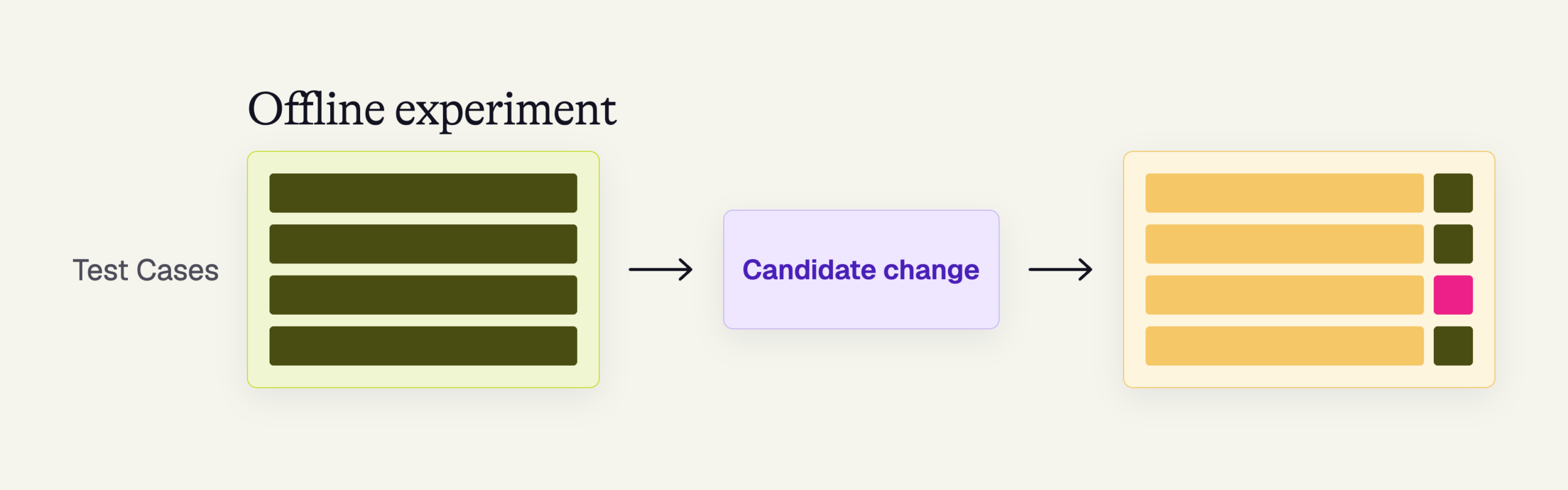
That lets you ask a narrow causal question: when I change the reranking prompt and hold the rest of the system constant, what happens to the agent’s behavior?
Which execution surface you use depends on what changed.
| What changed | Useful experiment surface | Where execution happens |
|---|---|---|
| Prompt only, with no downstream behavior that needs testing | Prompt playground | Arize |
| End-to-end behavior against captured traffic | Agent replay | Arize |
| Application code, interfaces, or orchestration | Python/TypeScript client or REST API | Your runtime, results logged to Arize |
| Configuration accepted by an existing deployed agent | Agent endpoint | Deployed runtime, results logged to Arize |
rerank_prompt_v3 is a prompt-only change, so a playground or replay experiment may be enough for the first comparison.
Replay does have an important limitation. It is most faithful at the captured entry point. If the candidate chooses a different tool or follows a different trajectory, downstream context from the original trace may no longer represent what would have happened.
Recorded tool responses improve determinism. Live tool calls give you current behavior but introduce more variance. Whichever mode you choose, record it as part of the experiment.
Look at paired differences, not only the average
Suppose rerank_prompt_v3 clears our illustrative acceptance bar of improving faithfulness by at least five points.
That aggregate improvement is useful, but it is not enough.
Compare the control and treatment case by case. Which cases improved? Which regressed? Did the candidate get slightly better everywhere, or did it dramatically improve refunds while making escalation behavior worse?
Then inspect the traces behind those changes.
The traces do not establish the treatment effect. Your comparison does that. Traces help you understand the mechanism behind the measured result.
That distinction is important.
Anti-pattern: Changing three things and calling it an experiment
If you change the prompt, model, and tool configuration together, you may discover which bundle performs better. You will not know which change caused the difference.
Anti-pattern: Trusting the average
An improved mean can hide a serious regression in a smaller but important slice. Keep paired, per-case differences next to the aggregate result.
At the end of this stage, rerank_prompt_v3 has earned the right to move forward. It has not earned the right to ship.
4. Run a separate regression gate in CI
Our 40-case experiment was designed to answer one question: did the new reranking prompt improve retrieval-sensitive support behavior?
It was not designed to prove that the rest of the agent still works.
For that, use a separate regression suite.
Our support agent’s CI suite might cover tone requirements, the ticket-lookup tool, refusal behavior when the documentation cannot answer a question, and other capabilities the team has committed to preserving.
Keeping this suite separate from the optimization dataset matters. If developers repeatedly optimize against the same cases that determine whether code can merge, the agent gradually learns the test.
The CI gate should run automatically against a pinned dataset and evaluator configuration, with thresholds defined before the result appears.
For example, the team might allow rerank_prompt_v3 to proceed only if the targeted faithfulness improvement survives and no CI metric crosses its predefined regression threshold.
Agent outputs and evaluator scores can vary between runs, so your policy should account for expected variance. You might repeat unstable cases, compare against a pinned baseline under identical conditions, or require regressions to exceed a minimum margin before failing the build.
The exact policy depends on your tolerance for false passes and false failures. The important part is deciding the rule before seeing this candidate’s score.
Anti-pattern: Negotiating the CI threshold after the candidate fails
A gate should encode the team’s existing release policy. If every failed run triggers a debate about whether the threshold really matters, the gate is reporting a number rather than controlling a release.
Store each gate run with its traces, dataset version, evaluator versions, candidate identity, and results.
When a production failure appears later, you should be able to answer a useful question: was this failure absent from our CI coverage, or did our evaluator see it and miss it?
5. Run a production A/B test that you can trust
rerank_prompt_v3 has now improved the targeted behavior offline and cleared the regression suite.
The next question is harder: does that improvement survive real users?
Production adds variation your offline dataset cannot reproduce completely. Users phrase questions differently. Sessions take unexpected paths. External systems change. Tool calls fail. The mix of requests changes over time.
That is why the production comparison needs its own controls.
For our support agent, we define the experiment before sending the first treatment request:
| Experiment decision | rerank_prompt_v3 example |
|---|---|
| Assignment unit | session_id |
| Assignment | Random |
| Persistence | Same variant for the entire session |
| Execution | Control and treatment run concurrently |
| Primary metric | Same calibrated faithfulness evaluator |
| Guardrail | Escalation rate |
| Additional observability | Latency, cost, tool errors |
| Duration / sample target | Defined before launch |
| Stopping rule | Defined before launch |
Assign the variant before the request enters the agent.
For a multi-turn support agent, assignment should remain stable for the full session. Switching reranking behavior in the middle of a conversation would contaminate the result because later turns depend on what happened earlier.
Run control and treatment concurrently. Comparing this week’s candidate traffic with last month’s control traffic introduces other possible explanations, including changes in users, model behavior, upstream systems, and traffic mix.
Keep the treatment configuration fixed while the test runs. Changing the prompt, model, tools, or evaluator in the middle of the test creates a new variant.
Anti-pattern: Peeking until you get the result you want
Do not stop an experiment simply because the preferred treatment crosses a significance threshold during one inspection. Define the stopping condition first and run until that condition is met, unless a safety or operational guardrail requires an early shutdown.
A quality improvement can still be a bad production change.
That is why we also watch escalation rate, latency, cost, tool failures, and other operational guardrails. If rerank_prompt_v3 produces more faithful responses but sharply increases escalations, the experiment has surfaced a tradeoff that offline faithfulness alone could not show.
6. Put the experiment ID and variant on the trace
An A/B test becomes much harder to debug if you know which arm a user entered at the edge of the application but lose that information inside the agent.
For rerank_prompt_v3, attach two attributes to the request:
experiment.id = "rerank_prompt_v3"
experiment.variant = "control" | "treatment"
Those values should follow the request through every service that emits relevant spans.
This lets you compare treatment and control on more than the final response. You can inspect retrieval, tool selection, trajectory length, latency, failures, and evaluator results within the same experiment population.
OpenTelemetry baggage is useful for propagating experiment membership across execution and process boundaries, but baggage does not automatically become span attributes. Each service needs to copy the values onto its local spans.
Attach the experiment context at the request boundary
Assign the variant once, then activate that context around the agent execution:
from contextlib import contextmanager
from opentelemetry import baggage, context

EXPERIMENT_ID = "experiment.id"
EXPERIMENT_VARIANT = "experiment.variant"

@contextmanager
def activate_experiment(experiment_id: str, variant: str):
    ctx = baggage.set_baggage(EXPERIMENT_ID, experiment_id)
    ctx = baggage.set_baggage(
        EXPERIMENT_VARIANT,
        variant,
        context=ctx,
    )
    token = context.attach(ctx)
    try:
        yield
    finally:
        context.detach(token)
The request handler can then activate the experiment around the existing agent call:
variant = flags.variant_for(
    session_id,
    experiment="rerank_prompt_v3",
)

with activate_experiment("rerank_prompt_v3", variant):
    response = agent.run(request)
The cleanup matters. In long-lived workers, thread pools, and async request handlers, failing to detach the context can leak experiment membership into a later request.
Copy the assignment onto spans
Baggage and span attributes are different concepts. A span processor can read the active baggage when a span begins and copy the experiment information onto that span:
from opentelemetry import baggage
from opentelemetry import context as otel_context
from opentelemetry.sdk.trace import SpanProcessor

class ExperimentAttributeProcessor(SpanProcessor):
    KEYS = (
        "experiment.id",
        "experiment.variant",
    )

    def on_start(self, span, parent_context=None):
        ctx = (
            parent_context
            if parent_context is not None
            else otel_context.get_current()
        )

        for key in self.KEYS:
            value = baggage.get_baggage(key, context=ctx)
            if value is not None:
                span.set_attribute(key, value)

    def on_end(self, span):
        pass

    def shutdown(self):
        pass

    def force_flush(self, timeout_millis=30_000):
        return True
Register the processor before your application begins creating spans:
tracer_provider.add_span_processor(
    ExperimentAttributeProcessor()
)
Each downstream service that emits spans needs to perform the same local conversion. Baggage can cross a process boundary. Span attributes do not magically propagate with it.
Before trusting the experiment result, verify that the telemetry is complete. Check the observed traffic split, variant coverage across relevant spans, evaluator versions, and missing attributes.
A dashboard can group the data it receives. It cannot tell you that one arm quietly lost half its experiment metadata.
Anti-pattern: Encoding the variant inside session_id
Keep identity and treatment membership as separate fields. You will want to group, filter, and reason about them independently.
Anti-pattern: Putting user data in baggage
Baggage can be serialized into headers and sent downstream. Keep experiment metadata short and non-sensitive. Do not put customer identifiers, prompts, credentials, tokens, or other private context there.
7. Turn production failures into the next experiment
Now suppose our results look like this:
rerank_prompt_v3wins the offline faithfulness comparison.- It passes the CI regression suite.
- In production, faithfulness still looks better, but the escalation-rate guardrail gets worse.
The treatment does not ship.
That outcome is still useful because the experiment tells us where to investigate next.
Compare treatment and control traces from the measured production population. Look at the escalation paths. Did the new reranking prompt consistently promote a policy document that leads the agent toward escalation? Did it suppress another context that previously helped the agent resolve those requests?
Those traces can support an explanation for what happened. They do not replace the measured A/B result.
Then feed the evidence into the next loop.
Reproducible escalation failures become cases in the next optimization dataset. Suspicious evaluator judgments go to human review and, once labeled, strengthen the evaluator-validation set.
Anti-pattern: Treating a compelling trace as the experiment result
A trace can explain why you think a metric moved. It cannot establish whether the treatment improved the population. Keep the measured treatment effect and the behavioral explanation separate.
This is where the experimentation loop starts to compound.
The first run gave you a candidate decision. The second-order result is more valuable: you now have better coverage of escalation behavior and better evidence for the next reranking candidate.
Automate the loop only after you trust the controls
Once this workflow is repeatable, reducing the cost of each experiment becomes valuable.
This is where tools such as Alyx, Signal, coding agents, and custom agent workflows belong in the story.
They can help generate test cases, retrieve relevant production traces, run defined experiments, analyze results, implement candidate changes, and prepare pull requests with evidence attached.
But delegation should come after the datasets, evaluators, acceptance criteria, and experiment boundaries are explicit.
A useful way to think about the progression is:
| Stage | What changes |
|---|---|
| Manual | A developer authors cases, runs comparisons, inspects traces, and records the decision. |
| Assisted | AI helps generate cases, search traffic, or interpret experiment results under human direction. |
| Programmatic | Experiments become versioned, rerunnable workflows invoked through APIs, clients, or CI. |
| Agent-driven | Agents can propose or implement candidates, run the defined checks, analyze evidence, and open a PR for review. |
The goal is not automation for its own sake. The payoff is experiment throughput.
If the cost of testing a candidate falls, your team can evaluate more ideas. That expands the search space for better prompts, models, tools, and orchestration.
The controls should not weaken as throughput increases. A faster experiment that quietly changes the dataset, evaluator, or success criteria is simply a faster way to generate an unreliable answer.
An agent experimentation checklist
Before you trust an experiment, you should be able to fill in every cell:
| Check | Ready? |
|---|---|
| The candidate changes a clearly defined behavior. | ☐ |
| The optimization dataset is versioned and frozen for the comparison. | ☐ |
| The evaluator has been checked against held-out human labels. | ☐ |
| Control and treatment use the same cases and evaluator versions. | ☐ |
| Unrelated behavior is covered by a separate CI regression suite. | ☐ |
| Production assignment is randomized, persistent, and concurrent. | ☐ |
| Primary metric, guardrails, duration, and stopping rules are defined before launch. | ☐ |
experiment.id and experiment.variant survive the full request path. |
☐ |
| The final decision can be reproduced from stored experiment data. | ☐ |
| New agent failures become test cases for the next version. | ☐ |
| Questionable evaluator judgments go to human review. | ☐ |
You do not need the complete system on day one.
Start with one candidate, one frozen dataset, and one measurement system you trust. Make that comparison repeatable. Then add a regression gate. Then add production traffic and end-to-end experiment tracing.
The useful unit of progress is a loop that turns every production surprise into a better controlled test for the next change.

