

To monitor an agent swarm in production, instrument each agent’s execution, preserve trace context across handoffs, and evaluate whether the coordinated workflow completed the task. Track invalid handoffs, repeated delegation, stalled work, latency, and cost across runs. Turn confirmed failures into regression tests before changing the system.
An agent swarm can return a well-formed answer even when one agent has dropped a requirement that the rest of the workflow depends on. Finding that failure requires visibility into the context agents exchange and the actions they take with it.
In this guide, an agent swarm means a multi-agent application in which agents delegate work, exchange context, and combine results to complete a task. The monitoring principles apply whether a supervisor coordinates the agents or they hand work directly to one another.
This guide explains what to instrument, how to evaluate coordination, and how to use production failures to test improvements.
Why swarm failures are different
When an agent hands off work to a downstream agent, it passes a context payload carrying the current state and task definition. When that payload is incomplete, the receiving agent proceeds with what it has. It doesn’t know what it was supposed to get, so it works with what arrived, and the failure compounds quietly through every subsequent step. Standard infrastructure monitoring often won’t flag it, because the agents are responding, latency is normal, and the system returned a result.
Research on agent trajectory failures found that failures in multi-turn, tool-using agents are often triggered by sparse critical episodes, such as looping, incoherent tool use, or user-agent miscoordination. These episodes happen even when each local step looks confident, so signals scoped to a single step miss them.
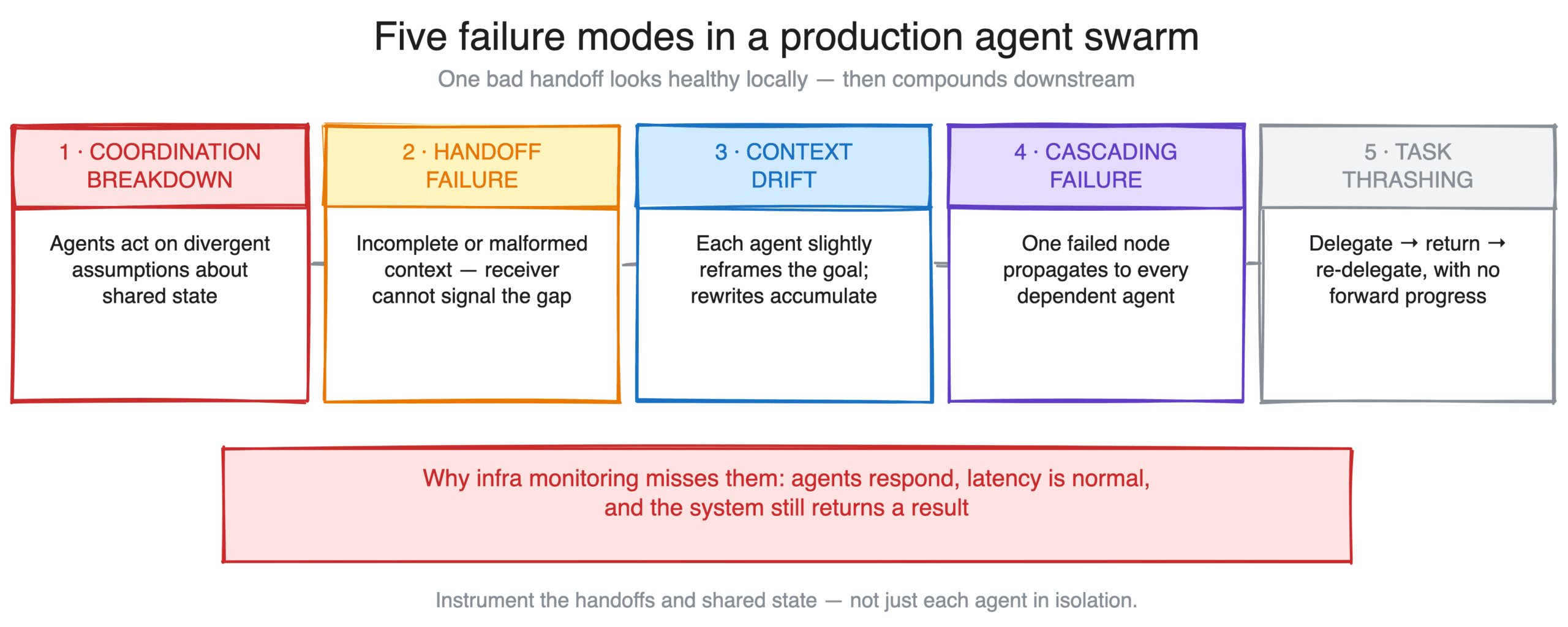
These five failure modes are worth understanding before you instrument a production swarm:
- Coordination breakdowns: agents operating on divergent assumptions about shared state, typically because context wasn’t correctly synchronized across a parallel execution
- Handoff failures: incomplete or malformed context passed between agents, where the receiving agent has no mechanism to signal the problem
- Context drift: accumulated loss of task context across long multi-agent chains, where each agent slightly reframes the original goal and the final output reflects those accumulated rewrites
- Cascading failures: ascading failures: a single agent failure that propagates through the swarm because downstream agents depend on outputs from the failed node
- Task thrashing: agents caught in coordination loops where work gets delegated, returned, and re-delegated without making forward progress. In traces, it often looks like one task ID delegated repeatedly in a session, for example three or more times, with no new tool calls in between
What to monitor in a multi-agent system
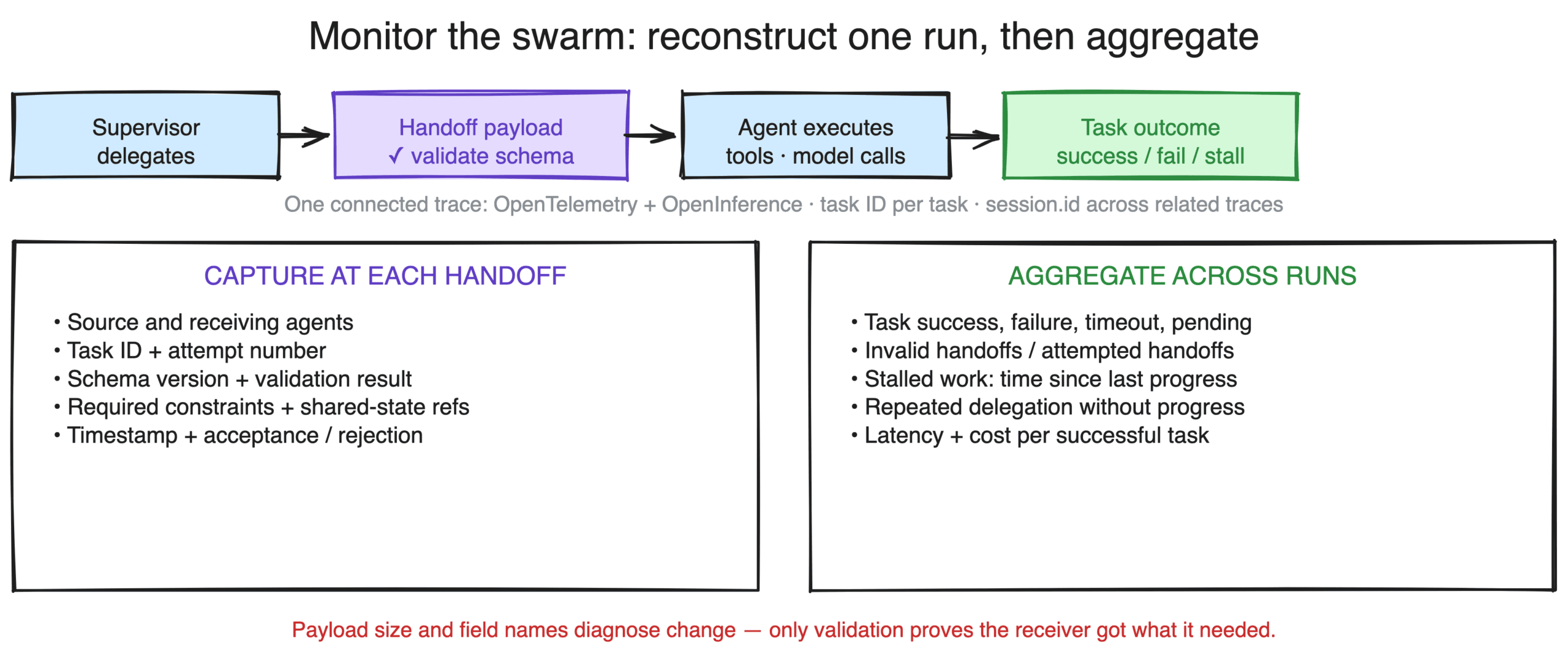
Start with enough telemetry to reconstruct one workflow run, then aggregate outcomes across runs to identify changes in reliability, latency, and cost.
Connect execution across agent boundaries
Use OpenTelemetry to trace operations and preserve their relationships. OpenInference adds attributes that identify AI operations such as agent execution, model calls, retrieval, and tool use.
Instrument the agents and tools involved in the workflow. When work crosses a process boundary through an HTTP request or queue message, propagate trace context from the sender to the receiver. Confirm that downstream spans reach your tracing backend; context propagation alone does not create instrumentation.
Some asynchronous workflows span multiple traces. Preserve task correlation across those traces and use span links where appropriate.
Use a task ID to identify the work being performed. Add a shared session.id when related traces belong to the same conversation or longer interaction. A session can contain several tasks, and sharing a session ID does not create parent-child relationships between spans.
See how to set up sessions in Arize AX.
Record what crosses each handoff
For each handoff, capture:
- The source and receiving agents.
- The task ID and attempt number.
- The handoff schema version and validation result.
- Required constraints and references to relevant shared state.
- The time of the handoff and the receiving agent’s acceptance or rejection.
Let your tracing SDK manage trace IDs, span IDs, and parent relationships. Add application-specific fields as attributes, while following your redaction and data-handling rules.
Payload size and field names can help diagnose changes, but they cannot establish that the receiving agent got the correct information. Validate required fields and compare important constraints with the original task.
Track outcomes and operational signals
| What to monitor | What to measure | What to investigate |
|---|---|---|
| Task outcomes | Success, failure, timeout, and pending status for each task | Which requirements were missed, and which workflow versions are affected |
| Handoff validity | Failed validations as a proportion of attempted handoffs | Missing fields, incorrect values, incompatible schemas, or stale state |
| Stalled work | Task age and time since the last meaningful progress event | Blocked dependencies, missing responses, or ineffective recovery |
| Repeated delegation | Revisited tasks and retries without progress | Whether the agent is recovering appropriately or repeating the same failed approach |
| Latency and cost | End-to-end latency, cost per run, and cost per successful task | Expensive paths, excessive retries, and changes that reduce task success |
Set thresholds by task type and expected behavior. Include failed attempts and retries when calculating cost per successful task.
Build better agents with Arize
Trace, evaluate, and learn. Build agents that work with Arize AX and start tracing your runs today.
Prefer open source? Try Arize Phoenix for self-hosted, open source agent observability.

How to evaluate an agent swarm
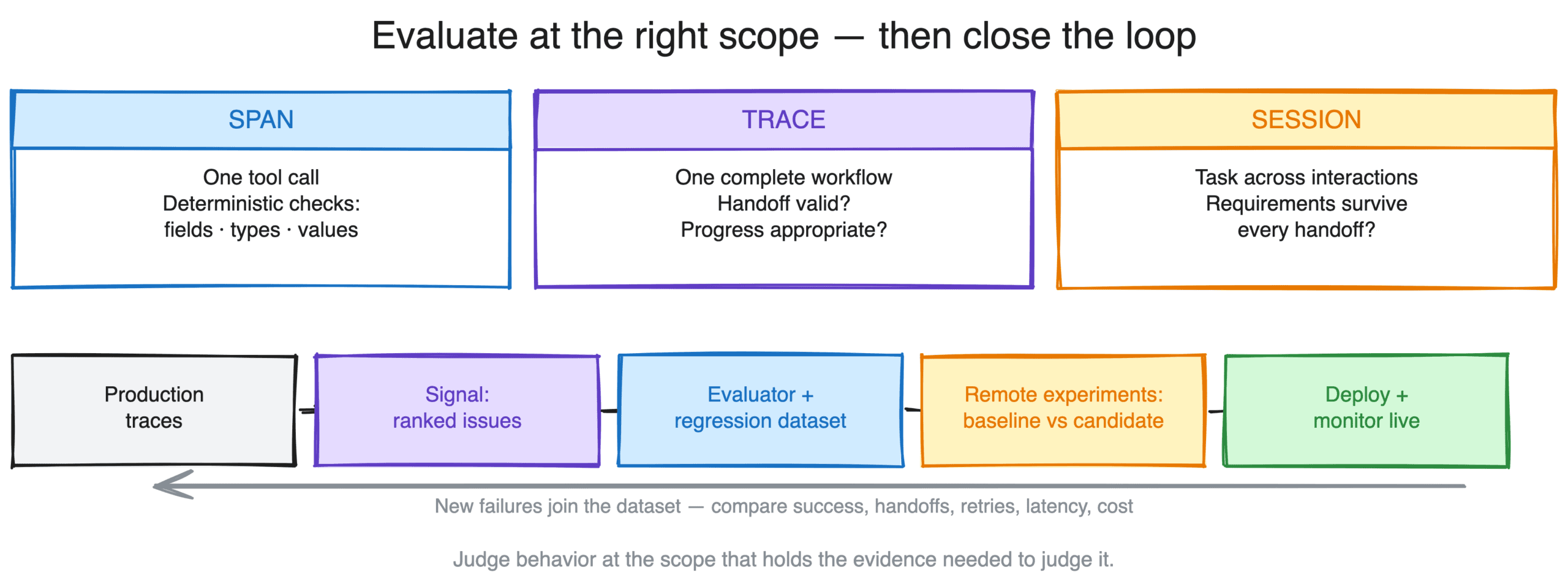
Evaluate each behavior at the scope that contains the evidence needed to judge it. This applies to single-agent and multi-agent systems alike.
An individual tool call may need a span evaluation. A complete workflow may need a trace evaluation. A task that spans several interactions may require evaluation across related traces.
For multi-agent workflows, cover three questions:
- Was the handoff valid? Check that the payload follows its schema and preserves the requirements the receiving agent needs. Use code for deterministic checks such as required fields, types, and allowed values. Use semantic evaluation when you need to judge whether a summary preserved the user’s intent.
- Did the execution make appropriate progress? Check routing, tool selection, delegation, and recovery against the workflow’s requirements. Repeated steps and backtracking deserve investigation, but they can also be appropriate responses to new evidence.
- Did the system complete the task? Compare the final result and any relevant external state with explicit acceptance criteria. In the quote example, success requires the requested products and a total within the user’s budget.
Clarification requests and repeated work are useful diagnostic signals. Inspect the incoming context and downstream behavior before attributing them to a particular agent or handoff.
Choose trace or session evaluation according to where the task’s evidence lives. A task completed within one trace can be evaluated at trace scope; a task spread across related interactions may need session scope. See trace and session evaluations in Arize AX.
For subjective checks, review evaluator results against a small set of human-labeled examples before relying on the scores. Record the evaluator version alongside the workflow version so you can interpret changes over time.
Example: Find a dropped budget constraint
Consider a hypothetical application that asks research and pricing agents to prepare a quote under $5,000. The pricing agent receives the product list, but the handoff omits the budget. It returns a $6,200 quote, which the supervisor passes to the user.
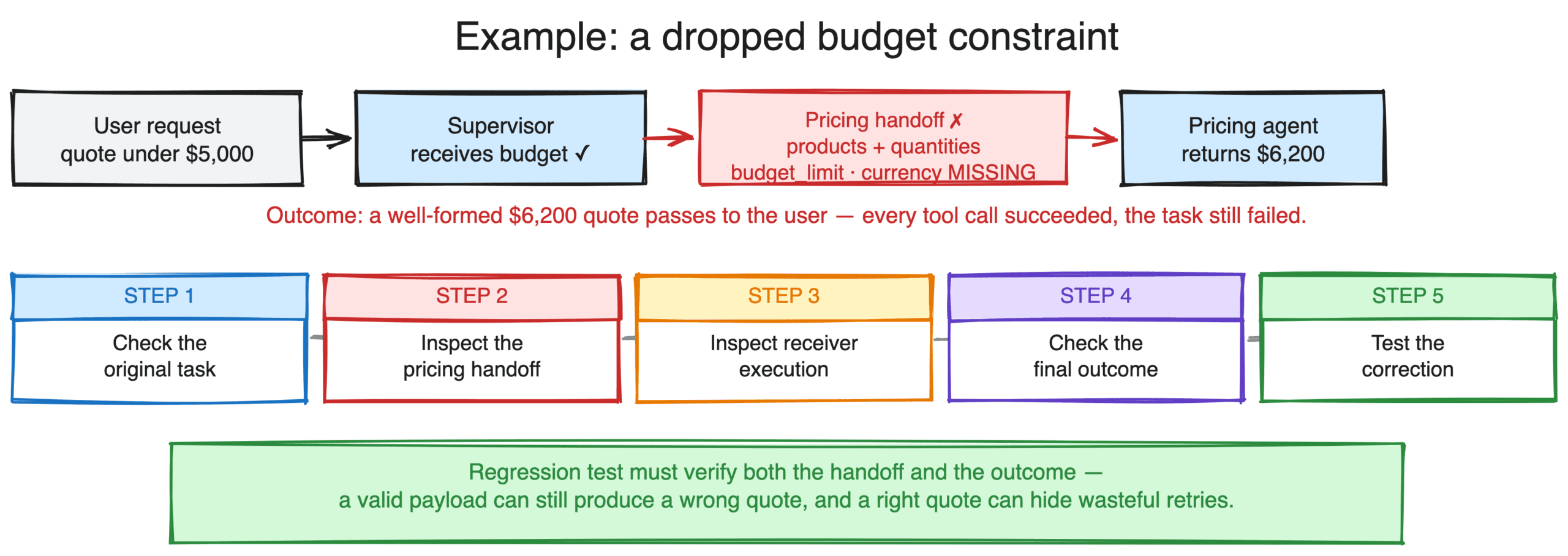
The investigation should connect the failed outcome to the boundary where the requirement disappeared.
- Check the original task. Confirm that the user supplied the budget and that the supervisor received it.
- Inspect the pricing handoff. Compare the outgoing payload with the pricing agent’s required inputs. In this example, the payload contains product IDs and quantities but omits budget_limit and currency.
- Inspect the receiving agent’s execution. Confirm which inputs it used, how it calculated the price, and whether it requested clarification.
- Check the final outcome. Evaluate the quote against the original request. Successful tool calls do not satisfy the budget requirement.
- Test the correction. Add the missing fields to the handoff contract and define how the receiver should handle an invalid payload. Re-run the failed case alongside valid quotes and cases where the requested products cannot fit the budget.
The regression test should verify both the handoff and the outcome. A valid payload can still produce an incorrect quote, while a successful quote can conceal unnecessary retries or other coordination problems.
How to find failure patterns across an agent fleet
As traffic grows, combine alerts for known failure conditions with scheduled review of production traces.
Use alerts for conditions that require a timely response, such as rising tool errors, tasks exceeding their execution budget, or workflows making no progress. Use scheduled review to investigate recurring patterns that your existing checks may not capture.
Group failures by task type, agent route, handoff schema, and workflow version. Inspect representative traces to confirm the pattern and identify the earliest point where behavior diverged from the task’s requirements.
Signal in Arize AX reviews a tracing project’s recent traces on a schedule and groups recurring failure patterns into ranked issues. Each investigation includes an overview, trace evidence, and a suggested fix.
Use confirmed findings to add or revise an evaluator, expand a regression dataset, or change the workflow. Continue checking known failure conditions between scheduled reviews.
Validate fixes before they ship
Test a coordination change against the complete workflow. A routing or handoff change can fix one task while creating a regression elsewhere.
Build a dataset that includes the confirmed failure, similar cases, and representative successful tasks. Include cases that require clarification or recovery so the test does not reward agents for avoiding those behaviors entirely.
Run the baseline and candidate versions against the same dataset under comparable conditions. Record the prompts, models, tools, routing logic, and handoff schemas used by each version. Use controlled dependencies or an isolated environment when tool actions change external state.
Remote agent experiments in Arize AX run dataset inputs against your agent’s HTTP endpoint and collect the results as comparable experiments. Configure trace-context propagation so you can inspect the execution behind each result.
Compare task success, handoff failures, retries, latency, and cost per successful task. Repeat cases where nondeterminism could change the conclusion. Inspect regressions and sample passing runs to check that the evaluators are scoring the behavior you intended.
After deployment, monitor the same signals on live traffic and add newly confirmed failures to the dataset.
Monitor your agent swarm with Arize AX
Use Arize AX to inspect execution, evaluate coordination, investigate recurring failures, and compare changes:
- Inspect agent paths. Agent Graph and Path views help you inspect relationships between agents and the routes taken through a workflow. Supported instrumentors supply the required metadata; custom workflows can add it explicitly. See Agent Trajectory setup.
- Evaluate operations and task outcomes. Apply checks at span, trace, or session scope. For nuanced criteria that require exploring trace context, Agent-as-a-Judge uses an agent harness to read project data and write evaluation results.
- Investigate recurring failures. Signal reviews production traces on a schedule and produces ranked issues with evidence and suggested fixes.
- Compare workflow changes. Remote agent experiments test your deployed agent against a dataset while the agent continues to run in your infrastructure.
Start with one representative workflow. Trace its handoffs, define what successful completion means, and add checks for the requirements most likely to be lost between agents.
FAQs: Monitoring an agent swarm in production
How is swarm monitoring different from single-agent observability?
Multi-agent monitoring adds visibility into delegation, shared state, and context exchanged between agents. Both single-agent and multi-agent systems need evaluation of individual operations and completed tasks. Multi-agent workflows also need checks that requirements survive each handoff.
Which coordination failures should I monitor?
Monitor invalid handoffs, conflicting shared state, lost task constraints, cascading errors, and repeated delegation without progress. Track these alongside task outcomes so you can distinguish a workflow that completed successfully from one that merely returned a response.
How do you evaluate handoff quality?
Validate the payload against the receiving task’s requirements, then inspect whether the receiving agent used the information correctly. Use code for schema and required-field checks. Use semantic evaluation when judging whether delegated instructions preserve intent. Clarification requests and retries need context before they can be classified as failures.
How do you detect coordination loops?
Look for repeated delegation or revisited steps without meaningful progress toward completion. Define progress for the task, such as completing a required step, resolving a dependency, or incorporating new evidence. Tool-call activity alone cannot establish progress, and legitimate retries should remain distinguishable from loops.
How do you find failure patterns without reviewing every trace?
Combine aggregate metrics, alerts for known failure conditions, and scheduled trace review. Group suspected failures by workflow version, task type, and agent path, then inspect representative examples. Turn confirmed patterns into evaluation checks and regression cases.
What telemetry standard should you use for multi-agent tracing?
Use OpenTelemetry for tracing and context propagation, with OpenInference attributes to describe AI operations. Instrument each participating component and preserve context across service boundaries. Use task IDs for workflow correlation and session IDs for related interactions. Some asynchronous workflows require relationships across multiple traces rather than a single trace hierarchy.

