
Your agent still returns HTTP 200. It also started choosing the wrong tool, passing malformed arguments, and skipping an escalation rule that worked last week.
Prompt changes can alter system behavior without producing a conventional software error. A revised instruction may improve average answer quality while making one high-value customer segment worse. A new model may follow the prompt more closely but call tools less reliably. A cleaner response format may add enough latency to miss a product requirement.
That is why production teams need more than a prompt editor. They need a repeatable workflow for testing candidate prompts against representative data, scoring both outputs and agent trajectories, comparing results against a baseline, blocking regressions in CI, and learning from failures after deployment.
This guide compares eight prompt testing and optimization tools that support meaningful parts of that workflow. The products are listed alphabetically rather than ranked from one to eight because the right choice depends on whether you need a managed evaluation platform, a self-hosted stack, a Python testing framework, a CI-first CLI, or an algorithmic optimizer.
Disclosure: Arize develops Arize AX and Arize Phoenix. We applied the same criteria to every product and included practical limitations for each one. Last reviewed and updated on August 25, 2026.
Related guides: Prompt testing sits inside a broader evaluation stack. See our guides to LLM evaluation, LLM-as-a-judge, and AI prompt management tools.
What prompt testing and optimization mean in 2026
Prompt work now spans several related engineering activities that are easy to collapse into one category:
- Prompt management stores, versions, reviews, and deploys prompts or broader context artifacts.
- Prompt testing runs a prompt, model, parameter set, or agent configuration against controlled test cases and measures the result.
- Prompt optimization searches for or proposes a better configuration using an explicit objective, training examples, evaluation feedback, or human annotations.
- Production evaluation scores live traces and sessions so that real failures become new test cases.
The distinction matters because a prompt registry can tell you which version is in production without telling you whether that version is better. A playground can help you inspect a few outputs without revealing regressions across a dataset. An optimizer can improve the metric you give it while overfitting to weak examples or an unreliable judge.
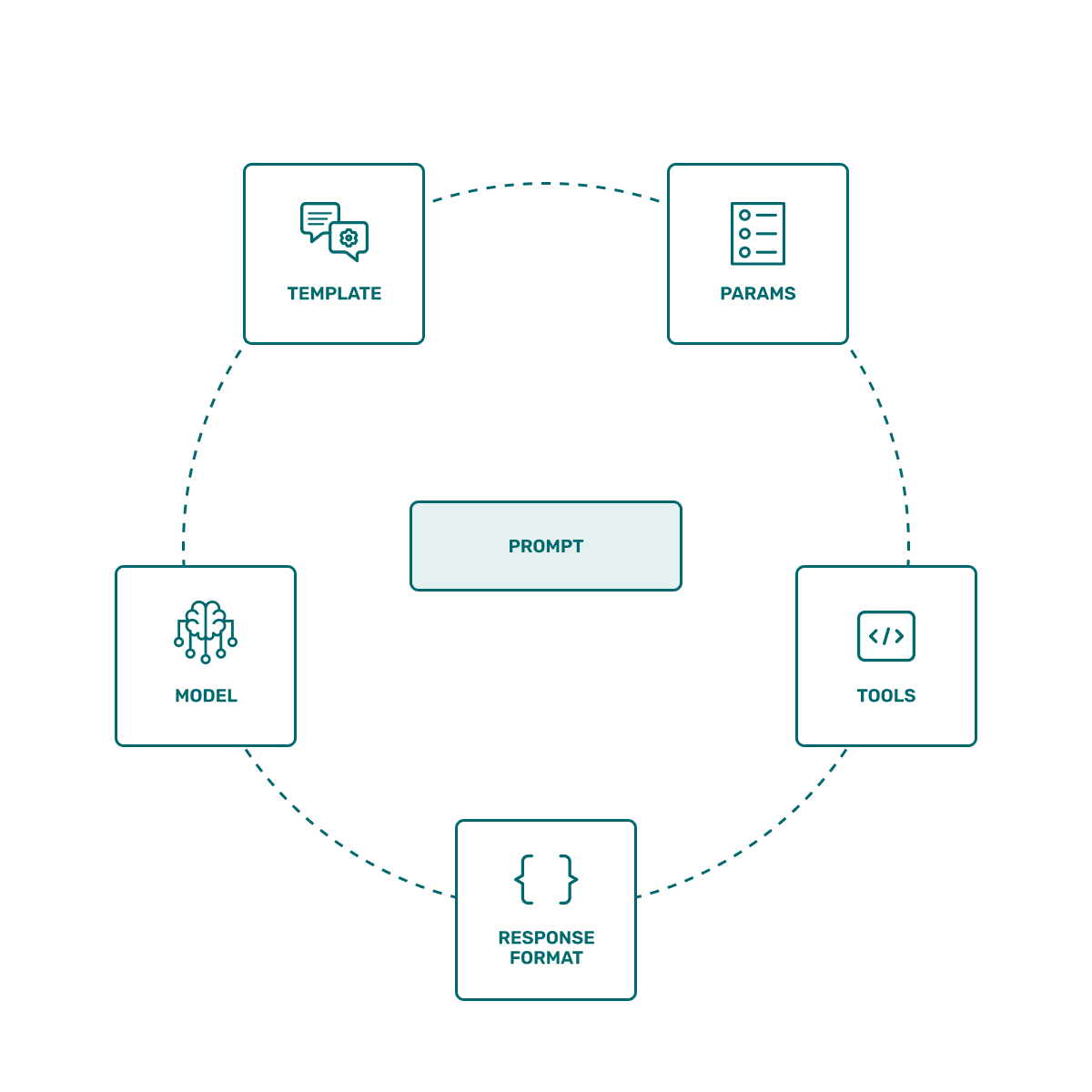
For agent systems, the unit under test also extends beyond a single instruction string. It can include the system prompt, model, inference parameters, tool schemas, retrieval context, output format, router instructions, sub-agent handoffs, and stopping conditions.
How we evaluated the tools
We assessed each product against the parts of the prompt improvement loop that matter in real development:
- Controlled experiments: Can a team run multiple prompt or system configurations against the same dataset and retain comparable results?
- Evaluator flexibility: Does the tool support deterministic checks, custom code, LLM-as-a-judge evaluators, human review, or combinations of these methods?
- Agent coverage: Can it evaluate tool calls, arguments, trajectories, handoffs, retrieval steps, and end-to-end outcomes?
- Regression testing: Can teams run evaluations from code or CI and enforce release thresholds?
- Production feedback: Can failed traces or user feedback become dataset examples for the next experiment?
- Optimization: Does the product help generate or search candidate prompts using evaluation evidence, rather than offering only free-form rewriting?
- Deployment and interoperability: Can it work across model providers and frameworks, and does it fit the team’s hosting, governance, and access-control requirements?
No single tool leads every category. Some are complete AI engineering platforms. Others deliberately solve one part of the workflow and integrate with the rest of a team’s stack.
Prompt testing and optimization tools at a glance
| Tool | Best for | Testing and evaluation | Optimization approach | Deployment model |
|---|---|---|---|---|
| Arize AX | Managed, end-to-end improvement loops | Datasets, experiments, code and LLM evals, human review, production traces | Automated Prompt Learning and AI-assisted iteration with Alyx | Managed platform with enterprise deployment options |
| Arize Phoenix | Self-hosted tracing, evaluation, and prompt experimentation | Span replay, datasets, experiments, trace and span evals | Automated Prompt Learning through the SDK | Self-hosted or Phoenix Cloud |
| Braintrust | Evaluation-first product and engineering teams | Playgrounds, immutable experiments, CI, remote agent evals, online scoring | Annotation-driven suggestions through Loop | Cloud platform with self-hosted data-plane options |
| DeepEval | Python and pytest-style LLM or agent tests | End-to-end, trajectory, component, tool, RAG, and multi-turn metrics | GEPA and MIPROv2 prompt optimizers, plus side-by-side comparison | Local open-source framework with optional hosted collaboration |
| DSPy | Programmatic prompt and LM-program optimization | Custom metrics and trainsets defined in code | Search, bootstrapping, and reflection-based optimizers | Self-managed Python library |
| LangSmith | Teams building with LangChain and LangGraph | Datasets, experiments, custom and LLM evals, online evaluation, CI | AI-assisted iteration in the Playground | Cloud, hybrid, and self-hosted options |
| promptfoo | CLI-based regression testing and red teaming | YAML test matrices, assertions, quality gates, security scans | Variant comparison rather than a dedicated iterative optimizer | Local and CI execution, plus enterprise offerings |
| Vellum | Visual prompt and workflow development | Sandboxes, scenarios, test suites, custom metrics, online evals | Assisted and manual iteration across test suites | Managed platform |
8 top prompt testing and optimization tools
Arize AX
Best for: Teams that want prompt management, experiments, evaluation, production observability, and automated improvement in one managed platform.
Arize AX connects the prompt development workflow to the production evidence that should drive it. Teams can save and version prompts in Prompt Hub, replay production inputs in the Playground, run controlled experiments against datasets, attach code-based or LLM-based evaluators, compare cost and latency, and promote a winning version with a deployment tag.
AX also supports Prompt Learning, which uses a current prompt, examples, evaluator labels, and written feedback to propose an improved prompt. Explanations matter here: a binary failure label tells an optimizer that something went wrong, while a clear explanation gives it evidence about what to change.
The current Python client can run a task and its evaluators against an existing dataset. This example keeps credentials and the model identifier in environment variables:
import os

from arize import ArizeClient
from arize.experiments import EvaluationResult
from openai import OpenAI

arize_client = ArizeClient(api_key=os.environ["ARIZE_API_KEY"])
openai_client = OpenAI()


def answer_question(dataset_row) -> str:
    question = dataset_row.get("attributes.input.value", "")
    response = openai_client.chat.completions.create(
        model=os.environ["OPENAI_MODEL"],
        messages=[{"role": "user", "content": question}],
    )
    return response.choices[0].message.content or ""


def correctness(output, dataset_row) -> EvaluationResult:
    expected = dataset_row.get("attributes.output.value", "")
    generated = output or ""
    correct = bool(expected) and expected.lower() in generated.lower()
    return EvaluationResult(
        score=int(correct),
        label="correct" if correct else "incorrect",
        explanation=f"Expected '{expected}', got '{generated[:80]}'.",
    )


experiment, results = arize_client.experiments.run(
    name="prompt-baseline-v1",
    dataset=os.environ["ARIZE_DATASET_ID"],
    task=answer_question,
    evaluators=[correctness],
    concurrency=10,
)
Why it stands out
- Production traces can become datasets, which shortens the path from a real failure to a reproducible regression test.
- Experiments can cover a single prompt call, a retrieval pipeline, an agent, or an externally executed workflow whose results are uploaded to AX.
- Teams can combine deterministic evaluators, LLM judges, human annotations, cost, latency, and trace-level analysis instead of optimizing one quality score in isolation.
- Prompt Learning and Alyx support evidence-based revisions after a team has collected experiment results or annotations.
Tradeoffs
- Useful production analysis depends on instrumenting the application and sending the relevant traces, attributes, and feedback.
- The platform covers more than local prompt testing, so a solo developer who only wants a lightweight CLI may prefer a narrower tool.
- Deployment, security, retention, and data-region requirements should be evaluated against the appropriate AX plan before adoption.
Arize Phoenix
Best for: Teams that want a self-hosted, code-friendly workflow for tracing, replaying, evaluating, and improving prompts.
Arize Phoenix is an OpenTelemetry-native platform distributed under the Elastic License 2.0. It can identify prompts from application traces, replay a failing span in the Playground, save prompt versions, run candidates across a dataset, compare experiments, and attach evaluations at the trace or span level.
Phoenix is especially useful when the problem first appears in production. An engineer can inspect the trace, isolate the prompt-bearing span, replay that step with a candidate change, and then test the change against a broader dataset before updating the application. Phoenix also exposes Prompt Learning through the SDK for automated optimization based on evaluation feedback.
Tracing can begin with the Phoenix OpenTelemetry helper:
from phoenix.otel import register

tracer_provider = register(
    project_name="support-agent",
    auto_instrument=True,
)

tracer = tracer_provider.get_tracer(__name__)
Why it stands out
- Span replay lets teams test a local prompt change while preserving the context of the production execution that exposed the problem.
- Datasets and experiments turn a promising manual edit into a measurable comparison across many examples.
- OpenTelemetry and OpenInference integrations make Phoenix a strong fit for heterogeneous model and framework stacks.
- Self-hosting gives teams direct control over infrastructure and data placement.
Tradeoffs
- Self-hosting transfers responsibility for capacity planning, upgrades, storage, backups, and operational security to your team.
- Phoenix observes and evaluates an application, while orchestration remains in your agent framework or application code.
- Organizations that need a fully managed service, centralized governance across many teams, or enterprise support may prefer AX.
Braintrust
Best for: Product and engineering teams that organize development around datasets, scorers, experiments, and continuous evaluation.
Braintrust treats evaluation as a continuous loop. Teams can iterate on prompts and models in a browser playground, promote a useful configuration into an immutable experiment, run that experiment in CI, score production traces, and pull important failures back into datasets.
The distinction between playgrounds and experiments is useful. Playground results are designed for fast iteration and can be overwritten when rerun. Experiments preserve a comparable record, which makes them better suited to baselines, pull-request checks, and release decisions. Remote evals and sandboxes extend the same workflow to agents or custom code that cannot be represented as one prompt call.
Braintrust’s Loop agent can analyze logs, generate datasets and scorers, and suggest prompt revisions in a playground using annotations as context. This is an assisted optimization workflow rather than the metric-driven search used by DSPy, but it can reduce the manual work required to turn observed failures into candidate changes.
Why it stands out
- The playground-to-experiment-to-CI-to-production loop is explicit and consistent across the product.
- Scorers can be code-based, model-based, or custom, and online scoring can evaluate live traces asynchronously.
- Remote evals and sandboxes make the evaluation surface broad enough for multi-step agents and custom application code.
- A self-hosted data plane is available for teams that need to keep evaluation data in their own environment.
Tradeoffs
- The product’s full value comes from adopting its dataset, scorer, experiment, and logging model, which may require migration work for teams with mature internal tooling.
- Loop proposes improvements from annotations, but teams seeking systematic instruction or demonstration search should also evaluate DSPy or another dedicated optimizer.
- A local-only developer workflow can be simpler with DeepEval or promptfoo.
DeepEval
Best for: Python teams that want LLM and agent evaluations to behave like tests in a familiar development and CI workflow.
DeepEval is an open-source evaluation framework built around test cases, datasets, metrics, tracing, and pytest-style assertions. It supports single-turn and multi-turn applications, RAG, tool use, MCP, and agent evaluations at three useful levels: end-to-end outcomes, complete trajectories, and individual components such as a tool call or retrieval span.
After instrumenting an agent, a regression test can run the application and fail when a metric falls below its threshold:
import pytest

from deepeval import assert_test
from deepeval.dataset import EvaluationDataset, Golden
from deepeval.metrics import TaskCompletionMetric

from my_app import run_instrumented_support_agent


dataset = EvaluationDataset(
    goldens=[
        Golden(input="Help me return a damaged order."),
        Golden(input="I was charged twice for one order."),
    ]
)


@pytest.mark.parametrize("golden", dataset.goldens)
def test_support_agent(golden: Golden) -> None:
    run_instrumented_support_agent(golden.input)
    assert_test(
        golden=golden,
        metrics=[TaskCompletionMetric()],
    )
DeepEval also supports prompt metadata and side-by-side comparison. Its PromptOptimizer includes GEPA and MIPROv2, which search for higher-scoring prompts using DeepEval metrics and golden examples. The command-line runner adds behavior for repeated tests, concurrency, error handling, and CI reporting on top of the underlying pytest pattern.
Why it stands out
- Tests live close to application code and can run on every pull request.
- Trajectory and component-level metrics help separate final-answer quality from tool, retrieval, or routing failures.
- The framework can run locally without requiring a hosted account, while Confident AI provides optional reporting and collaboration.
- Its metric library covers agentic, RAG, conversational, safety, and multimodal use cases.
Tradeoffs
- The workflow is Python-centric, so polyglot teams may need wrappers or another system of record.
- Reliable tests still require well-designed datasets, thresholds, and calibrated judges. Installing a metric library does not solve those design problems.
- Teams that need a fully integrated prompt registry, production observability platform, and visual experiment analysis may pair DeepEval with another product.
DSPy
Best for: Engineers who want to optimize instructions, demonstrations, or complete LM programs against a metric in code.
DSPy replaces ad hoc prompt-string editing with modules, typed signatures, metrics, and optimizers. An engineer defines the behavior the program should produce, supplies training examples and a metric, and then compiles the program with an optimizer that searches for better instructions, demonstrations, or model weights.
This makes DSPy the clearest fit in this list for algorithmic optimization. MIPROv2 can search instructions and demonstrations together, SIMBA focuses on weak examples in mini-batches, GEPA uses reflective feedback to evolve instructions, and bootstrap optimizers construct few-shot demonstrations from successful runs.
import os

import dspy


lm = dspy.LM(os.environ["DSPY_MODEL"])
dspy.configure(lm=lm)


class RouteTicket(dspy.Signature):
    """Route a support ticket to billing, returns, technical, or account."""

    ticket: str = dspy.InputField()
    category: str = dspy.OutputField()


program = dspy.ChainOfThought(RouteTicket)


def classification_metric(example, prediction, trace=None) -> bool:
    expected = example.category.strip().lower()
    actual = prediction.category.strip().lower()
    return expected == actual


trainset = [
    dspy.Example(
        ticket="I was charged twice.",
        category="billing",
    ).with_inputs("ticket"),
    dspy.Example(
        ticket="My package arrived damaged.",
        category="returns",
    ).with_inputs("ticket"),
]

optimizer = dspy.MIPROv2(
    metric=classification_metric,
    auto="light",
)
optimized_program = optimizer.compile(
    program,
    trainset=trainset,
)
optimized_program.save("route-ticket-v1.json")
Why it stands out
- Optimization is tied to an explicit metric and dataset instead of a general request to make a prompt better.
- Programs can include multiple LM calls and modules, which is useful when behavior depends on more than one prompt.
- The optimizer ecosystem supports several strategies for instructions, demonstrations, and fine-tuning.
- The compiled result can be saved and reused, allowing teams to amortize the optimization cost across many inference calls.
Tradeoffs
- Search-based compilation can consume substantial model tokens, especially with large trainsets or multi-module programs.
- A weak metric or unrepresentative trainset can produce an optimized program that performs well on the wrong objective.
- Teams need a held-out evaluation set because optimizer results can overfit the examples used during compilation.
- DSPy is a programming framework rather than a production observability system, prompt registry, or hosted experiment platform.
LangSmith
Best for: Teams using LangChain or LangGraph that want prompt versioning, tracing, datasets, experiments, and online evaluation in the same ecosystem.
LangSmith supports a complete evaluation workflow around datasets, target functions, evaluators, and experiments. Teams can use prebuilt evaluators from OpenEvals, write arbitrary custom evaluators, run offline experiments, attach evaluators to tracing projects for online scoring, and integrate the results into CI.
The Prompt & Context Hub extends prompt management beyond message templates. It can version prompts as well as broader context artifacts such as instructions, tools, skills, and agent configurations, then promote those artifacts through environments. The Playground supports side-by-side testing and AI-assisted changes to prompts, tool definitions, and output schemas.
Why it stands out
- LangSmith connects naturally to LangChain and LangGraph traces, agents, and deployment workflows.
- Offline and online evaluators can share the same workspace-level definitions.
- Custom code evaluators and LLM judges can be managed through the UI or SDK.
- Cloud, hybrid, and self-hosted deployment options address a range of infrastructure requirements.
Tradeoffs
- The strongest integration path runs through the LangChain ecosystem, even though arbitrary functions and non-LangChain applications can also be evaluated.
- The breadth of tracing, evaluation, prompt, context, and deployment features creates a larger operating surface than a focused test runner.
- Playground assistance can propose prompt changes, while systematic search over instructions and demonstrations remains a stronger DSPy use case.
promptfoo
Best for: Developers who want fast, reproducible prompt comparisons, quality gates, and adversarial tests from the command line.
promptfoo defines prompts, providers, variables, test cases, and assertions in configuration files that can live beside application code. A single evaluation can compare multiple prompts across multiple models and datasets, produce an HTML or JSON report, and fail the build when a test or pass-rate threshold is missed.
A small regression suite can be expressed in YAML:
description: Support prompt regression suite

prompts:
  - file://prompts/support-v1.txt
  - file://prompts/support-v2.txt

providers:
  - openai:gpt-5-mini

tests:
  - vars:
      ticket: I was charged twice for one order.
    assert:
      - type: contains
        value: billing
      - type: llm-rubric
        value: The response should explain next steps without promising a refund.

  - vars:
      ticket: My package arrived damaged.
    assert:
      - type: contains
        value: returns
Teams can then use npx promptfoo@latest eval --fail-on-error as a local check or CI step. promptfoo also has a separate red-team workflow for testing vulnerabilities such as prompt injection, harmful content, data exposure, and application-specific authorization failures.
Why it stands out
- Configuration and test cases can be reviewed in pull requests and run without adopting a large hosted platform.
- The provider matrix makes cross-model and cross-prompt comparisons straightforward.
- Assertions can combine exact checks, JavaScript, model-graded rubrics, latency, cost, and other criteria.
- Evaluation and red teaming can both run as release gates in common CI systems.
Tradeoffs
- promptfoo focuses on offline testing and security validation, so production tracing and feedback loops usually require another tool.
- Large YAML suites can become difficult to maintain unless teams establish conventions for fixtures, shared assertions, and dataset ownership.
- It compares variants effectively but does not provide the same kind of metric-driven iterative optimizer as DSPy.
Vellum
Best for: Cross-functional teams that want to design prompts or workflows visually, test them against reusable suites, and promote releases through managed environments.
Vellum combines prompt and workflow sandboxes with scenarios, test suites, metrics, deployment releases, and online evaluations. A test suite can run the same cases against compatible prompts or workflows, which supports test-driven development, large-scale performance checks, and regression testing before a deployment.
The evaluation model is broader than text matching. Teams can attach multiple built-in or custom metrics, import cases by CSV or API, rerun only failed cases, and validate function or tool calls against expected outputs. Online evaluations extend the same measurement approach to production executions. Vellum also offers a workflows SDK for teams that prefer to keep workflow definitions in code while using the platform for execution and analysis.
Why it stands out
- The visual sandbox lowers the barrier for product managers and domain experts who need to collaborate with engineers on prompt behavior.
- Reusable test suites can evaluate both prompts and multi-step workflows with the same input contract.
- Environment-specific releases make it easier to separate development, staging, and production configurations.
- Function-call testing is useful for agents whose correctness depends on choosing the right tool and arguments.
Tradeoffs
- Teams that prefer local files, Git, and a minimal CLI may find a managed visual workflow heavier than necessary.
- Adopting Vellum’s prompt and workflow abstractions can require more platform alignment than adding a standalone evaluation library.
- Its optimization workflow centers on guided iteration and evaluation rather than the algorithmic search provided by DSPy.
How to choose the right tool
The fastest way to narrow the list is to start with the engineering workflow you need to support:
- Choose Arize AX when production traces, prompt experiments, evals, monitoring, governance, and automated prompt improvement should live in one managed system.
- Choose Arize Phoenix when self-hosting and open telemetry matter, and your team is prepared to operate the supporting infrastructure.
- Choose Braintrust when datasets, scorers, experiments, CI, and online scoring form the center of your development process.
- Choose DeepEval when engineers want prompt and agent regressions expressed as Python tests that can fail a pull request.
- Choose DSPy when the primary goal is algorithmic optimization of instructions, demonstrations, or LM programs against a metric.
- Choose LangSmith when the application already uses LangChain or LangGraph and the team wants evaluation integrated with that ecosystem.
- Choose promptfoo when a local CLI, model matrix, security tests, and simple CI quality gates are the immediate priorities.
- Choose Vellum when engineers, product managers, and domain experts need a shared visual environment for prompt and workflow testing.
Many mature teams use more than one. A common pattern pairs a code-first test runner such as DeepEval or promptfoo with a production observability and experiment platform. Another pairs DSPy for optimization with a tracing system that supplies representative failures and verifies the compiled program after deployment.
A practical prompt testing and optimization workflow
A tool can make the loop faster, but the quality of the result still depends on how the experiment is designed. The following workflow applies across most of the products in this guide.
- Define the behavior contract. Specify the outcome the system should achieve, the actions it may take, and the constraints it must respect. For an agent, this can include tool selection, argument validity, handoff behavior, policy compliance, final-answer quality, cost, and latency.
- Build a representative dataset. Combine known production failures, normal traffic, rare but important edge cases, adversarial inputs, and examples from domain experts. Add metadata for slices such as language, customer tier, workflow, tool, or failure mode.
- Freeze a baseline configuration. Record the prompt version, model, parameters, tools, retrieval configuration, and code revision. A comparison loses meaning when several untracked variables change at once.
- Use an evaluator portfolio. Apply deterministic checks to schemas, citations, tool names, arguments, and policy rules. Use model-based judges for semantic criteria that resist exact matching. Include human review for subjective, high-risk, or poorly calibrated dimensions.
- Run repeated trials where variance matters. One output per test case can hide instability. Repeat stochastic tasks, report distributions or pass rates, and inspect whether a candidate is consistently better rather than occasionally impressive.
- Analyze slices and individual regressions. Aggregate scores can improve while a critical segment gets worse. Compare candidates by failure mode, tool, language, workflow stage, and other product-relevant slices, then inspect the traces behind the scores.
- Validate on held-out data and gate the release. Keep an evaluation set outside the optimization loop. Require the candidate to clear explicit quality, safety, cost, and latency thresholds before it can move through CI or receive a production tag.
- Canary the change and keep evaluating. Release to a limited traffic segment, run online evals, watch user feedback and operational metrics, and turn new failure traces into regression cases for the next iteration.
Multi-agent systems benefit from separate scores for the router, each specialist agent, tool use, handoffs, termination, and the final task outcome. A single end-to-end score can confirm that the system failed, while component and trajectory evaluations show where the failure entered the workflow. For a broader treatment of that problem, see the Arize guide to agent evaluation.
Where PromptLayer and PromptHub fit
PromptLayer and PromptHub remain useful products, but their clearest category is prompt management: storing, versioning, reviewing, and deploying prompts across a team. Arize covers that category separately in its guide to AI prompt management tools.
PromptLayer
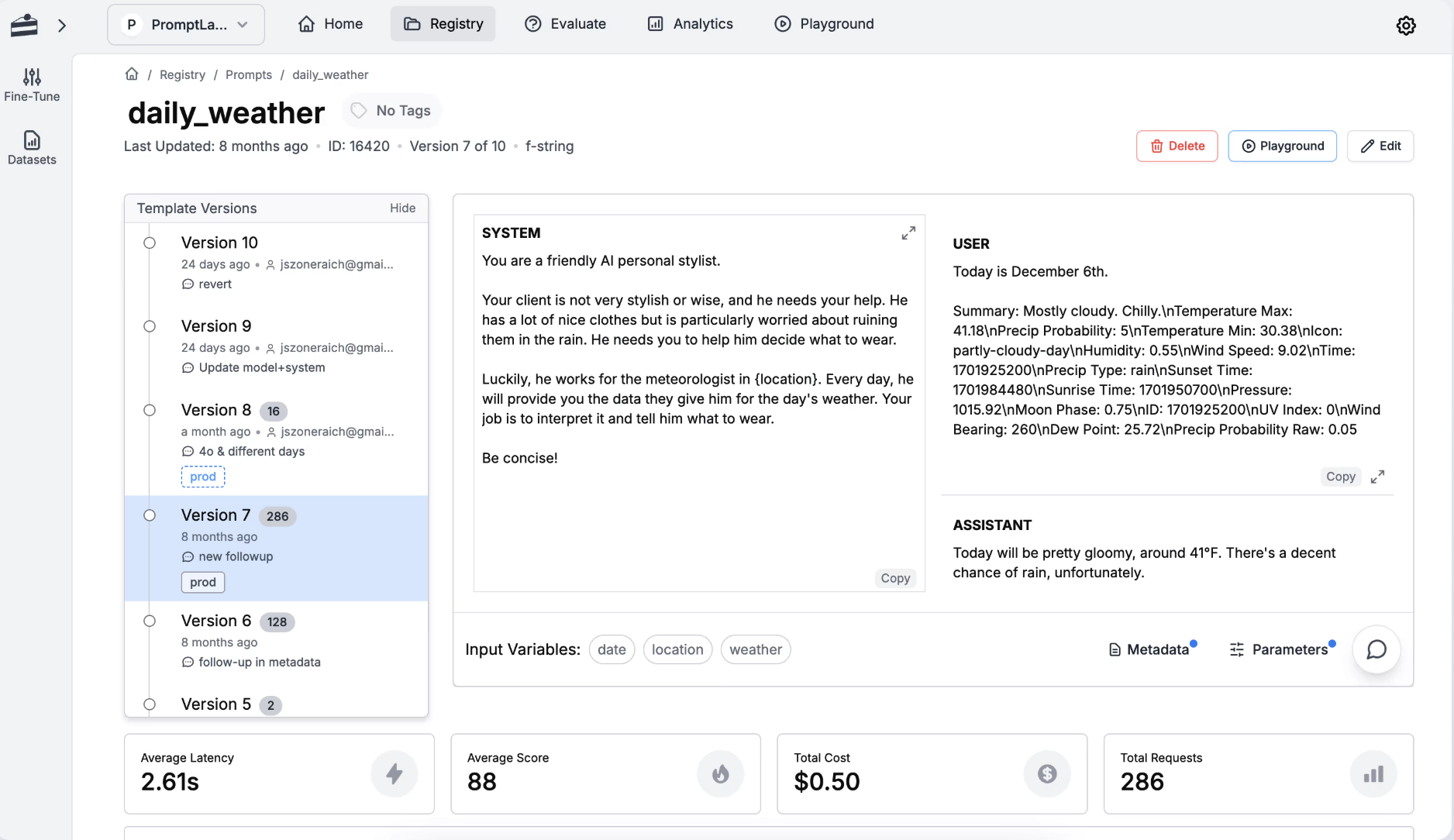
PromptLayer provides a visual prompt registry with version history, release labels, request logs, evaluations, and deployment workflows. It is a strong option when engineers, product managers, and subject-matter experts need to collaborate on prompt changes through a shared interface. Teams should assess its testing depth against the trajectory, CI, and production-feedback requirements of their application.
PromptHub
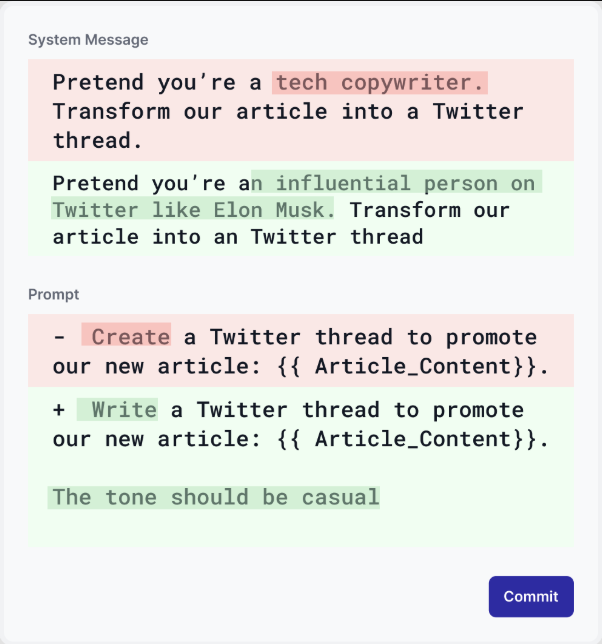
PromptHub focuses on prompt creation, versioning, testing, collaboration, and deployment. Its Git-like version views and team workflows can be useful for organizations that want prompts to move through a review process outside the application repository. As with any registry-centered product, teams should verify how it connects to representative datasets, custom evaluators, agent traces, and release gates.
Frequently asked questions
What is the best prompt testing tool?
The strongest choice depends on the workflow. Arize AX and Braintrust cover broad managed evaluation loops. Phoenix supports self-hosted tracing and experimentation. DeepEval and promptfoo fit code-first testing and CI. DSPy is designed for programmatic optimization. LangSmith fits LangChain and LangGraph teams, while Vellum emphasizes visual prompt and workflow development.
How should a team test an LLM prompt?
Start with a versioned baseline and a dataset that represents normal use, known failures, important edge cases, and adversarial inputs. Run the candidate and baseline under the same model and parameter settings, score them with deterministic, model-based, and human evaluators as appropriate, inspect slice-level regressions, and validate the winner on held-out data before release.
What is the difference between prompt management and prompt optimization?
Prompt management controls the prompt lifecycle: storage, versioning, review, access, and deployment. Prompt optimization uses examples and an objective to identify or generate a configuration that performs better. A mature workflow usually needs both, along with production tracing and evaluation.
Can an LLM-as-a-judge replace human evaluation?
LLM judges can score large datasets quickly, especially for criteria such as relevance, tone, groundedness, or task completion. Their scores should be calibrated against human labels, monitored for bias and drift, and combined with deterministic checks where possible. High-risk decisions and ambiguous criteria still need human review.
How do you test a multi-agent system?
Evaluate the final outcome and the path that produced it. Useful component checks include router accuracy, specialist-agent selection, tool choice, argument correctness, retrieval quality, handoff context, loop behavior, and termination. Trace-level and span-level evaluations help connect an end-to-end failure to the component that caused it.
Take this with you
Prompt testing has become a software quality discipline. The teams that improve fastest keep prompt versions reproducible, test changes against representative datasets, evaluate agent behavior at multiple levels, gate releases with explicit criteria, and feed production failures back into the next experiment.
The products in this guide support different parts of that process. AX, Phoenix, Braintrust, and LangSmith connect experiments to broader observability and evaluation workflows. DeepEval and promptfoo make tests easy to run from code and CI. DSPy offers the deepest programmatic optimization model. Vellum gives cross-functional teams a visual environment for prompts and workflows.
A useful first step is to collect a small set of real failures, define two or three release criteria, and compare one candidate change against the current production baseline. That experiment will reveal more about the tool your team needs than a long feature checklist.

