
Updated August 2026.
Changing a production prompt changes application behavior. In an agent, a small edit can alter which tool the model selects, what arguments it sends, how it uses retrieved evidence, and whether the final response matches the expected schema. The application may continue returning successful HTTP responses while task success quietly declines.
Prompt management gives teams a controlled way to store, version, test, release, observe, and roll back the instructions and configuration sent to a model. A useful platform should answer six questions without requiring a forensic search through code, notebooks, and chat threads:
- Which prompt version ran?
- Which model, parameters, tools, and output schema ran with it?
- How did the candidate compare with the current production version?
- Who promoted the change, and why?
- How did the new version behave on real traffic?
- How quickly can the team return to a known-good version?
This guide explains the production prompt lifecycle, shows how to evaluate prompt changes, and compares five tools worth shortlisting in 2026: Arize AX, Arize Phoenix, LangSmith, Langfuse, and PromptLayer. It also covers Vellum, Braintrust, Parea, PromptHub, and DSPy so that teams can distinguish full prompt lifecycle platforms from adjacent workflow, evaluation, and optimization tools.
Top 5 AI prompt management tools at a glance
The five prompt management tools covered in this guide are Arize AX, Arize Phoenix, LangSmith, Langfuse, and PromptLayer. The strongest choice depends on whether your team prioritizes a managed evaluation and observability workflow, self-hosting, LangChain and LangGraph integration, a permissively licensed open-source core, or a focused prompt operations interface.
| Tool | Best fit | Deployment model | Core prompt workflow | Main consideration |
|---|---|---|---|---|
| Arize AX | Teams that want prompt versioning, experiments, evaluations, and production traces in one managed platform | Managed commercial platform, with enterprise deployment options | Prompt Hub, immutable versions, environment tags, Playground, datasets, evals, experiments, trace linkage, and automated prompt optimization | Its broader platform scope may exceed the needs of a small team that only wants a lightweight registry |
| Arize Phoenix | Teams that want to self-host prompt engineering, tracing, evaluation, and experimentation | Free self-hosting under the Elastic License 2.0 | Versioned prompts, tags, Playground, span replay, datasets, experiments, evals, SDK access, and prompt optimization | Your team owns deployment, upgrades, backups, scaling, and the operational controls around the service |
| LangSmith | Teams building with LangChain or LangGraph that also want to version broader agent context | Cloud, hybrid, and enterprise self-hosted options | Prompt and Context Hub, commits, diffs, environments, owners, webhooks, Playground, traces, datasets, and offline or online evaluation | Its deepest product and documentation alignment centers on the LangChain and LangGraph ecosystem |
| Langfuse | Open-source-first teams that want prompt management connected to LLM observability | Cloud or self-hosted; MIT-licensed core with commercial enterprise features | Prompt versions, labels, variables, client caching, fallbacks, trace linkage, datasets, experiments, and evaluations | Self-hosting creates operational work, and some governance controls vary by plan |
| PromptLayer | Teams that want a dedicated prompt registry with visual editing, review, and release controls | Managed platform with enterprise self-hosting | Prompt Registry, diffs, commit messages, release labels, approvals, Playground, datasets, evaluations, logs, and multiple deployment patterns | Teams should choose carefully between direct execution, local caching, GitOps, and managed workflows because each changes the runtime dependency model |
Disclosure: Arize develops AX and Phoenix. This comparison uses the same production criteria for every product and includes tradeoffs for each option.
Related: Prompt management controls an instruction change, while agent evals test whether the full workflow still succeeds after it ships.
Compare: See the guide to LLM and agent evaluation platforms when you need a broader comparison of datasets, judges, tracing, CI, and production evaluation.
What is prompt management?
Prompt management is the practice of storing, versioning, testing, deploying, and observing the prompt configurations used by an LLM application. The managed artifact usually contains more than prose. A production prompt can include system and user messages, template variables, few-shot examples, model selection, inference parameters, tool definitions, and a structured output schema.
The exact fields vary by provider and platform, but a prompt object often resembles the following:
{
"name": "support-ticket-summary",
"messages": [
{
"role": "system",
"content": "Summarize the ticket and assign a priority from P0 to P3."
},
{
"role": "user",
"content": "{{ticket_text}}"
}
],
"model": "provider/model-version",
"parameters": {
"temperature": 0,
"max_output_tokens": 300
},
"tools": [],
"response_schema": {
"type": "object",
"required": ["summary", "priority"]
},
"labels": ["staging"],
"metadata": {
"owner": "support-platform",
"evaluation_dataset": "ticket-summary-v4"
}
}
A central registry makes that object searchable and recoverable. Version history shows what changed, while environment labels such as development, staging, and production identify which immutable version each environment should load.
The common comparison with Git is useful for understanding immutable history and movable labels. Prompt changes also require behavioral testing because an LLM is probabilistic. Recovering the exact prompt configuration does not guarantee the exact output unless the surrounding model, provider behavior, retrieved context, tool state, and sampling conditions are also stable. A temperature setting of zero can reduce sampling variation, but it cannot guarantee identical results across provider or model changes.
For a deeper architectural treatment, see Prompt Management from First Principles.
How prompt management fits into agents and context engineering
Prompts remain important in agent systems, although they represent one part of the runtime. An agent’s behavior also depends on the model, retrieval pipeline, memory, tools, routing logic, permissions, response schema, and orchestration code. A prompt manager can only explain a behavior change when the rest of that execution context is recorded alongside the prompt version.
At minimum, a production trace or experiment should identify:
- The immutable prompt version or content hash
- The model provider and model identifier
- Inference parameters that affect generation
- The tool schema and tool implementation version
- The response schema or parser version
- The retrieval configuration and relevant index version
- The application or agent code revision
- The dataset snapshot and evaluator versions used during testing
This version envelope prevents a common debugging error. When a prompt, model, and tool schema all change in the same release, a score movement cannot be attributed confidently to any single change. Strong prompt workflows encourage controlled comparisons and preserve enough execution context to reproduce the test.
What should a production prompt management platform provide?
| Capability | What a strong implementation provides | Failure it helps prevent |
|---|---|---|
| Central registry | Searchable prompt objects with owners, metadata, dependencies, and clear naming conventions | Production running a prompt that nobody can locate or explain |
| Immutable versions and diffs | A permanent record of messages, parameters, model, tools, and response format for every save | Silent overwrites, ambiguous bug reports, and lost rollback points |
| Environment labels | Mutable pointers such as staging and production that can be promoted or returned to a prior version | Applications following an unreviewed latest version |
| Playground and replay | The ability to start from a real trace, change one part of the prompt object, and compare outputs | Optimizing against a hand-picked example that does not represent production behavior |
| Datasets and evaluations | Repeatable tests across representative examples, deterministic checks, human labels, and calibrated LLM judges | Shipping a prompt because one output looked better |
| Release controls | Approvals, CI checks, canaries, traffic splitting, webhooks, and rapid rollback | A direct edit changing all production traffic without review |
| Runtime reliability | Client caching, startup prefetch, a last-known-good fallback, or build-time synchronization | A registry outage interrupting every inference request |
| Trace linkage | Every production run records the exact prompt version and related configuration | Seeing a regression without knowing which prompt caused it |
| Governance | Role-based access, audit history, retention controls, and separation between editing and production promotion | Unreviewed changes, unclear accountability, and sensitive prompt data leaking across teams |
| Portable access | SDKs, APIs, CLI support, exports, and a path that does not force the registry into the inference hot path | Vendor lock-in or avoidable runtime latency |
How to release a prompt change safely
- Start with a concrete failure: pull a failing production trace, user report, or labeled example, then record the prompt version, model, tool state, and surrounding context that produced it.
- Add representative examples to a dataset: include the original failure, nearby edge cases, and examples that the production prompt already handles well so that a narrow fix does not create a broader regression.
- Freeze a baseline: pin the current prompt version and every relevant dependency so that the comparison has a stable control.
- Make one hypothesis-driven change: adjust the instruction, examples, parameters, model, or tool description for a stated reason, and separate changes whenever attribution matters.
- Run an offline experiment: execute the baseline and candidate against the same dataset and evaluators, repeating stochastic tasks enough times to measure variation.
- Inspect aggregate scores and individual failures: slice the results by customer segment, language, tool path, document type, and other application-specific dimensions because averages can conceal concentrated regressions.
- Promote the candidate to staging: assign an environment label or pin the version, then run integration tests against the real application and tool stack.
- Canary the production release: route a small share of eligible traffic to the candidate when the platform and application architecture support it, then compare task success, constraint violations, cost, and latency by prompt version.
- Promote or roll back: move the production label only after the candidate meets the release criteria, while retaining the previous version as the last-known-good fallback.
- Feed production evidence back into the dataset: preserve new failures and successful edge cases so that the next release begins with broader coverage.
A production application should usually avoid fetching a remote prompt inside every request. A safer design refreshes the production-tagged version on startup or on a background cadence, stores it locally, and continues serving the last-known-good copy when a refresh fails.
# Vendor-neutral pseudocode. Adapt it to your registry SDK.

def refresh_prompt(registry, cache):
candidate = registry.get(name="support-ticket-summary", label="production")
cache.write(candidate)

def load_prompt(cache, bundled_fallback):
cached = cache.read("support-ticket-summary")
return cached if cached is not None else bundled_fallback

# Run refresh_prompt at startup and on a background cadence.
# Inference reads from local state, so a registry outage does not stop requests.
Four ways to deploy prompts
Prompt management products support several deployment architectures. The right choice depends on who edits prompts, how quickly changes need to ship, and how much runtime dependency the application can tolerate.
| Pattern | How it works | Advantages | Operational risk |
|---|---|---|---|
| Prompt in code | The prompt lives in the application repository and ships with a normal code release. | Familiar review, testing, rollback, and no runtime registry dependency | Every prompt edit requires the code deployment process, which can slow domain experts and create duplicated copies outside the repository |
| Registry with client cache | The application refreshes a tagged prompt on startup or in the background, then serves requests from local memory, disk, or a shared cache. | Prompt releases can move independently from code while inference remains resilient to registry outages | Teams must define cache TTL, refresh behavior, fallbacks, and how quickly a label move should propagate across processes |
| Build-time or CI sync | CI pulls an approved prompt version from the registry and writes it into a release artifact or configuration bundle. | The registry supports collaboration and evaluation without becoming a production runtime dependency | Prompt releases still require a build or deploy, and bidirectional sync needs a clear source of truth |
| Proxy or managed execution | The application asks the platform to load, render, and sometimes execute the prompt through a provider. | Fast integration, centralized logging, and consistent provider routing | The platform enters the request and data path, so latency, availability, privacy, and provider-key handling require careful review |
Many mature teams use more than one pattern. Engineers may keep stable system instructions in Git, let domain experts edit a versioned registry, validate changes in CI, and distribute the approved prompt through a local cache. The architecture should make the source of truth and failure behavior obvious.
What should prompt evaluations measure?
Generic ratings such as coherence or helpfulness rarely provide enough evidence for a release decision. The most useful prompt evaluations map directly to the job the application must complete and the constraints it must respect.
| Evaluation layer | Example metrics | Why it matters |
|---|---|---|
| Task outcome | Answer correctness, issue resolution, classification accuracy, successful booking, accepted code change, or completed workflow | Measures whether the application accomplished the user goal |
| Output contract | JSON schema validity, required fields, citation format, length limit, or parser success | Catches failures that can break downstream code even when the prose looks reasonable |
| Evidence quality | Groundedness, citation correctness, retrieval relevance, and unsupported-claim rate | Tests whether the response is supported by the information the system was allowed to use |
| Agent behavior | Tool selection, argument validity, tool success, loop count, recovery behavior, and side-effect safety | Shows whether the prompt improved the full trajectory instead of only the final wording |
| Policy and safety | Refusal correctness, permission checks, PII handling, secret exposure, and prohibited action rate | Prevents quality gains from weakening required controls |
| Operational performance | Latency, model calls, tool calls, token usage, and cost per successful task | Captures the production cost of a behavioral improvement |
| Stability | Pass rate across repeated runs, variance, worst-case performance, and failure consistency | Reveals prompts that produce a strong average while failing unpredictably |
Deterministic checks should handle objective conditions such as schema validity, exact fields, regex requirements, or executable tests. Narrow LLM judges can score semantic criteria when their rubric, inputs, and output format are stable. Human labels remain important for calibration, ambiguous cases, and high-impact decisions.
When automated optimization uses an evaluation dataset, keep a held-out test set. Reusing the same examples for optimization and final reporting can overstate improvement because the prompt may become specialized to the training cases.
See the guide to LLM evaluation metrics for a deeper treatment of metric design.
How these prompt management tools were selected
Each tool in the main comparison covers the production lifecycle beyond an isolated Playground. The selection criteria were:
- A prompt registry or equivalent source of truth
- Version history and a practical promotion or rollback mechanism
- Programmatic prompt retrieval or deployment
- Testing through datasets, experiments, evaluations, replay, or a comparable workflow
- A way to connect prompt versions with runtime behavior
- Current first-party documentation and active product development in 2026
Model-provider consoles, standalone prompt collections, and programmatic optimization frameworks can still be useful. They appear later in the guide when their primary role falls outside the full prompt management lifecycle.
Top prompt management tools for 2026
1. Arize AX
Best for: Teams that want a managed workflow connecting prompt versions with datasets, evaluations, experiments, and production traces.
Arize AX treats a prompt as a versioned object that can contain messages, model configuration, invocation parameters, tools, and response format. Every save creates an immutable, content-addressed version. Mutable tags identify the version used in development, staging, production, or a controlled experiment.
The Prompt Hub acts as the source of truth, while the Playground provides the interactive editing and comparison surface. A team can load a production trace or saved prompt, create a candidate, run both versions against the same dataset, attach evaluators, and compare the results as experiments. The winning version can then receive the production tag without rewriting the application.
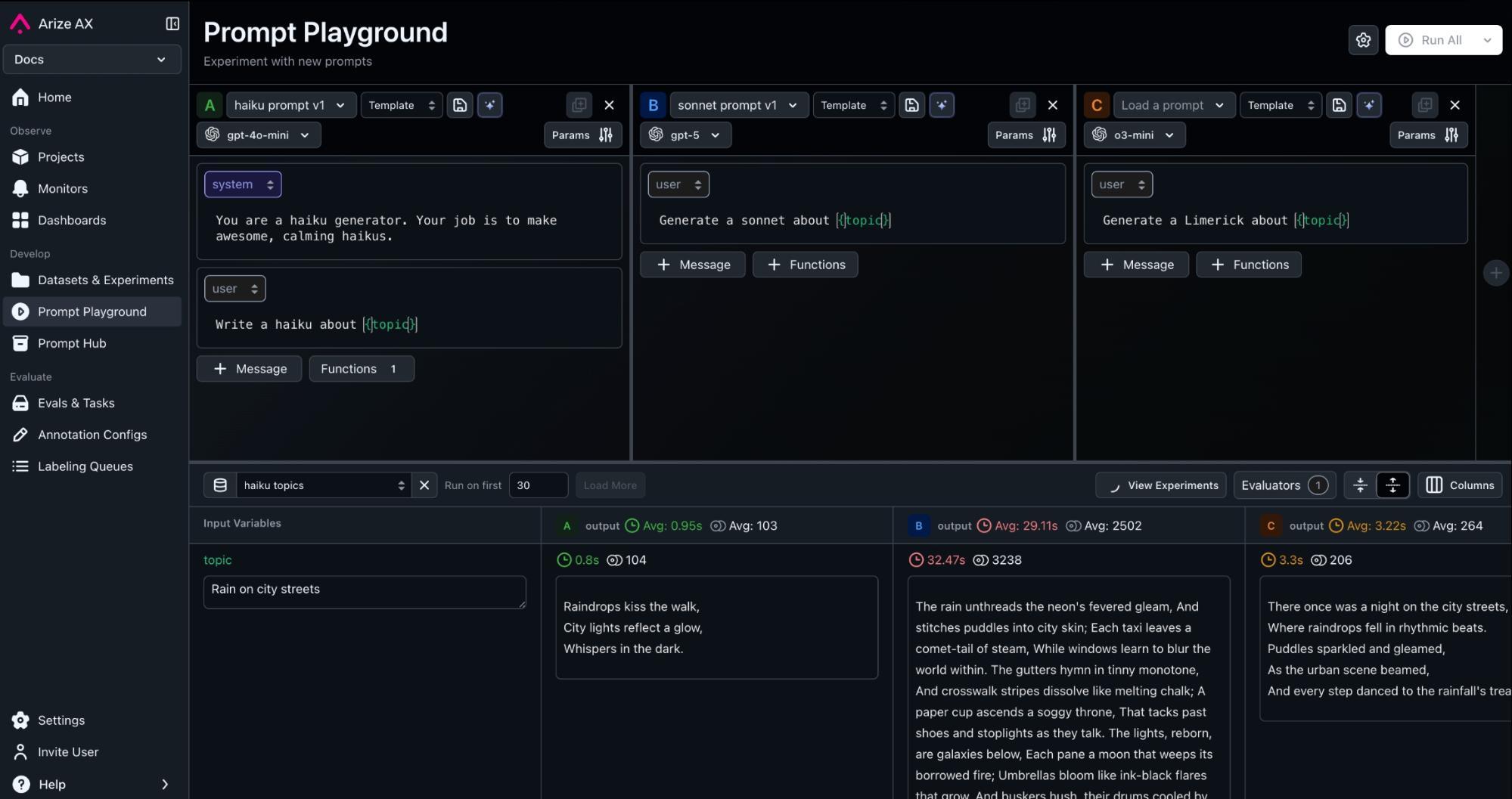
Applications can retrieve prompts by name and tag or pin a specific version hash. Arize recommends a local-cache-fallback pattern that keeps the Prompt Hub outside the inference hot path. The same platform can ingest OpenTelemetry traces enriched with OpenInference semantics, which makes it possible to connect prompt changes with LLM calls, retrievals, tool invocations, latency, cost, and evaluation results.
AX also supports Prompt Learning, which uses evaluation feedback and examples to propose revised prompt candidates. Those candidates remain versioned artifacts that teams can test and review before promotion.
Key capabilities
- Prompt Hub for searchable prompt objects, immutable versions, tags, diffs, creator metadata, and filters
- Playground workflows for editing prompts and comparing models, parameters, tools, and response formats
- Datasets, evaluators, and experiments for repeatable release decisions
- Python, TypeScript, Go, CLI, and REST access for prompt retrieval and CI workflows
- Local caching and version pinning for runtime reliability and controlled rollouts
- OpenTelemetry and OpenInference tracing for linking prompt versions to production behavior
- Prompt Learning and Alyx-assisted iteration for generating candidates from evaluation feedback
Tradeoffs
- AX covers observability, evaluation, and optimization in addition to prompt management, so a small team seeking only a registry may prefer a narrower tool.
- The workflow becomes valuable after teams instrument the application and define meaningful datasets and evaluators. That setup requires engineering and domain input.
- Teams still need a deliberate runtime retrieval pattern. A managed registry should not become a synchronous dependency for every inference request.
2. Arize Phoenix
Best for: Teams that want to self-host prompt management, tracing, experimentation, and evaluation while keeping the model call in their own application.
Arize Phoenix provides a prompt lifecycle that begins with real traces. Developers can save a prompt from an LLM span, replay the call in the Playground, create a new version, test variants across a dataset, compare experiments, and tag the selected version for an environment.
Phoenix clients for Python and TypeScript can retrieve a prompt by version or tag, format template variables, and convert the prompt into the request shape expected by supported provider SDKs. The application calls the model directly, so Phoenix does not need to proxy inference. The Phoenix CLI can also list and export prompts for use in scripts, CI, or coding-agent workflows.
Watch the Phoenix tracing walkthrough.
Key capabilities
- Prompt creation, storage, version history, custom tags, and environment retrieval
- Playground editing with model and invocation-parameter comparisons
- Span replay for testing a changed LLM step inside a larger trace
- Datasets, deterministic or LLM-based evaluators, and experiment comparison
- Python and TypeScript prompt clients, plus CLI access
- OpenTelemetry and OpenInference tracing across LLM, tool, retriever, and agent spans
- Prompt Learning for feedback-driven candidate generation
Tradeoffs
- Self-hosting places deployment, database operations, upgrades, backups, capacity planning, and availability on your team.
- Phoenix is distributed under the Elastic License 2.0. The license permits free self-hosting, modification, and redistribution, while restricting uses such as offering Phoenix itself as a managed service. Teams that require an OSI-approved license should review this distinction during procurement.
- Phoenix includes authentication, role-based access control, and data-retention settings for self-hosted deployments. Your team remains responsible for tenancy design, approval policy, release process, and operation of those controls.
3. LangSmith
Best for: Teams building agents with LangChain or LangGraph that want prompt management connected to context, tools, traces, and evaluation.
LangSmith’s Prompt and Context Hub reflects the broader shift from editing a single instruction to managing the non-code assets around an agent. Prompts contain model messages and configuration, while contexts can package instructions, tools, skills, and other files used by an agent.
Prompt commits have diffs, tags, owners, and environment assignments for staging and production. Webhooks can notify CI or downstream systems when a prompt changes. The SDK supports programmatic prompt management and in-memory caching with stale-while-revalidate behavior, which reduces repeated network requests.
The Playground supports model configuration, custom tools, provider tools, output schemas, and multimodal inputs. LangSmith’s evaluation workflow can run candidates over datasets before release and apply online evaluators to production traces after release.
Key capabilities
- Prompt commits, diffs, tags, staging and production environments, owners, and permissions
- Context versioning for broader agent instructions, tools, skills, and files
- Python, TypeScript, and Java SDK workflows for managing and pulling prompts
- Prompt caching with stale-while-revalidate behavior
- Playground support for tools, structured outputs, custom endpoints, and multimodal content
- Datasets, experiments, offline evaluation, online evaluation, traces, and feedback
- Cloud, hybrid, and enterprise self-hosted deployment options
Tradeoffs
- LangSmith can support applications outside LangChain, but its most developed workflows and examples align with LangChain and LangGraph.
- Self-hosted LangSmith is an Enterprise add-on and requires operating several platform and storage services.
- Teams that adopt the broader Context Hub should establish review boundaries for prompts, tools, skills, and agent files because each asset can change production behavior.
4. Langfuse
Best for: Teams that want an open-source-first prompt registry connected to LLM tracing and evaluation, with a choice between cloud and self-hosted deployment.
Langfuse Prompt Management supports text and chat prompts, template variables, nested prompt references, message placeholders, configuration, immutable versions, and mutable labels. Applications commonly load the version carrying the production label, while staging, tenant, or experiment labels can point to different versions.
Langfuse links prompt versions to traces so teams can compare runtime quality, cost, and latency by version. Client SDKs cache prompts locally, revalidate them in the background, and support prefetching or a fallback prompt. This design reduces latency and protects the application when the prompt API is temporarily unavailable.
Langfuse also includes datasets, experiments, scores, annotation, and LLM-as-a-Judge workflows. Its SDKs use OpenTelemetry-based tracing, and teams can run Langfuse Cloud or self-host the core platform.
Key capabilities
- Text and chat prompts with variables, references, message placeholders, and configuration
- Immutable versions, environment labels, diffs, and rapid rollback
- Client-side caching, background revalidation, startup prefetch, and fallback prompts
- Prompt-to-trace linkage for production analysis by version
- Datasets, experiments, scores, annotation, and automated evaluation
- Cloud deployment or self-hosting with an MIT-licensed core
- OpenTelemetry-based SDKs and integrations
Tradeoffs
- Self-hosted teams own upgrades, storage, scaling, backups, and compatibility between server and SDK versions.
- The platform follows an open-core model, so some enterprise governance features use a commercial license.
- Client caching improves resilience, but it also means a label move may not reach every process immediately. Release plans should account for cache TTL, refresh behavior, and fallback versions.
5. PromptLayer
Best for: Teams that want a focused prompt operations product with visual editing, version review, release labels, approvals, evaluations, and flexible deployment patterns.
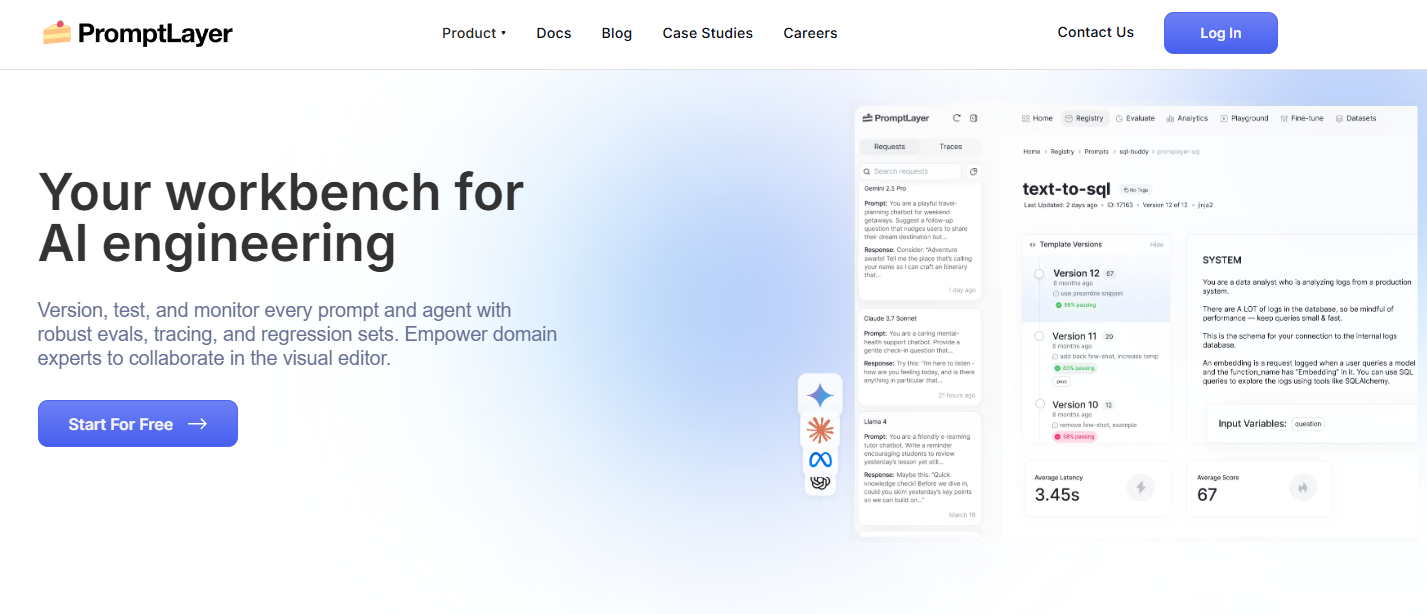
PromptLayer’s Prompt Registry stores reusable templates containing messages, variables, model settings, and runtime configuration. Each save creates a version with a diff and commit message. Teams can organize prompts with folders and tags, test them in the Playground, and assign release labels such as staging or production.
Protected labels can add approval steps, while dynamic release labels can split traffic across prompt versions for a canary or A/B test. PromptLayer’s Tables and evaluation workflows let teams score candidates against datasets or backtest them on request history. Logs and analytics connect the released prompt with cost, latency, feedback, and evaluation results.
PromptLayer documents several ways to integrate the registry. An application can call PromptLayer to fetch and execute a prompt, mirror prompts into a local cache through webhooks, synchronize changes through Git and CI, or use managed workflows. This range is useful because different teams place different boundaries around latency, data flow, and operational control.
Key capabilities
- Prompt Registry with folders, tags, commit messages, diffs, and version history
- Release labels, protected label approvals, and dynamic traffic splitting
- Playground editing, replay, and version creation
- Datasets, evaluations, request-history backtests, and prompt-level analytics
- Direct SDK execution, webhook-driven caching, GitOps synchronization, and managed workflows
- Prompt, agent, and workflow observability
- Managed cloud and enterprise self-hosted deployment
Tradeoffs
- Direct SDK execution places PromptLayer in the request path. Teams with strict latency or availability requirements may prefer webhook caching or GitOps synchronization.
- The breadth of agent-level debugging should be compared with platforms whose primary architecture centers on full traces, experiments, and production evaluation.
- Advanced governance and self-hosting are enterprise capabilities, so plan-level requirements should be confirmed during evaluation.
Other prompt tools worth evaluating
The main list is intentionally limited to five products, although several other platforms cover meaningful parts of the prompt lifecycle and may fit a particular architecture better.
Vellum
Best for: Teams that want visual prompt and workflow development with managed deployments, environment-specific releases, test suites, and online evaluations.
Vellum turns a prompt or workflow Sandbox into a versioned Deployment. Each environment maintains its own release history, and applications can follow the latest release, use a movable custom release tag, or pin the static tag created for a specific version. Vellum also supports test suites and online metrics for deployed prompts and workflows.
Vellum is especially relevant when prompt management sits inside a broader visual workflow platform. Teams should evaluate whether requests will execute through Vellum or whether their architecture will load configuration and call the model elsewhere, since that choice affects latency, provider routing, data handling, and failure behavior.
Braintrust
Best for: Teams whose prompt workflow begins with datasets, scorers, experiments, and eval-driven deployment.
Braintrust lets teams create and version prompts, evaluate them through experiments, assign environment tags, and invoke a deployed prompt from application code. A production application can use the latest version in an environment or pin a specific version for a controlled release. Braintrust is worth shortlisting when prompts are part of a broader evaluation and function-deployment workflow.
Parea
Best for: Evaluation-first teams that want versioned prompt deployments with separate development and production branches.
Parea versions prompts in its Playground and lets teams deploy, bump, or revert a specific version without changing the deployment ID used by application code. Separate branches can support development, QA, A/B tests, and production. An application can execute a deployed prompt through Parea or fetch the rendered prompt and model configuration for use with its own client.
PromptHub
Best for: Teams that prefer a Git-style review model for prompt changes and want no-code evaluation pipelines around commits and merge requests.

PromptHub provides branches, commits, merge requests, version history, model testing, batches, evaluations, and API access. Its Pipelines feature can run evaluators when a prompt is committed or submitted for review, then enforce pass-rate rules before a change moves forward. Teams that value an approachable review interface for subject-matter experts may find this workflow attractive.
When evaluating PromptHub for a large deployment, test the exact observability, access-control, data-handling, and scale requirements that matter to your organization instead of inferring them from the editing workflow alone.
DSPy
Best for: Developers who want to define LLM behavior as Python programs and optimize instructions or examples against a metric.
DSPy provides Python abstractions and optimizers for programming LLM behavior. Developers define signatures and modules, compose them in code, and use optimizers such as GEPA or MIPROv2 to search for better instructions and demonstrations against a metric. Production registry functions such as environment promotion, approvals, runtime retrieval, and prompt-level rollback remain the responsibility of another system.
DSPy can save an optimized program artifact, while a separate prompt management and evaluation platform can provide the production versioning, approvals, environment promotion, runtime retrieval, traces, and rollback needed around that artifact.
Which prompt management tool should you choose?
| Requirement | Tools to shortlist |
|---|---|
| Managed prompt, evaluation, experiment, and production-observability loop | Arize AX |
| Self-hosted prompt engineering with tracing, replay, datasets, and experiments | Arize Phoenix |
| LangChain or LangGraph development with versioned prompts and broader agent context | LangSmith |
| Open-source-first prompt management with cloud and self-hosted options | Langfuse; also evaluate Phoenix based on the workflow and license requirements |
| Dedicated visual prompt operations with approvals and flexible release patterns | PromptLayer |
| Visual prompt and workflow development with managed deployments | Vellum |
| Evaluation-first prompt and function deployment | Braintrust |
| Versioned prompt deployments with development and production branches | Parea |
| Git-style prompt reviews and no-code evaluation pipelines | PromptHub |
| Programmatic prompt and demonstration optimization in Python | DSPy paired with a registry and production evaluation system |
Run a proof of concept with one real production workflow before choosing a platform. Import an existing prompt, attach a representative dataset, reproduce a known failure, test a candidate, promote it to staging, observe a canary, and perform a rollback. That exercise exposes gaps that feature checklists often miss.
Common prompt management mistakes
- Using latest as the production contract. Production should follow a reviewed environment label or a pinned version, depending on the rollout model.
- Fetching the registry on every request. Use caching, prefetch, background refresh, a bundled fallback, or build-time synchronization.
- Testing one hand-picked input. Build a dataset from production failures, common cases, edge cases, and previously successful behavior.
- Changing several dependencies at once. Separate prompt, model, tool, retrieval, and schema changes when attribution matters.
- Relying on one generic LLM judge. Use deterministic checks for objective requirements, calibrate semantic judges against humans, and inspect disagreements.
- Optimizing on the final test set. Keep held-out examples so automated prompt search has an honest evaluation target.
- Leaving the prompt version out of traces. A regression is difficult to debug when production telemetry cannot identify the exact version that ran.
- Putting credentials inside prompts. Store secrets in the execution environment and give tools the minimum authorization required for the current request.
- Allowing editors to promote directly to production: separate authoring, approval, and production-release permissions for high-impact workflows.
- Assuming prompt rollback reverses side effects. A label move can restore future behavior, but it cannot undo an email, purchase, database write, or other action already completed by an agent.
Prompt management security checklist
- Require authentication for prompt reads and writes, including SDK and CI access.
- Separate permission to edit a prompt from permission to move the production label.
- Preserve immutable history, authorship, timestamps, diffs, and release notes.
- Verify webhook signatures and rotate registry API keys.
- Redact or restrict sensitive inputs and outputs stored in logs, traces, datasets, and Playground runs.
- Keep credentials and long-lived secrets outside prompt text and few-shot examples.
- Test prompt injection and tool authorization at the application level because version control alone cannot make untrusted input safe.
- Define a last-known-good prompt and test the rollback path before an incident.
- Review data residency, retention, encryption, and self-hosting requirements before sending production traces to any platform.
Frequently asked questions
What is the difference between prompt engineering and prompt management?
Prompt engineering focuses on designing instructions, examples, tool descriptions, and output constraints that improve model behavior. Prompt management provides the lifecycle around those artifacts: storage, versioning, testing, review, deployment, traceability, and rollback.
What is the difference between prompt management and context engineering?
Prompt management focuses on the messages and invocation configuration sent to a model. Context engineering covers the broader system that assembles the model’s working context, including retrieved documents, memory, tool definitions, user state, policies, and task-specific instructions. Some 2026 platforms are expanding from prompt registries into versioned context and agent assets.
Does prompt management make LLM output reproducible?
It improves experimental reproducibility by preserving the prompt configuration that ran. Exact output reproduction can still fail when the model is nondeterministic, a provider updates a model behind an alias, retrieval returns different documents, a tool changes state, or the application code has moved. Record and pin the surrounding execution context whenever the provider and architecture allow it.
Should prompts live in Git or in a remote registry?
Git works well when engineers own every change, prompt releases follow the code deployment cycle, and code review is the primary control. A remote registry becomes useful when prompts change more frequently than code, domain experts need a safe editing surface, applications need environment labels, or teams want prompt versions linked directly to experiments and production traces. Many teams combine both through CI synchronization or webhooks.
Should an application fetch a prompt on every request?
Usually no. A per-request fetch adds latency and couples inference availability to the registry. Prefer client caching, startup prefetch, background refresh, a last-known-good fallback, or a build-time sync. Pin a version when a rollout or experiment must remain stable even if an environment label moves.
How does prompt management connect to observability?
Every trace should record the prompt version and related model configuration. That linkage lets teams compare task success, tool behavior, cost, latency, and failure patterns before and after a release. Traces can then supply failing examples for a dataset, which closes the loop from production evidence to an offline experiment and a safer prompt update.
Can prompt management replace fine-tuning?
Prompt iteration often provides a faster and less expensive first lever because it does not require training or hosting new weights. Fine-tuning becomes relevant when the desired behavior cannot be expressed reliably through instructions, examples, retrieval, tools, or orchestration, or when a smaller specialized model needs to learn a stable pattern. Evaluation data should determine whether the added training and deployment complexity produces enough improvement.
What are the top five AI prompt management tools for 2026?
The five tools covered in this guide are Arize AX, Arize Phoenix, LangSmith, Langfuse, and PromptLayer. AX connects prompt releases with managed evaluation and production debugging, while Phoenix gives teams a self-hosted workflow spanning prompts, traces, datasets, and experiments. LangSmith is especially well aligned with LangChain and LangGraph applications, Langfuse offers an open-source-first platform with cloud and self-hosted deployment, and PromptLayer provides a focused prompt operations workflow with visual release controls.
What is the best self-hosted prompt management tool?
Arize Phoenix and Langfuse are the strongest starting points in this comparison. Phoenix combines prompt management with span replay, agent tracing, datasets, experiments, and evaluations, and it permits free self-hosting under ELv2. Langfuse has an MIT-licensed core and combines prompt versions, labels, caching, trace linkage, and evaluation. License requirements, operational capacity, and the surrounding observability workflow should drive the decision.
How should teams measure the ROI of prompt management?
Measure the change in task success, release lead time, prompt-related incident rate, mean time to identify a regression, rollback time, manual review effort, and cost per successful task. A prompt platform creates value when it shortens the path from a production failure to a validated fix while reducing the probability and impact of regressions.
Build the prompt lifecycle around evidence
Together, the registry, datasets, evaluations, traces, and release controls connect every prompt change to evidence while giving the team a safe path to promote, canary, or recover without losing history.
The best prompt management tool for a team is the smallest system that closes that loop reliably across the people, models, frameworks, and deployment environments involved. Test the full workflow with real data before committing to a platform, and treat every prompt release as a behavioral change that deserves the same evidence and operational discipline as a code release.
To discuss prompt management workflows with other practitioners, join the Arize community.
Product capabilities in this guide were checked against first-party documentation on August 24, 2026. Packaging and plan-level features can change, so verify deployment, governance, and pricing requirements with each vendor.

