

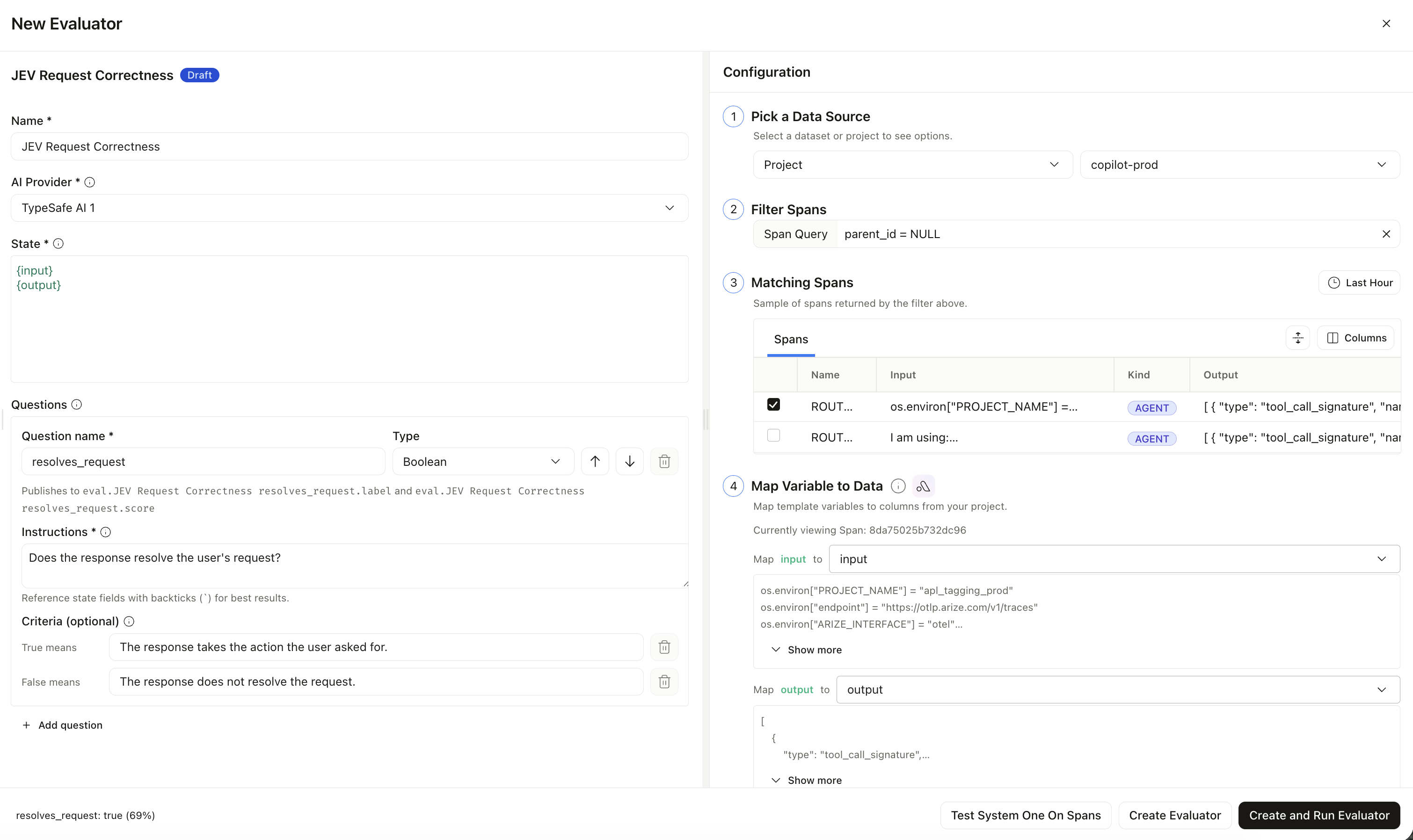
Creating a Jev-as-a-Judge evaluator with a shared state and typed boolean question
Question types
Each question needs a name (for the published column only) and instructions (what Jev actually judges). Results land on:eval.<evaluator name> <question name>.{label,score,...}
Create a Jev-as-a-Judge evaluator
1
Add a TypeSafe AI integration
Go to Settings → AI Providers and add TypeSafe AI with your API key. You can also create it inline from the evaluator form. TypeSafe is eval-only — it does not appear in the prompt playground.
2
Create the evaluator
Go to Evaluators → Create → Jev-As-A-Judge. Select your TypeSafe integration.
3
Write the state and questions
Define the shared state (plain text or JSON with
{variables}), map variables to span columns, then add one or more boolean, choice, or score questions. Put the full judgment in instructions.When you refer to a state field in a question, wrap it in backticks (for example `output`) so Jev treats it as data, not as part of the instruction text.4
Test and save
Optionally run Test System One On Spans, then Create Evaluator or Create and Run Evaluator. Attach it to an online eval task like any other evaluator.
Jev-as-a-Judge cannot run in the prompt playground yet. Model is always
jev-latest. Do not mix Jev and remote evaluators on the same task.