

Chapter summary
Pricing information was verified on August 31, 2026.
Once an AI application reaches production, the model call becomes an infrastructure decision.
Teams have to manage provider outages, rate limits, latency, spend, security policies, and a growing mix of proprietary and open-weight models. Hard coding those decisions into application logic makes every provider change more expensive and every incident harder to contain.
An LLM gateway centralizes that complexity. It gives applications a consistent endpoint while handling concerns such as provider routing, failover, caching, rate limits, access controls, and cost tracking. As teams adopt more models, the gateway becomes the control plane that determines where each request goes and how the system responds when a provider slows down, changes pricing, or becomes unavailable.
Routing still answers only part of the production question. A fallback model may keep an application online while producing responses that are less accurate, relevant, or safe. Gateway logs can show which provider handled a request, how long it took, and what it cost. Those operational signals do not automatically establish whether the answer worked for the user.
The distinction is no longer absolute. Several gateways now include feedback collection, content guardrails, prompt evaluation, or LLM-as-a-judge workflows. These features can be useful, especially when a team wants to enforce a policy inline or attach feedback to a request. A dedicated tracing and evaluation layer becomes important when teams need to evaluate the broader application, including retrieval, tool calls, agent decisions, multi-step workflows, and end-user outcomes.
This guide compares six widely deployed LLM gateways (LiteLLM, Portkey, OpenRouter, TrueFoundry, Kong AI Gateway, and Cloudflare AI Gateway) and explains where each one fits. It does not cover every proxy on the market (for example, Vercel AI Gateway or Helicone). Teams typically pair a gateway with application-level tracing and evaluation in platforms like Arize AX, which helps measure quality across retrieval, tool calls, and multi-step workflows and not just the model call itself.
TL;DR
- LiteLLM is a strong fit for teams that want a self-hosted, open-source gateway with support for more than 140 providers. Its paid Enterprise edition adds governance, security, support, and multi-region capabilities while remaining self-hosted.
- Portkey, now part of Palo Alto Networks and the Prisma AIRS portfolio, is designed for teams that want a managed or hybrid gateway with routing, caching, guardrails, and organization-wide governance.
- OpenRouter is a strong fit when access to a large model catalog through one managed API matters most. Its routing, caching, privacy controls, and organizational guardrails are considerably more capable than a simple model aggregator.
- TrueFoundry offers a standalone AI Gateway as well as integrations with its broader platform. It supports managed, hybrid, and self-hosted deployment models.
- Kong AI Gateway is most compelling for organizations that already use Kong and want to govern model traffic through the same API management control plane.
- Cloudflare AI Gateway fits teams already building on Cloudflare and now supports conditional routing, traffic splitting, retries, fallbacks, caching, guardrails, and cost controls.
- Gateway telemetry provides important operational context. Application-specific evaluation still requires criteria, datasets, traces, and a way to measure quality consistently across providers and system changes.
What is an LLM gateway?
An LLM gateway sits between an application and the model providers it calls. Instead of integrating a separate SDK, authentication flow, and reliability strategy for every provider, the application sends requests through a consistent endpoint.
Depending on the product, an LLM gateway may handle:
- Model and provider routing
- Retries and fallbacks
- Load balancing
- Rate and budget limits
- API key management
- Request and response logging
- Guardrails and data-loss prevention
- Exact-response, semantic, or provider-side prompt caching
- Usage and cost attribution
For a canonical definition of the term, see the LLM gateway glossary entry.
Consider an application that calls one provider directly. When that provider reaches a rate limit or becomes unavailable, requests may fail until the application retries or switches providers. A gateway can detect the failure and route the request to another deployment or model without requiring an application release.
The gateway can also centralize policies that would otherwise be scattered across services. A platform team can set budgets by application, limit which models a team can access, require zero-data-retention endpoints, or apply the same content guardrail across providers.
How the gateways were compared
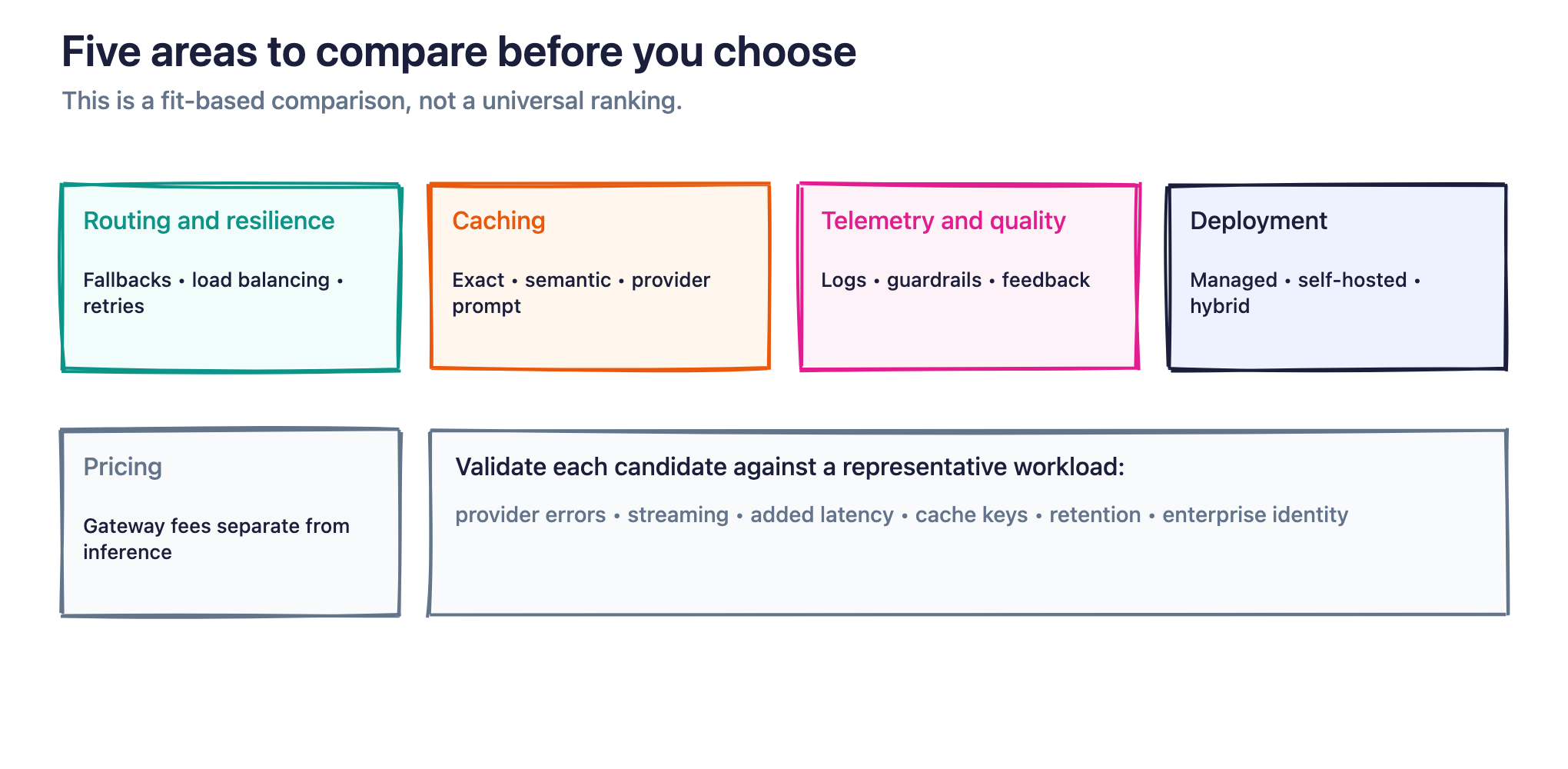
This is a fit-based comparison rather than a universal ranking. The right gateway depends on the infrastructure a team already operates and the level of control it needs.
The comparison focuses on five areas:
- Routing and resilience: How the gateway handles model selection, load balancing, retries, provider degradation, and fallback behavior.
- Caching: Whether the product supports exact-response caching, semantic response caching, provider-side prompt caching, or a combination.
- Telemetry and quality controls: What the gateway records and whether it supports guardrails, feedback, or evaluation workflows.
- Deployment: Whether the product is managed, self-hosted, hybrid, air-gapped, or available in multiple configurations.
- Pricing: How the gateway itself is priced, separate from the underlying model inference costs.
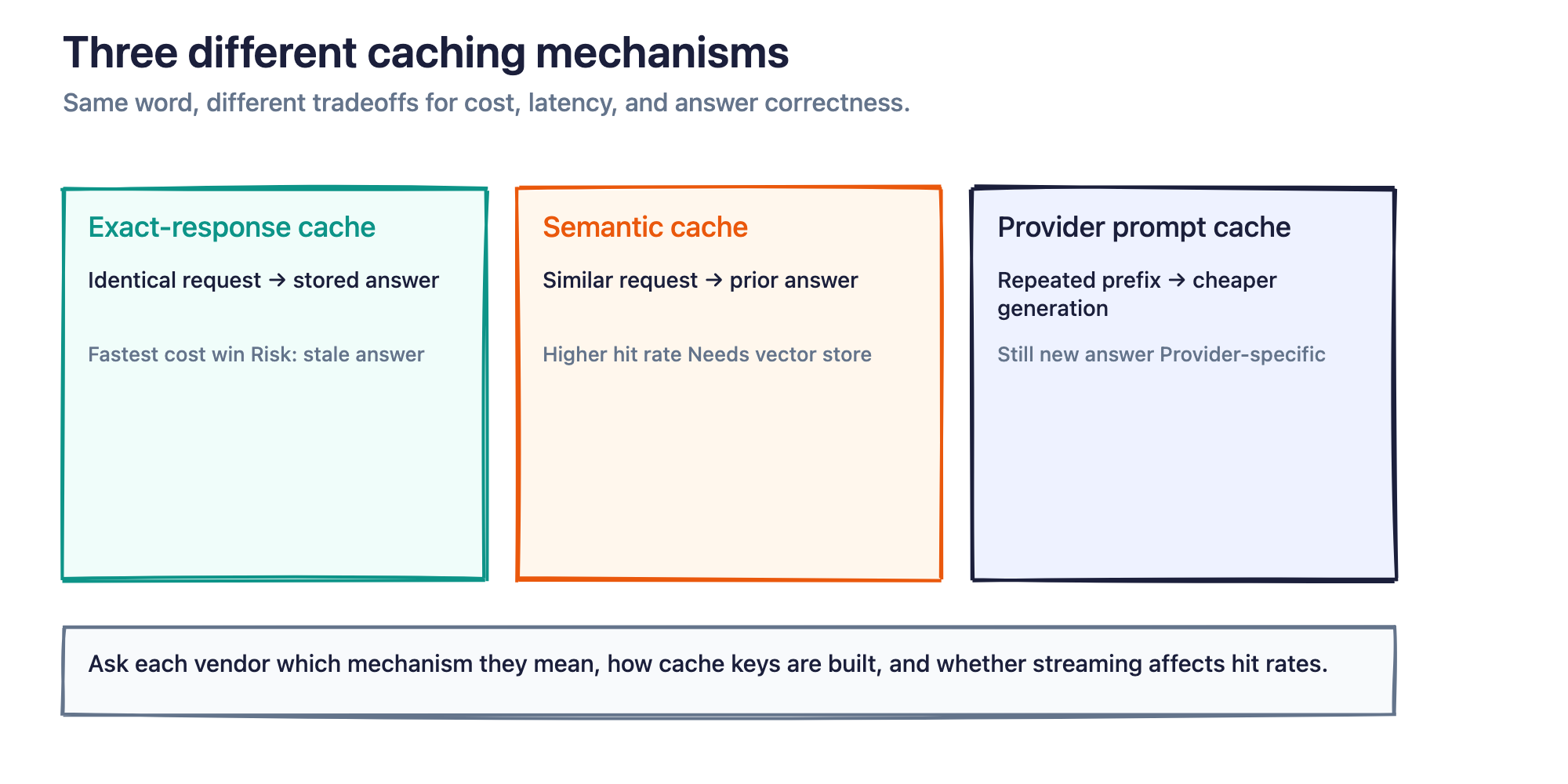
Caching deserves particular attention because the term covers several different mechanisms. Exact-response caching returns a previously generated answer for an identical request. Semantic caching may return a prior answer for a similar request. Provider-side prompt caching reuses computation for a repeated prompt prefix while still generating a new answer. These approaches have different cost, latency, and correctness implications.
Build better agents with Arize
Trace, evaluate, and learn. Build agents that work with Arize AX and start tracing your runs today.
Prefer open source? Try Arize Phoenix for self-hosted, open source agent observability.

LLM gateway comparison for 2026
Pricing information was verified on August 31, 2026. Vendors may change plans, limits, and packaging. Gateway pricing excludes underlying model inference costs unless noted otherwise.
| Gateway | Best fit | Routing and failover | Caching and telemetry | Deployment | Gateway pricing |
|---|---|---|---|---|---|
| LiteLLM | Teams that want to operate an open-source gateway in their own infrastructure | more than 140 providers, virtual keys, rate limits, budgets, load balancing, retries, and fallbacks | Exact and semantic response caching, provider-side prompt caching, request logging, Prometheus metrics, external observability integrations, an Evals API, and an LLM-as-a-judge guardrail | Self-hosted open source; self-hosted or air-gapped Enterprise | Open-source edition is free. Enterprise is priced annually according to request capacity, architecture, and support requirements. |
| Portkey | Teams that want managed or hybrid gateway infrastructure with centralized governance | Conditional routing, load balancing, automatic retries, fallbacks, circuit breaking, canary testing, rate limits, and budgets | Simple caching on all plans, semantic caching on Pro and Enterprise plans (requires a vector database), logs, traces, feedback, guardrails, and prompt-evaluation workflows | Managed SaaS, hybrid, and additional enterprise deployment configurations | Free Dev plan with 10,000 monthly requests; Pro at $49 per month for 100,000 requests; custom Enterprise pricing. |
| OpenRouter | Teams that want a large hosted model catalog through one managed API | Automatic provider fallbacks and routing based on price, throughput, latency, availability, provider preference, and data policy | opt-in OpenRouter response caching (beta), supported provider prompt caching, activity analytics, budgets, model and provider allowlists, PII controls, prompt-injection filters, and external observability integrations | Managed service with OpenRouter credits or bring-your-own-provider-key support | Provider inference prices are passed through without markup. OpenRouter charges a 5.5% credit-purchase fee, with a minimum fee of $0.80. PAYG BYOK includes $25,000/month of list-price inference with no fee ($200,000 on Enterprise); usage above that is billed at 5% of equivalent OpenRouter inference cost. |
| TrueFoundry | Teams that want a standalone enterprise gateway with flexible deployment, or one that connects to a broader AI platform | Retries, fallbacks, budgets, rate limits, and guardrails across more than 1,600 models; weighted, latency-based, and priority-based routing on paid plans | Simple caching on all plans and semantic caching on paid plans; OpenTelemetry-compatible logs and traces, cost attribution, custom metadata, alerts, and feedback attached to trace spans | Managed SaaS, managed gateway with customer-owned storage, self-hosted gateway plane, or self-hosted control and gateway planes; VPC, on-prem, and air-gapped are Enterprise | Developer plan is free; Pro is $499 per month; Pro Plus is $2,999 per month; Enterprise pricing is custom. |
| Kong AI Gateway | Organizations already operating Kong for APIs, identity, traffic policy, and governance | Universal model interface through AI Proxy; advanced weighted, priority, latency, usage, and semantic routing with retries and fallbacks through AI Proxy Advanced | Token, latency, and cost telemetry; OpenTelemetry support; guardrails; exact and semantic caching through the AI Semantic Cache plugin | Self-managed Kong Gateway or Kong-managed Konnect configurations | The core Kong Gateway has open-source options. AI Proxy Advanced and AI Semantic Cache require the paid AI Gateway Enterprise offering. |
| Cloudflare AI Gateway | Teams already using Cloudflare Workers, Workers AI, or Cloudflare’s global network | Conditional routing, model-selection flows, body, header, or custom-metadata policies, fractional traffic splits, rate limits, retries, and fallbacks | Exact-response caching, analytics, persistent logs, DLP, spend limits, and prompt and response guardrails | Managed through Cloudflare’s network | Core features such as analytics, caching, and rate limiting are free. Log limits vary by Workers plan. Guardrails run on Workers AI and bill separately from core gateway features, and Unified Billing adds a 5% fee on purchased credits. |
LiteLLM
Choose LiteLLM when your team wants to operate the gateway in its own infrastructure and retain direct control over deployment, provider credentials, routing rules, and telemetry.
LiteLLM exposes an OpenAI-compatible interface across more than 140 providers. The open-source proxy includes virtual keys, budgets, rate limits, provider fallbacks, request and response logging, and Prometheus metrics. It also supports exact and semantic response caching as well as provider-side prompt caching for supported providers.
The deployment model is important. LiteLLM’s open-source and Enterprise gateways are self-hosted. The Enterprise edition adds features such as SSO, SCIM, audit logs, secret-manager integrations, multi-region management, dedicated support, and service-level agreements. It does not remove the need to operate the gateway itself. Your team remains responsible for deployment architecture, capacity, upgrades, monitoring, and availability.
LiteLLM also has more quality-related functionality than a basic traffic proxy. Its proxy supports OpenAI’s Evals API, and it offers an LLM-as-a-judge guardrail that can score, log, or block responses according to configured criteria. These capabilities can enforce useful checks at the gateway.
A separate application-observability layer can still provide broader context. The gateway sees the model requests that pass through it, while an application trace can also capture retrieval, tool calls, agent steps, and business outcomes. Arize AX can receive LiteLLM traces by instrumenting the OpenAI client that points at the proxy, through LiteLLM’s native arize callback, or through LiteLLM SDK instrumentation.
Primary tradeoff: LiteLLM gives teams extensive control and reduces the amount of provider-specific code in their applications. That control comes with operational ownership.
Portkey, now part of Prisma AIRS
Choose Portkey when you want a gateway with managed infrastructure, routing controls, guardrails, caching, and organization-level governance available through one product.
Portkey supports conditional routing, load balancing, retries, fallbacks, circuit breakers, canary testing, rate limits, and budget controls. Its caching options include exact-response caching and, semantic caching on Pro and Enterprise plans (requires a vector database) semantic caching backed by a vector database.
The product also includes logs, traces, feedback APIs, prompt management, and evaluation workflows. Teams can attach weighted feedback to individual requests or conversations, analyze that feedback with request metadata, and build LLM-as-a-judge workflows through Portkey’s prompt tooling. Those features make Portkey more than a routing-only proxy, although teams should still evaluate whether they cover the full scope of their application and evaluation program.
Portkey offers a managed SaaS deployment as well as hybrid and additional Enterprise configurations. New air-gapped deployments are no longer offered; existing air-gapped customers remain supported. The current published plans include a free Dev tier, a $49-per-month Pro tier, and custom Enterprise plans. Plan limits affect request volume, retention, semantic caching, security controls, and deployment options.
Palo Alto Networks completed its acquisition of Portkey on May 29, 2026. Portkey is being incorporated into the Prisma AIRS portfolio as its AI Gateway. Teams evaluating the product should account for that ownership and product-positioning change during procurement and roadmap discussions.
Primary tradeoff: Portkey reduces the amount of gateway infrastructure a team has to operate, while tying the team more closely to a managed control plane and an evolving enterprise security portfolio.
OpenRouter
Choose OpenRouter when access to a broad model catalog through one hosted API is the primary requirement.
on Pro and Enterprise plans (requires a vector database), an OpenAI-compatible endpoint. Teams can use OpenRouter credits or supply their own provider keys, then route requests according to price, throughput, latency, provider order, availability, quantization, and data-retention policies. Automatic provider fallback is enabled by default, and teams can configure explicit provider or model fallback chains.
Its routing and governance capabilities extend well beyond changing a model string. Organizations can create spending limits, restrict available models and providers, enforce zero-data-retention requirements, detect or redact sensitive information, and apply filters intended to catch prompt-injection or jailbreak patterns.
OpenRouter also offers an opt-in response cache (currently in beta) for identical requests. Enable it per request with the X-OpenRouter-Cache header or a preset; the default TTL is five minutes. Cache hits return before the upstream provider and are not billed. Teams can also use provider-side prompt caching where the selected model and provider support it. These mechanisms should be evaluated separately because one reuses a completed answer while the other reduces the cost of processing repeated prompt context.
The pricing model is often misunderstood. OpenRouter says it passes through the underlying provider’s inference pricing without adding an inference markup. It instead charges a 5.5% fee when customers purchase credits, subject to a minimum fee of $0.80. Bring-your-own-key usage includes $25,000 per month of list-price inference with no platform fee on pay-as-you-go, or $200,000 per month on Enterprise. Usage above that allowance is billed at 5% of the equivalent OpenRouter inference cost.
Primary tradeoff: OpenRouter provides a convenient managed abstraction across a large model and provider catalog. Teams that require a self-hosted data plane or complete control over the gateway runtime will need another option.
TrueFoundry
Choose TrueFoundry when you want an enterprise gateway with several deployment models and the option to connect gateway operations with a broader AI platform.
TrueFoundry’s AI Gateway can be used independently of its model-deployment and MLOps products. It provides one OpenAI-compatible endpoint across more than 1,600 models. Weighted, latency-based, and priority-based routing are available on paid plans. It also includes retries, fallbacks, budgets, rate limits, access controls, guardrails, prompt management, and an MCP registry.
The gateway supports simple caching on all plans and semantic caching on paid plans. Its telemetry includes OpenTelemetry-compatible metrics, traces, and request logs. Teams can attach ratings and comments to trace spans through the feedback API, then inspect that feedback alongside gateway traces.
Deployment ranges from a fully managed SaaS gateway to configurations in which request data, the gateway plane, or the full control plane runs in the customer’s infrastructure. VPC, on-prem, and air-gapped options are Enterprise. This lets teams choose between operational simplicity and tighter control over the path their data takes.
TrueFoundry also publishes several pricing tiers. The Developer plan is free and includes up to 50,000 monthly requests. Pro costs $499 per month, Pro Plus costs $2,999 per month, and Enterprise pricing is custom. Feature availability varies by plan.
TrueFoundry’s broader platform surface may benefit organizations that want one vendor for model serving, gateway management, agent governance, and related infrastructure. Teams seeking only a narrow proxy should compare that breadth and the associated operational model with lighter-weight alternatives.
Arize AX can trace TrueFoundry AI Gateway calls through OpenInference instrumentation of the OpenAI client, preserving the request, response, token usage, and resolved model name. For a walkthrough, see Trace and evaluate TrueFoundry AI Gateway traffic in Arize AX. TrueFoundry can also export gateway traces to Arize without application code.
Primary tradeoff: TrueFoundry’s deployment range is wide, from managed SaaS to customer-run gateway and control planes. VPC, on-prem, and air-gapped options are Enterprise. Its broader product and governance surface can require more evaluation and configuration than a narrower managed API.
Kong AI Gateway
Choose Kong AI Gateway when your organization already uses Kong and wants model traffic to inherit the same authentication, policy, deployment, and API-management practices.
Kong’s AI Proxy provides a common interface across supported model providers. It can translate request and response formats, apply authentication, record model usage, and expose both standardized and provider-native APIs.
More advanced traffic management is available through AI Proxy Advanced. The plugin supports multiple providers and models in one configuration, with weighted round-robin, priority, lowest-latency, lowest-usage, consistent-hashing, and semantic routing strategies. It also supports health checks, retries, circuit breaking, and fallbacks. AI Proxy Advanced requires Kong’s AI Gateway Enterprise offering.
Kong also offers AI-specific plugins for prompt handling, content safety, token-based rate limits, RAG injection, request and response transformation, and semantic caching. The AI Semantic Cache plugin supports exact and similarity-based response caching through a vector database, but it also requires an AI Gateway Enterprise license.
This makes Kong technically capable as an AI gateway. The main decision concerns fit rather than missing routing depth. Organizations already running Kong can add model governance without introducing another traffic control plane. Teams starting from scratch should compare the cost and complexity of adopting a general API platform with gateways focused exclusively on AI traffic.
Primary tradeoff: Kong can unify conventional API and model governance, although many of its advanced AI capabilities require paid Enterprise plugins and the broader Kong operating model.
Cloudflare AI Gateway
Choose Cloudflare AI Gateway when your application already uses Cloudflare Workers, Workers AI, or Cloudflare’s network and you want model traffic managed in the same environment.
Cloudflare AI Gateway includes analytics, logging, exact-response caching, rate limiting, spend limits, data-loss prevention, and prompt and response guardrails. Its cache can serve identical requests without sending another request to the model provider, which can reduce both model spend and response time for appropriate workloads.
Its routing capabilities have expanded substantially. Cloudflare’s dynamic-routing feature supports conditional flows based on request body, headers, or custom metadata. Teams can configure model-selection nodes, percentage-based traffic splits, rate and budget limits, retries, and fallbacks through a visual routing interface. Named dynamic routes are invoked through the OpenAI-compatible endpoint as dynamic/ followed by the route name. That endpoint is deprecated for ordinary single-model completions.
Cloudflare’s core AI Gateway features, including analytics, caching, and rate limiting, are available for free. Persistent log allowances vary by Workers plan. Guardrails run on Workers AI and bill separately from core gateway features, while Unified Billing adds a 5% fee on purchased credits and otherwise passes through provider inference pricing.
Cloudflare previously introduced an evaluations feature with datasets and human-feedback metrics. As of July 28, 2026, that evaluations product is deprecated and unavailable to new accounts. Teams should therefore evaluate Cloudflare primarily as a gateway, policy, security, and operational-telemetry layer rather than assume it will serve as their long-term evaluation system.
Primary tradeoff: Cloudflare AI Gateway is increasingly capable as a routing layer. Its value is highest when the application already benefits from the surrounding Cloudflare platform.
Where observability and evaluation fit alongside an LLM gateway
The boundary between gateways and evaluation platforms has become less rigid.
LiteLLM supports an Evals API and LLM-as-a-judge guardrails. Portkey supports feedback and evaluation workflows. TrueFoundry lets teams attach feedback to gateway traces. OpenRouter and Cloudflare provide guardrails that inspect prompts or responses. These features can answer important questions and enforce useful policies.
The remaining gap concerns the scope and consistency of evaluation.
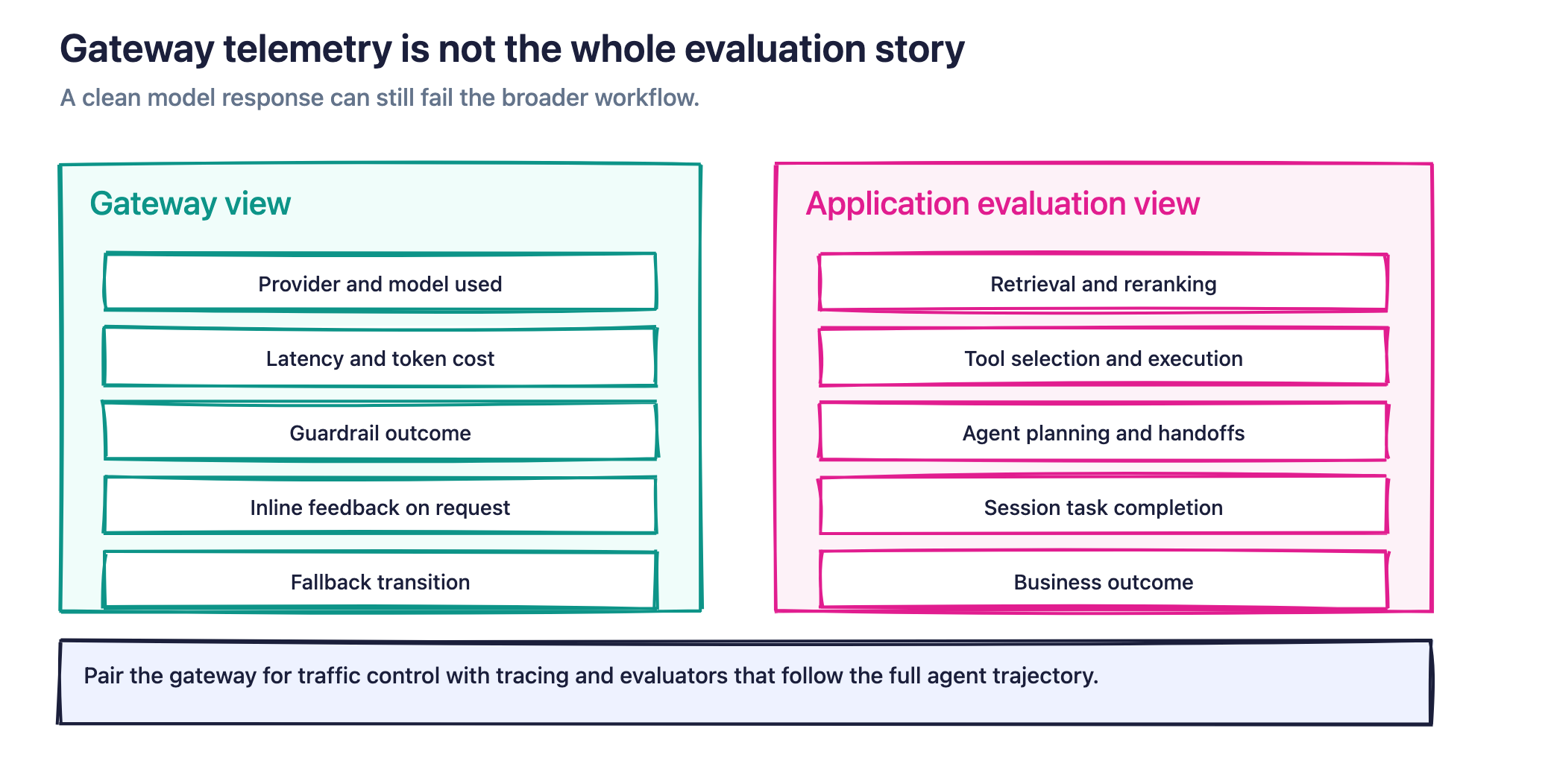
A gateway has the clearest view of requests that cross the gateway. An AI application may include much more:
- Retrieval and reranking
- Tool selection and tool execution
- Agent planning and handoffs
- Multiple model calls
- Code execution
- Memory and state
- Human approvals
- Application-specific business outcomes
A model response can look acceptable in isolation while the broader workflow fails. The agent may call the wrong tool, retrieve an outdated document, omit a required action, or complete a task in a way that creates a poor user outcome.
A dedicated tracing and evaluation layer follows the request through that broader system. In Arize AX, evaluators can score spans, traces, or complete sessions against criteria such as correctness, groundedness, tool use, policy compliance, or task completion. Evaluators can use an LLM judge, deterministic code, or a remote scoring endpoint. Agent-as-a-Judge, which runs a Claude Code harness over trace context, is a closed Enterprise beta.
Those evaluations can run in two places:
- Before release, teams can run a changed prompt, model, retriever, or agent against a dataset and compare the resulting experiment with a baseline. This can surface regressions before the change reaches production.
- In production, teams can evaluate new traces continuously and monitor quality alongside latency, token use, and cost. This can detect regressions soon after they begin affecting live traffic.
Arize AX supports both online, platform-managed evaluation and offline evaluation in a notebook, batch job, CI workflow, or other environment.
Consider a gateway that reroutes a request after the primary provider times out. The gateway can show the provider transition, request duration, token usage, cost, and guardrail outcome. An application-level evaluation can then determine whether the fallback answer remained correct, whether the agent used the right tools, and whether the end-to-end task still succeeded.
Experiments make that comparison repeatable. Teams can run the same dataset through different providers or configurations, score every output with the same evaluators, and inspect aggregate changes as well as individual regressions.
Arize therefore complements an LLM gateway rather than replacing it. The gateway controls how traffic reaches the model. Arize helps teams trace the resulting application behavior, define what good performance means, and measure whether changes improve or degrade the system.
How to choose the right LLM gateway
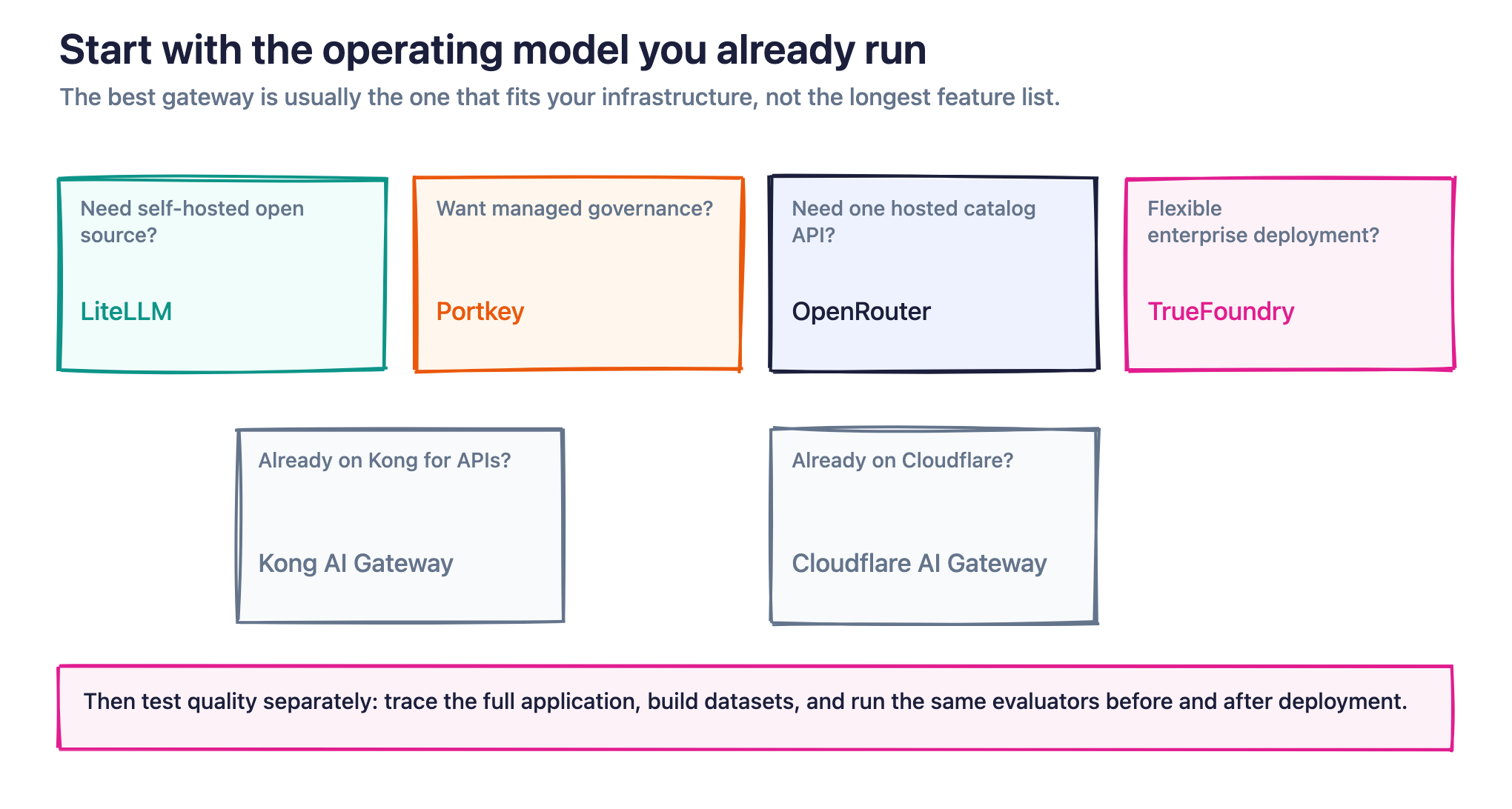
Start with the operating model your team wants:
- Choose LiteLLM when self-hosting, open-source access, and direct control over the gateway are priorities. Be prepared to own deployment and availability.
- Choose Portkey when you want a managed or hybrid control plane with routing, caching, guardrails, and enterprise governance. Account for its integration into Palo Alto Networks and Prisma AIRS.
- Choose OpenRouter when a large hosted model catalog, one API, unified billing, and flexible provider routing matter more than running the gateway yourself.
- Choose TrueFoundry when you need a standalone gateway with several deployment configurations, or when gateway management should connect to a wider platform for model deployment and agent governance.
- Choose Kong AI Gateway when your organization already relies on Kong and wants model traffic to use the same API management, identity, policy, and operational infrastructure.
- Choose Cloudflare AI Gateway when your applications already run on Cloudflare and you want routing, caching, logging, guardrails, and cost controls close to that existing stack.
Before making a final decision, test each candidate against a representative workload. Verify fallback behavior under provider errors, confirm how streaming requests behave, measure added latency, inspect how cached responses are keyed, and confirm what data the gateway stores. Pay attention to how exact and semantic caches key requests such as streaming mode, parameter ordering, and settings such as temperature can all affect hit rates. Check which features require paid plans, especially semantic caching, advanced routing, longer retention, private deployment, and enterprise identity controls.
Then evaluate quality separately. Decide how you will trace the full application, collect human feedback, build datasets, compare models, and run the same evaluators before and after deployment. See Arize’s guide on why AI engineers need a unified tool for AI evaluation and observability for a broader framing of that layer.
A durable production stack combines traffic control with application-level measurement. The gateway helps keep requests moving. Tracing, experiments, and evaluations show whether the system is moving in the right direction.
Sources & references
Pricing, plan gates, and product claims in this draft were verified against first-party documentation:
- Portkey acquisition (Palo Alto Networks)
- Portkey feature comparison and plans
- Portkey cache (simple vs semantic)
- LiteLLM pricing
- LiteLLM proxy caching
- LiteLLM Evals API
- LiteLLM LLM-as-a-judge guardrail
- LiteLLM Arize callback
- Arize LiteLLM tracing
- OpenRouter pricing and BYOK
- OpenRouter FAQ
- OpenRouter response cache
- OpenRouter guardrails
- TrueFoundry pricing
- TrueFoundry AI Gateway
- Arize TrueFoundry tracing
- Kong AI Proxy Advanced
- Kong AI Semantic Cache
- Cloudflare AI Gateway pricing
- Cloudflare evaluations (deprecated)
- Cloudflare dynamic routing
- Arize create evaluators
- Arize Agent-as-a-Judge
FAQs
What is an LLM gateway?
An LLM gateway sits between your application and the model providers it calls, handling routing, failover, rate limiting, caching, and logging. Tools like LiteLLM, Portkey, and OpenRouter let your code target one endpoint instead of managing each provider’s API separately.
How does a gateway differ from an observability platform?
A gateway controls how requests are routed and logged, but it doesn’t tell you whether the outputs are good. Arize handles that second problem by tracing gateway traffic and evaluating output quality across providers. You pair the two rather than choosing between them.
Should I self-host or use a managed gateway?
Self-hosting with LiteLLM gives you full control and no vendor lock-in, but you own production-hardening and support. Managed options like Portkey run the infrastructure for you at the cost of some flexibility.
How does gateway pricing usually work?
Most gateways charge either per request, per token, or through a subscription tied to volume, with open-source cores available free.

