Arize AX pushed out a lot of new updates in January 2026. From improved evaluator hub to custom prompt release labels, here are some highlights.
Build better agents with Arize
Trace, evaluate, and learn. Build agents that work with Arize AX and start tracing your runs today.
Prefer open source? Try Arize Phoenix for self-hosted, open source agent observability.

Evaluator Hub: Reusable Evaluators
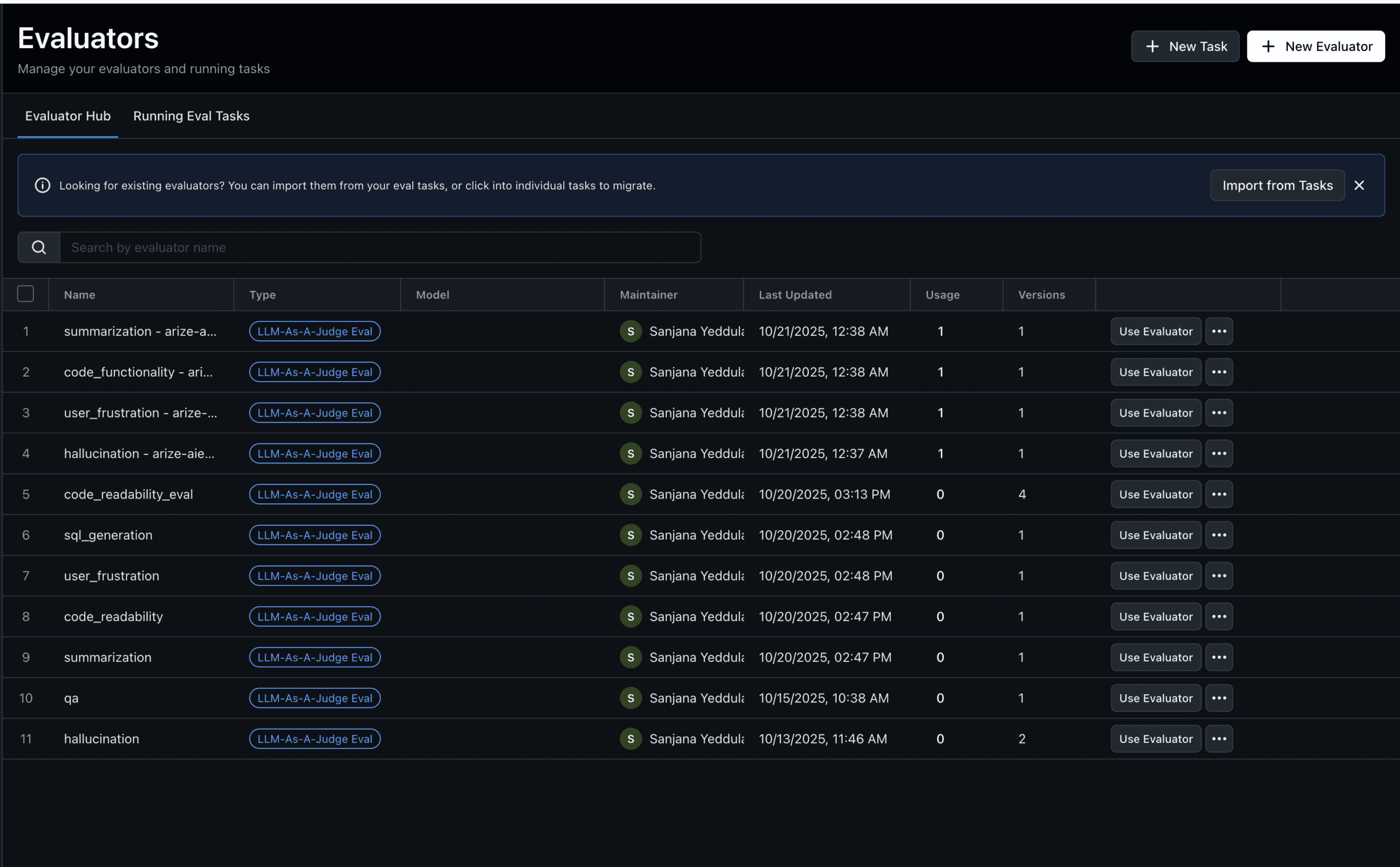
We’re excited to introduce the Evaluator Hub — a centralized place to create, version, and reuse evaluators across all your evaluation tasks.
Why reusable evaluators? Previously, evaluators were defined inline each time you created a task. This led to duplicated configurations, inconsistent evaluation criteria, and extra setup overhead. With the Evaluator Hub, you define an evaluator once and use it everywhere.
- Consistency: Reuse the same evaluator definition across tasks to eliminate drift.
- Reliability: Set LLM configuration (model/provider/params) at the evaluator level so it’s validated before production use.
- Version control: Track changes over time with commit messages for auditing and rollbacks.
- Flexibility: Reuse evaluators across datasets with different schemas via column mappings.
What’s new
- Evaluator Hub tab to browse, search, and manage all evaluators
- Running Tasks tab to view and manage active evaluation tasks
- “Use Evaluator” action to quickly create a task with an evaluator pre-selected
- Column Mappings to map evaluator template variables to datasource columns
- Evaluator Versioning with commit messages
Getting started
- Navigate to Evaluators in the left sidebar
- Click New Evaluator to create your first reusable evaluator
- Choose from pre-built templates or create a custom evaluation from scratch
- Use your evaluator via Use Evaluator or select it while creating a new task
Custom Prompt Release Labels
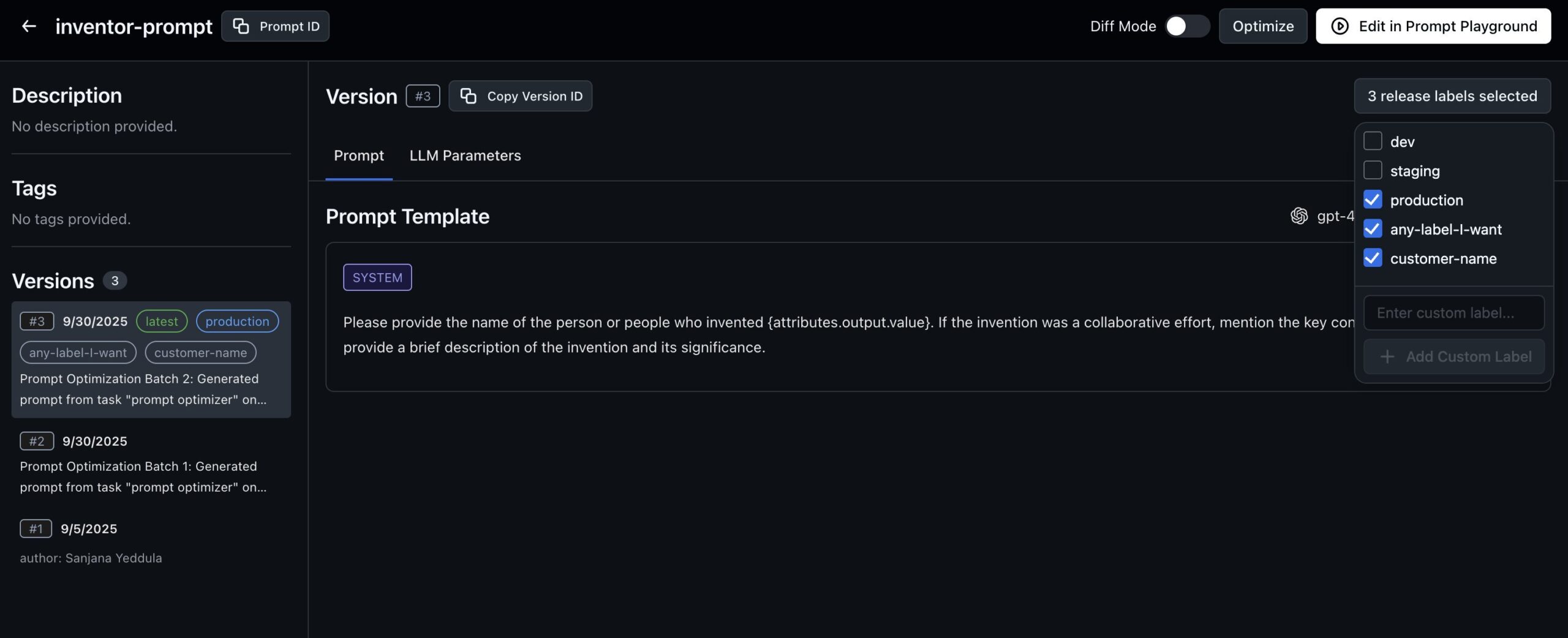
Organize and track prompt versions with custom labels like staging and production.
- Tag prompt versions with meaningful identifiers
- Use environment markers (e.g., “staging”, “production”)
- Get dynamic label suggestions from existing prompts
- Retrieve specific prompt releases quickly
Learn more about managing prompts in the Prompt Hub.
Labeling Queue Annotations
More flexible annotation management across spans, queues, and experiments.
- Clear annotations (reset to null) anywhere
- Support across spans, queues, and experiments for consistent workflows
- Improved annotation lifecycle management
Discover how to set up and use labeling queues for your annotation workflows.
AWS Bedrock Custom Endpoints
Enhanced AWS Bedrock integration for enterprise deployments.
- Custom base URL support for private endpoints
- Inference profile ARNs for multi-region routing
- Custom model configurations for specialized deployments
- Simplified regional management with unified tracking
Configure your AWS Bedrock integration to get started.
More January 2026 updates (roundup)
Enhanced Usage Monitoring
- Datasource-level breakdowns for granular usage visibility
- Account-based tracking with improved join keys for accurate reporting
- 10-minute update intervals for near real-time usage insights
- Automated cleanup of expired data for accurate retention calculations
Enhanced Platform Stability
- Configuration drift resolution in GCP Terraform
- Enhanced error handling across services
- Improved logging and monitoring for faster troubleshooting
- Database migration optimizations for schema updates
- Better resource management for high-volume workloads
Improved Onboarding Experience
- Redesigned onboarding cards with clearer visual hierarchy
- “My First Playground” experience for hands-on experimentation
- Role collection during signup for personalized setup
- Custom hover states matching each card’s accent color
Real-Time Evaluations
- Instant evaluation of production traces without delays
- Latent evaluation support for updating earlier spans
- Seamless cutover between batch and real-time processing
- Available across all Arize AX tiers by default
Set up online evaluations to monitor your production traces in real time.
Wildcard Array Path Variables
- Wildcard (*) patterns to reference all array elements
- Last-index (-1) access for the most recent item
- Automatic generation of wildcard variants for convenience
- Support in task variables and experiment columns
Improved Queue Management
- Duplicate detection with clear error messages
- Added and skipped record counts after bulk operations
- Actionable feedback when attempting to add existing records
Circuit Breaker for Evaluation Tasks
- Immediate abort on authentication errors (401/403)
- Automatic detection of systemic issues after 10 consecutive failures
- Failure rate monitoring to stop doomed batches early
- Resource optimization by preventing guaranteed-to-fail requests
Enhanced RBAC System
- Custom roles with specific permissions
- Space-level role bindings for granular access management
- Coexistence with legacy roles during migration
- UI support for role assignment across user management pages
- Automatic fallback to legacy roles when custom roles are deleted
Custom Metrics with LIKE Operator
- LIKE and ILIKE operators for pattern matching
- Wildcard support with % syntax
- Case-insensitive matching with ILIKE
- Direct Druid mapping for performance
Dashboard Template Filtering
- LLM-only space filtering shows only relevant templates
- Context-aware templates based on project types
- Reduced clutter in template selection
- Consistent experience across spaces and projects
Pivot Table Widget Schema
- Grouped categorical dimensions for organized views
- Configurable numeric columns with aggregations
- Flexible filtering and time range support
- Dashboard integration ready
Session Evaluations with Conversation Context
- {conversation} template variable for session-level evaluations
- Chronologically ordered input/output pairs
- Automatic aggregation of multi-turn dialogues
- Root span filtering for accurate session context
Tracing Configuration for Evaluation Tasks
- Toggle tracing on/off in Advanced Options
- Automatic trace generation for monitoring and debugging
- Persistent settings saved with your tasks
- Production-ready visibility into evaluation execution
Improved Error Handling for Exceptions
- Filter by exception.type and exception.message in the UI
- OpenInference semantic convention support for exceptions
- Consistent data structure across datasources
- Faster troubleshooting of error patterns
SAML Role Mapping Search
- Client-side search across attributes, spaces, roles, and organizations
- Visual highlighting of search matches
- Keyboard navigation through results
- Improved usability for enterprise customers
Enhanced Dashboard Time Persistence
- Auto-save time range, time zone, and granularity selections
- Instant restoration when returning to dashboards
- Per-dashboard settings for customized views
- Seamless experience across sessions
Resizable Trace Slideover
- Draggable slideover width for optimal layout
- Persistent sizing preferences across sessions
- Better content visibility for long traces
Trace Table Performance Improvements
- 30–50% faster initial load times
- String truncation for large content
- Lazy loading of full values in tooltips
- Minimal impact on user experience
Expandable Trace Hierarchy
- Expand traces to see child spans inline
- Hierarchical visualization without opening slideouts
- Faster navigation through complex traces
- Contextual understanding of request flow
Scatter Plot Widgets
- Correlation analysis for two numeric dimensions
- Interactive data points for detailed investigation
- Dashboard integration for visual analytics
- Customizable axes and filtering
Enhanced Monitor Configuration
- Configurable auto-threshold lookback windows via feature flag
- Extended lookback periods for sparse data projects
- Flexible threshold calculation based on historical patterns
- Account-specific customization for unique requirements
Enhanced Session Slideover
- Trace labels with links to detailed views
- Visual separators between traces
- Hover highlighting synchronized between list and conversation
- Improved readability for multi-turn interactions
Experiment Task Timeout Configuration
- Configurable timeout parameter beyond 120 seconds
- Function-level control in run_experiment and evaluate_experiment
- Backward compatibility with default values
- Support for complex evaluators requiring extended processing
Configurable Experiment Timeout
- Custom timeout values for long-running tasks
- Per-experiment configuration for flexibility
- Backward compatible defaults for existing code
Custom Prompt Release Labels
- Tag prompt versions with meaningful identifiers
- Environment markers like “staging” or “production”
- Dynamic label suggestions from existing prompts
- Easy retrieval of specific prompt releases
Eval Hub Enhancements
- Model information in evaluator listings with provider icons
- Evaluator counts in running tasks with hover details
- Automatic save when creating or editing evaluators
- Streamlined task flow for faster evaluation setup
Todo List Management Improvements
- Visual status indicators for all todo states
- Dynamic reminders with exact update calls needed
- Plan preservation across human-in-the-loop pauses
- Clearer instructions positioned near the plan
Span-to-Queue Workflow
- Multiple entry points from spans table, trace slideover, and queue records
- New or existing queue selection
- Batch operations for efficient queue population
- Dataclusters integration for reliable processing
Atlantis Terraform Automation
- Pull request integration for Terraform plans
- Automated plan posting as PR comments
- DevOps team permissions for webhook debugging
- Structured review process before applying changes
Java SDK Space ID Support
- Space ID authentication (space keys deprecated)
- Backward compatibility maintained with existing constructors
- Updated documentation and examples
- Test coverage for new authentication method
Enhanced Space Model Schema
- Space-level schema lookback overrides for custom retention
- Model-specific configurations for unique requirements
- Flexible data management across different use cases
Exact Match Code Evaluator
- String equality checks for exact matches
- Expected vs actual comparisons for testing
- Multi-field access with dataset row support
- Alphabetically sorted evaluator list in UI
Arrow Schema Reconciliation
- Parallel schema fetching from historicals
- Unified schema reconciliation across partitions
- Automatic conversion for schema consistency
- Support for both Druid and Arrow segments
Enhanced Annotation Configs
- Color-coded categories based on optimization direction
- Read-only view for reviewing existing configs
- Optimization direction control (maximize, minimize, or none)
- Clear label guidance for consistent evaluations
Batch Annotation Updates
- Optimization direction support in annotation configs
- Category-based labeling for issue detection
- Best practice guidance for naming and structure
- Streamlined categorization workflows
Stacked Bar Chart Widgets
- Stacked bar charts for comparing categories over time
- Druid-powered queries for fast rendering
- Customizable groupings and dimensions
- Dashboard integration for comprehensive monitoring
Enhanced Eval Hub Empty States
- Improved empty state design with clear next steps
- Documentation links for learning resources
- Actionable cards for common workflows
Google Analytics 4 BigQuery Sync
- Daily GA4 to BigQuery transfers via Terraform
- Raw event data access for advanced analysis
- Overcome GA4 limitations like sampling and retention
- Custom reporting capabilities with full data access
Vertex AI Migration
- Seamless Vertex AI connectivity for LLM applications
- Enhanced observability for Google Cloud deployments
- Modernized instrumentation for better tracing
Generative Service Monitoring
- Uptime and health alerts with paging
- CPU and memory monitoring with warnings
- Dedicated Grafana dashboard for visibility
- Runbook documentation for incident response
Custom Model Migrations
- Custom model endpoint support in evaluations
- Higher traffic model optimization for performance
- Flexible integration options for enterprise deployments
Prompt Optimization on Experiments
- Experiment selector in optimization task creation
- Dynamic column resolution for experiment data
- Enhanced iteration on proven prompts
- Seamless workflow from experiments to optimization
Labeling Queue Annotations
- Clear annotations (reset to null) anywhere
- Support across spans, queues, and experiments for consistent workflows
- Improved annotation lifecycle management

