

| Prediction ID | Timestamp | Prediction | Actual | Feature | Tag | Embedding | URL |
|---|---|---|---|---|---|---|---|
| 1fcd50f4689 | 1637538845 | No Claims | No Claims | ca | female | [1.27346, -0.2138, …] | “https://example_ur.jpg” |
Model Schema Definitions
See below for more details, or click to navigate directly to a definition.
- Model Name
- Model Version
- Model Environments
- Model Type
- Prediction ID
- Timestamp
- Features (Tabular - Structured Data)
- Embedding Features (Unstructured Data)
- Tags
- Feature Importance
Example Schema
Note: This schema example includes possible inputs using the Python Pandas SDK. Please consult model types for applicable schema parameters relevant to your model.Example Row
| prediction_id | prediction_ts | prediction_label | prediction_score | actual_label | actual_score | feature_1 | tag_1 | vector | text | image_link | group_id_name | rank | relevance_score | actual_relevancy |
|---|---|---|---|---|---|---|---|---|---|---|---|---|---|---|
| 1fcd50f4689 | 1637538845 | No Claims | 0.4 | No Claims | 0.4 | ca | female | [1.27346, -0.2138, …] | ”This is an example text" | "https://example_ur.jpg” | 148 | 4 | 0.155441 | not relevant |
1. Model Name or Model ID
A unique identifier for your model. Your model name should have a clear name of the business use case (i.e.,fraud-prevention-model)
Note: this field is synonymous to model_id in our SDK
2. Model Version
Model versions capture snapshots of a model at different times. New model versions are created after retraining, new weights, or new features. Each version can contain its own training, validation, and production environment. In Arize, you can have as many model versions as you want for a model, just as long as you upload them with the same Model ID. Use multiple model versions for a given model to filter and compare in Arize.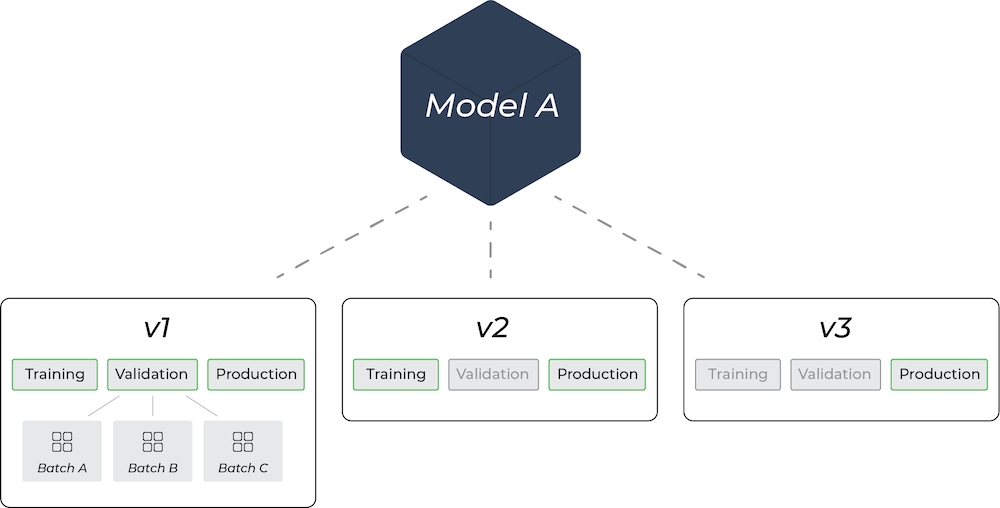
3. Model Environments
A model environment refers to the setup or conditions in which a model is developed. Arize supports uploading training, validation, and production environments. In Arize, a model can have multiple sets of environments depending on how many versions you have. Training Environment: Where the model learns from the training data, adjusting its parameters to minimize the error in its predictions.- Arize supports multiple training versions for any given model version
- We support multiple batches of validation data (i.e. batch1, batch2, etc)
- Production data can help inform retraining efforts, thus creating a new model version.
4. Model Type
Arize supports many model types - check out our various Model Types to learn more.5. Prediction ID
Aprediction ID is an ID that indicates a unique prediction event. A prediction ID is required to connect predictions with delayed actuals (ground truth). Learn how to send delayed (latent) actuals here. Note: The maximum character limit for prediction ID is 512 characters
6. Timestamp
The timestamp indicates when the data will show up in the UI - sent as an integer representing the UNIX Timestamp in seconds. Typically, this is used for the time the prediction was made. However, there are instances such as time series models, where you may want the timestamp to be the date the prediction was made for. The timestamp field defaults to the time you sent the prediction to Arize. Arize supports sending in timestamps up to 2 year historically and 1 year in the future from the current timestamp.7. Features (Tabular - Structured)
Arize captures the feature schema as the first prediction is logged. If the features change over time, the feature schema will adjust to show the new schema.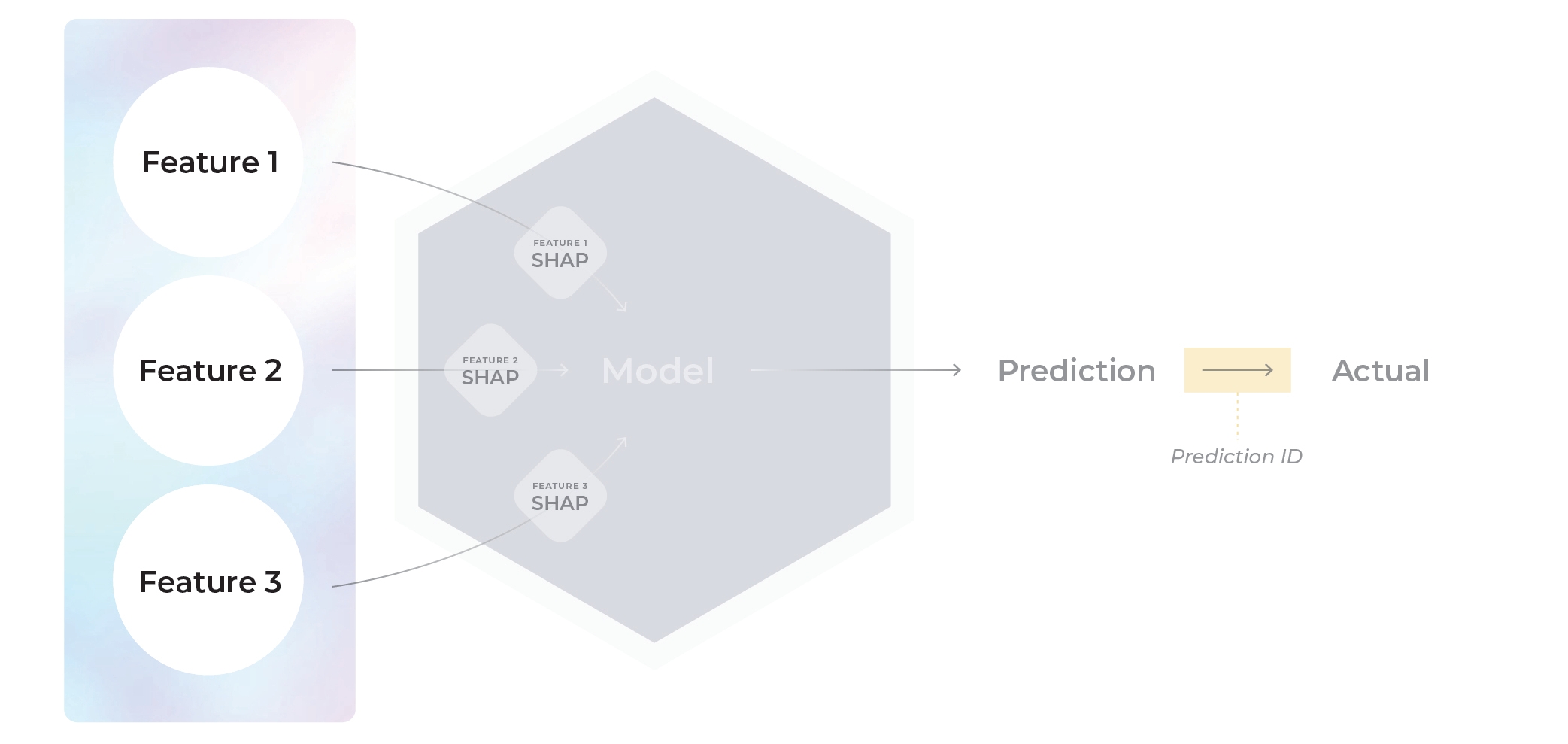
| age | distance | purchased |
|---|---|---|
| 29 | 0.1 | 1 |
| 34 | np.nan | 0 |
| 49 | 8 | 1 |
8. Embedding Features (Unstructured)
Arize’s embedding objects are composed of 3 different pieces of information:-
vector (required): the embedding vector itself, representing the unstructured input data. Accepted data types are
List[float]andnd.array[float]. -
data (optional): Typically the raw text represented by the embedding vector. Accepted data types are
str(for words or sentences) andList[str](for token arrays). -
link to data (optional): Typically a URL linking to the data file (image, audio, video…) represented by the embedding vector. Accepted data types are
str.
9. Tags
Tags are a convenient way to group predictions by metadata you find important but don’t want to send as an input to the model. (i.e., what server/node was this prediction or actual served on, sensitive categories, model or feature operational metrics). Use tags to group, monitor, slice, and investigate the performance of “cohorts” based on user-defined metadata for the model.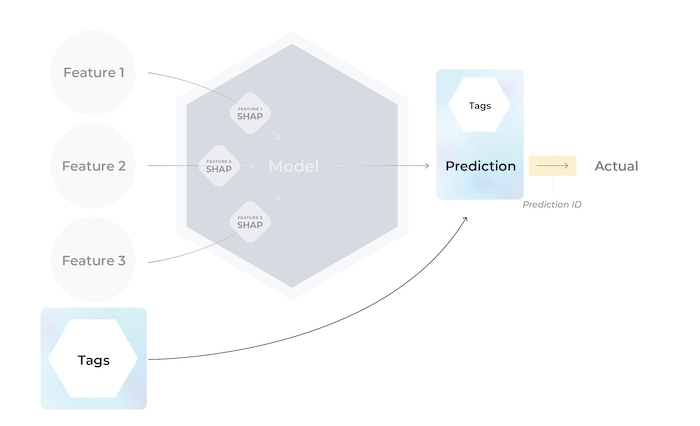
Tags can be sent in with predictions or actuals.If tags are sent in with a prediction and it’s corresponding actual, Arize merges the tag maps, keeping the prediction tag’s value if the tag keys are identical.
| location | month | fruit |
|---|---|---|
| New York | January | apple |
10. Feature Importance
Feature importance is a compilation of a class of techniques that take in all the features related to making a model prediction and assign a certain score to each feature to weigh how much or how little it impacted the outcome. Check out the explainability section to learn more.List of Model Schema Fields for Data Upload and Integrations
For ingesting data via direct UI upload or via any one of our supported integrations (AWS S3, Databricks, etc.), refer to the full list of supported Model Schema fields below:| Property | Description | Required |
|---|---|---|
| prediction_ID | The unique identifier of a specific prediction. Limited to 512 characters. | Required |
| timestamp | The timestamp of the prediction in seconds or an RFC3339 timestamp | Optional, defaults to current timestamp at file ingestion time |
| change_timestamp* | Timestamp of when a row was added (see example for details) | Required *(only applicable for table upload) |
| prediction_label | Column name for the prediction value | Required based on model type |
| prediction_score | Column name for the predicted score | Required based on model type |
| actual_label | Column name for the actual or ground truth value | Optional for production records |
| actual_score | Column name for the ground truth score | Required based on model type |
| prediction_group_id | Column name for ranking groups or lists in ranking models | Required for ranking models |
| rank | Column name for rank of each element on the its group or list | Required for ranking models |
| relevance_label | Column name for ranking actual or ground truth value | Required for ranking models |
| relevance_score | Column name for ranking ground truth score | Required for ranking models |
| features | A string prefix to describe a column feature/. Features must be sent in the same file as predictions | Arize automatically infers columns as features. Choose between feature prefixing OR inferred features. |
| tags | A string prefix to describe a column tag/. Tags must be sent in the same file as predictions and features | Optional |
| shap_values | A string prefix to describe a column shap/. SHAP must be sent in the same file as predictions or with a matching prediction_id | Optional |
| version | A column to specify model version. version/ assigns a version to the corresponding data within a column, or configure your version within the UI | Optional, defaults to ‘no_version’ |
| batch_id | Distinguish different batches of data under the same model_id and model_version. Must be specified as a constant during job setup or in the schema | Optional for validation records only |
| exclude | A list of columns to exclude if the features property is not included in the ingestion schema | Optional, applicable only for Generative LLM Models |
| embedding_features | A list of embedding columns, required vector column, optional raw data column, and optional link to data column. Learn more here | Optional |
| prompt | Column names for the following:- Raw Data: prompt raw text - (optional) Vector: prompt embedding vector | Optional; applicable only for LLM models |
| response | Column names for the following:- Raw Data: response raw text - (optional) Vector: response embedding vector | Optional; applicable only for LLM models |
| prompt_template | * (optional) Prompt Template: Name of column that contains the prompt templates - (optional) Prompt Template Name: Name of column that contains the names of the templates used - (optional) Prompt Template Variables: List of column names of variables used in the prompt template | Optional; applicable only for LLM models |
| llm_config | - (optional) LLM Name: Name of the column containing the LLMs used to produce responses to the prompts - (optional) LLM Params: Name of column containing the hyper-parameters used to configure the LLM used | Optional; applicable only for LLM models |
| run_metadata | * (optional) Prompt Token Count: Name of the column containing the prompt token counts - (optional) Response Token Count: Name of the column containing the response token counts - (optional) Total Token Count: Name of the column containing the total token counts - (optional) Response Latency Ms: Name of the column containing the LLM response latencies | Optional; applicable only for LLM models |
Questions? Email us at support@arize.com or Slack us in the #arize-support channel