

By adding this integration, your data may be sent to your Databricks workspace for certain actions within Arize AX (e.g., prompt playground) and your account may be billed for usage.
Add the Integration Using the Arize Skills
Add a Databricks integration from your coding agent using the Arize Skills:Create a custom model integration named 'my-databricks' with my base URL https://your-workspace-host/serving-endpoints and API key dapi...
Add the Integration from Arize AX
Select Custom Model Endpoints from the Providers List

The AI Provider integrations tab
Fill Out Your Integration Details
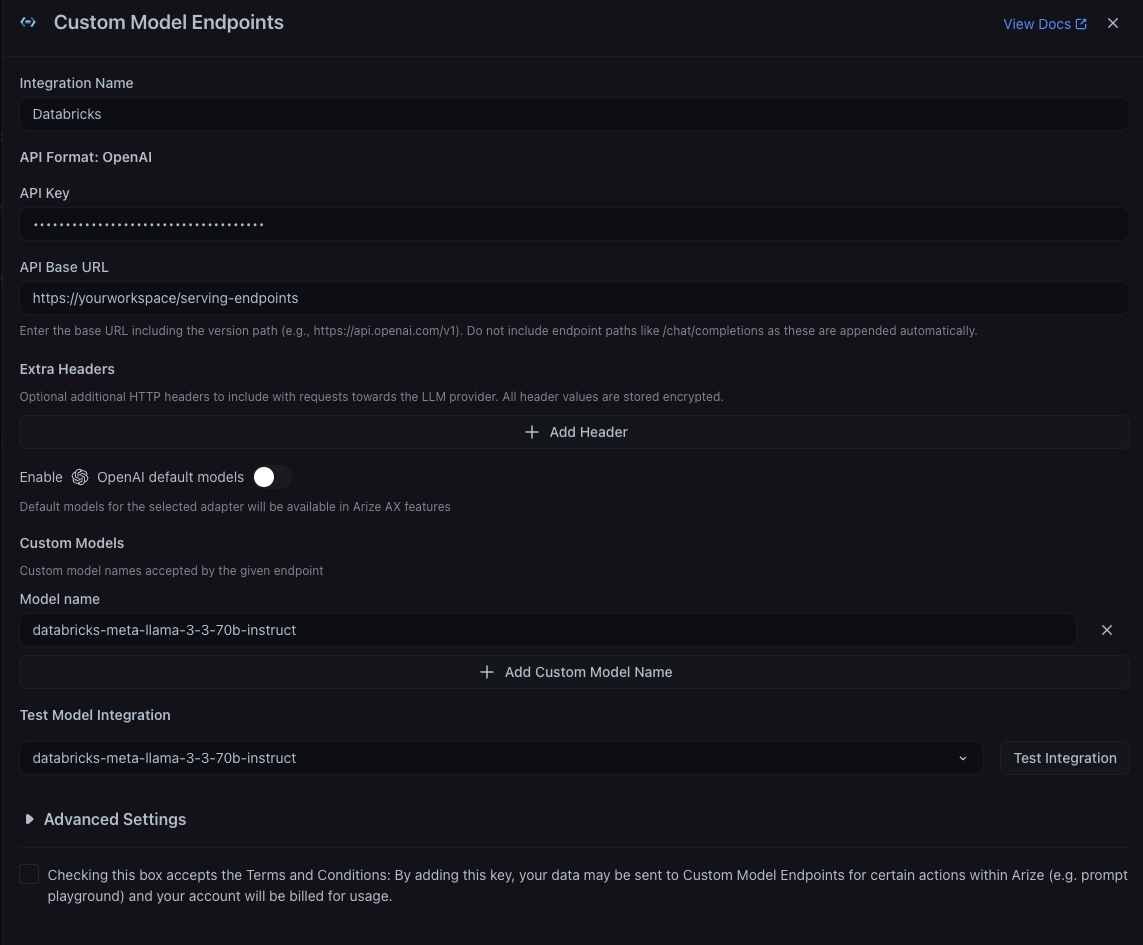
The Databricks custom model integration configuration pane
Databricks). Then set your base URL and a Databricks personal access token (a dapi... token created under Settings -> Developer -> Access tokens in your workspace).
Enter the base URL:If you need to send any extra headers to every request, set these. You then need to define the available model deployments. Leave OpenAI default models off and add your Databricks serving endpoint names as custom model names (e.g.https://your-workspace-host/serving-endpoints(for example,https://dbc-a1b2345c-d6e7.cloud.databricks.com/serving-endpoints). Do not include endpoint paths like/chat/completionsas these are appended automatically.
databricks-meta-llama-3-3-70b-instruct, or your own custom served-model endpoint name). See the Databricks Foundation Model APIs docs for the available endpoints.
Advanced Settings

The Advanced Settings configuration pane
- Supports Function Calling - Turn this on to allow the integration to use function calling features. This is on by default.
- Authorized Orgs - Configure which organizations have access to this integration.
- Authorized Spaces - Configure which spaces have access to this integration.