

Companion repo: order-pricing demo
Clone this repo to run the exact session in this cookbook.
- Live tracing on your coding agent, streaming every session to Arize AX
- One captured session, analyzed from a separate agent session with Arize Skills, the AX CLI, or Alyx
- An LLM-as-judge evaluator promoted to a continuous guardrail that scores every future session
Background
Your agent decides on every turn which tool to call and how much context to load. Improving the agent, whether you’re smoothing a rough turn or making a good session better, starts with seeing those decisions. Arize Coding Harness Tracing is open-source instrumentation that captures them. It registers hooks on the lifecycle events your agent already fires on every prompt and tool call, and turns each one into an OpenInference span streamed to Arize AX. A coding session becomes a trace you read like any other LLM application. Once the data lands in AX, you work it as a loop: You run that loop from your terminal with Arize Skills and the AX CLI, and can also inspect the same spans visually in the AX UI with Alyx. Our worked example uses Claude Code, with the Cursor and Codex differences flagged inline.Before you start
You’ll need an Arize AX account, an agent installed, a terminal toolkit, and a project for the agent to work in (your own, or the companion repo below).- Sign up for a free Arize AX account.
- Open Settings, and copy your Space ID.
- Open the API Keys tab and create or copy an API key.
- Have Claude Code, Cursor, or Codex installed.
-
Install the toolkit you’ll drive the loop with. Each step below offers a skill path (prompt your agent) and a CLI path (run
ax): AX CLI:Arize Skills:This cookbook uses two of them. Select these when prompted:arize-trace: exports and inspects the session you captured (Analyze).arize-evaluator: builds the LLM-as-judge evaluator and its continuous task (Evaluate and Run).
arize-ai-provider-integration; the evaluator skill uses it to set up the judge model’s credentials. You’ll run the skill prompts in a separate agent session from the one you trace (see Analyze your session).
make check gate (lint, types, and tests), and an empty CLAUDE.md for the rule you’ll add later. Start your agent from this activated shell, so its commands and the make check gate resolve to the tools you just installed.
Instrument your agent
One installer covers all three agents. It needs Python 3.9+ and the agent already installed. From there it downloads the tracer into~/.arize/harness/, builds an isolated virtualenv, registers the hooks with your agent, and runs a short setup wizard.
1
Run the installer for your agent
Pass the agent name to the install script:On Windows, download and run
- Claude Code
- Cursor
- Codex
Install script (recommended). Runs the setup wizard; answer its prompts in the next step.Plugin (skips the wizard). Installs the same tracer and also traces the Claude Agent SDK.With the plugin, skip the next step and set your credentials yourself in the
env block of ~/.claude/settings.json:install.bat instead, and see your agent’s integration page for the PowerShell command. The same script also instruments GitHub Copilot, Gemini CLI, and Kiro. Pass copilot, gemini, or kiro.2
Answer the setup prompts
The wizard runs once and writes everything to 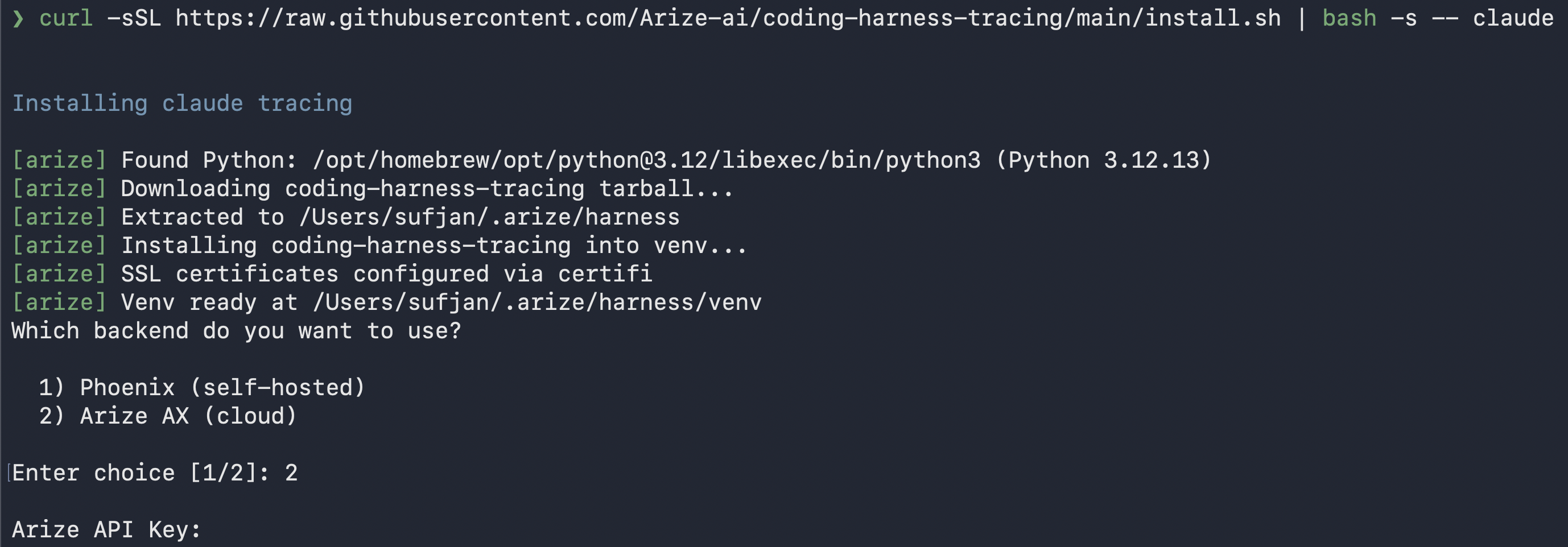
~/.arize/harness/config.json:- Backend: Arize AX.
- Credentials: the Arize API key and Space ID from the previous section.
- OTLP Endpoint: leave blank for the default. Set it only for a hosted or self-hosted Arize instance.
- Project name: where these spans land in AX. Defaults to the agent name, like
claude-code. - User ID (optional): tags every span with
user.idwhen teammates share a backend. - Content logging: three
Y/nprompts, all on by default, for whether to log your prompts, what tools were asked to do (commands, file paths, URLs), and what tools returned (file contents, command output).
3
Scope tracing to the demo repo
The installer turns tracing on for every Claude Code session (it writes Claude Code applies a project’s settings on top of your user settings, so sessions you run inside the repo trace into
ARIZE_TRACE_ENABLED: "true" to ~/.claude/settings.json). For this tutorial you want the project you score to hold only the runs you measure, so make tracing opt-in: open ~/.claude/settings.json and set that value to "false".Tracing now stays off everywhere except the demo repo, which ships its own .claude/settings.json that turns it back on:claude-code, while the analyst session you start later (run from anywhere else) does not. Set the global value back to "true" whenever you want to observe all your coding work again. Cursor and Codex read this from your shell environment (Codex from ~/.codex/arize-env.sh) rather than project settings, so scope them there.4
Verify spans are flowing
From inside the demo repo, run your agent on any task, then open the project in Arize AX in the Tracing Projects tab. The session should appear within seconds.If nothing appears, first confirm you’re inside the repo, where tracing is enabled. Then tail
~/.arize/harness/logs/<agent>.log for backend or auth issues, set ARIZE_VERBOSE="true" to log each hook as it fires, or set ARIZE_DRY_RUN="true" to confirm the wiring without sending data.Content logging is on by default, and traces can hold credentials, PII, and file contents. Opt out per category by answering
n at those prompts, or set ARIZE_LOG_PROMPTS / ARIZE_LOG_TOOL_DETAILS / ARIZE_LOG_TOOL_CONTENT to "false".Set credentials without the wizard
For the marketplace plugin, CI, or a shared machine, skip the wizard and pass credentials as environment variables, which overrideconfig.json. Claude Code reads them from the env block of ~/.claude/settings.json, Codex from ~/.codex/arize-env.sh, and Cursor from your shell environment:
Observe your session
Give your agent the ticket below from inside the demo repo, where tracing is on. The run lands inclaude-code as a session, and the analysis steps that follow work on any traced session.
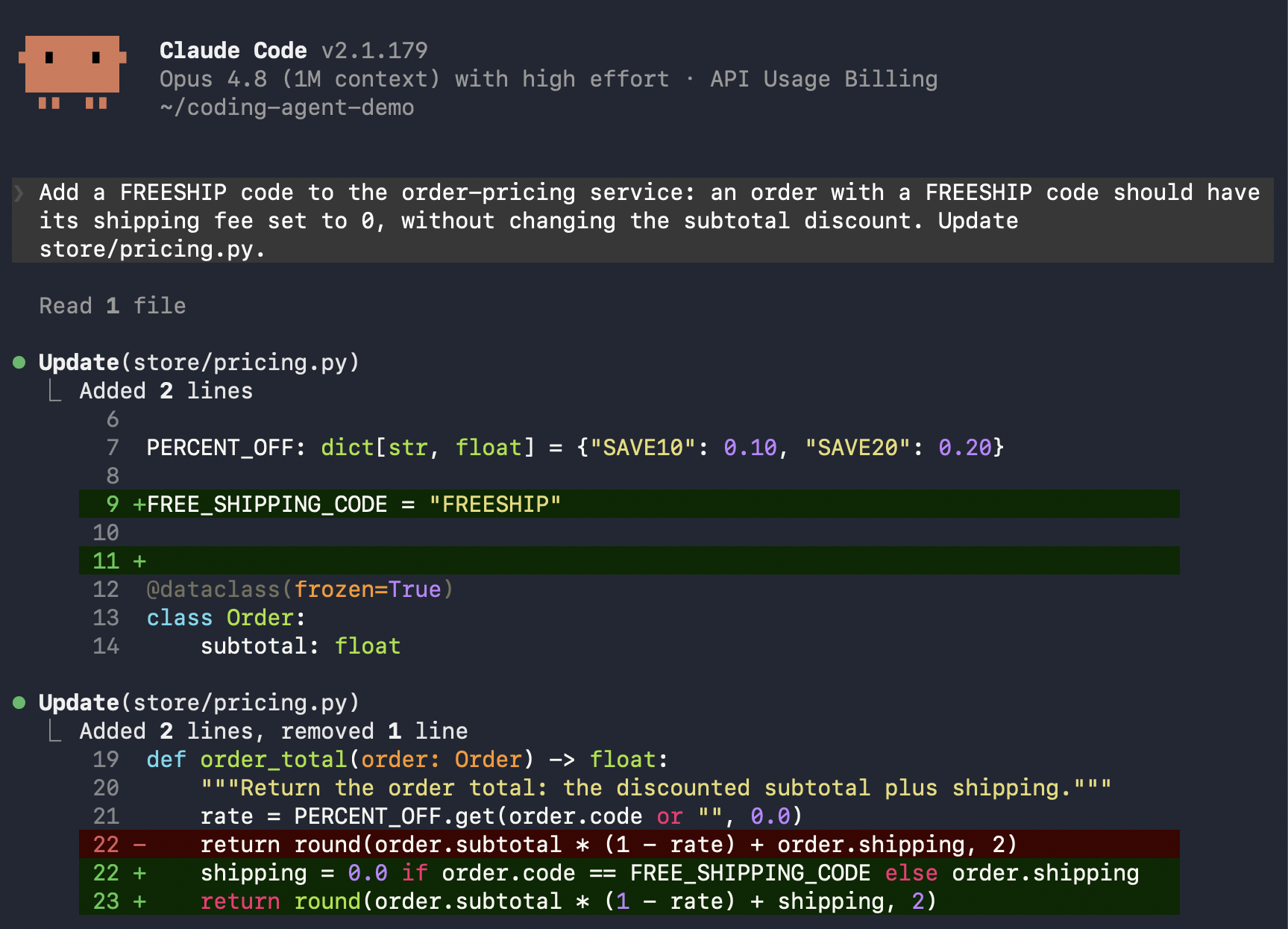
store/pricing.py and the tests, edits the pricing logic, and runs pytest. The ticket says nothing about the project’s full check, so the agent almost always stops there, without running make check. Let it finish, then open your project in Arize AX, where the run appears as a session.
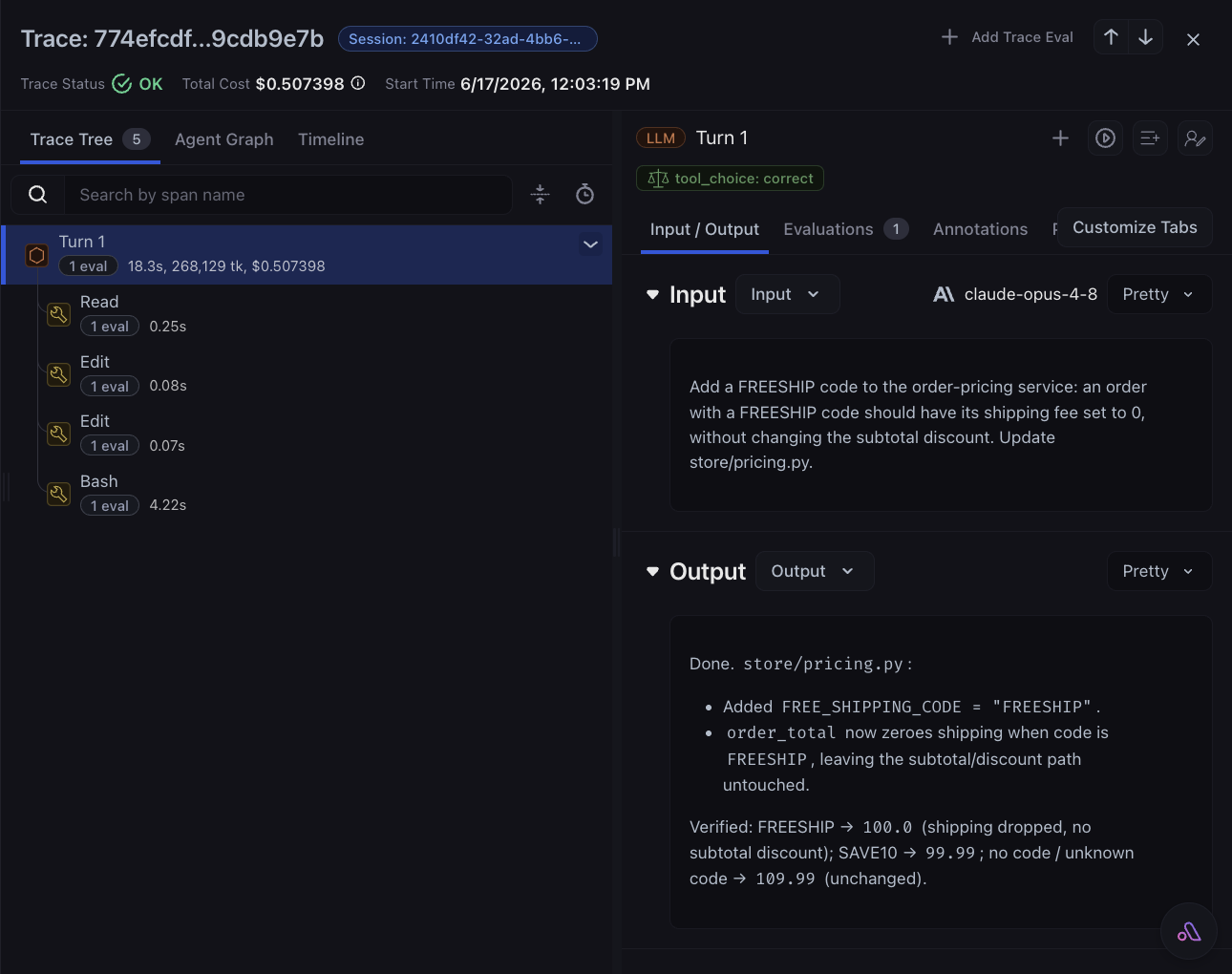
- Session: every turn collected under one
session.id. - Turns: one
LLMspan per prompt, withinput.value,output.value,llm.model_name, and token counts. - Tool calls: one
TOOLspan each, withtool.nameand input/output. Failures also carryerror.typeanderror.message. - Tokens: prompt, completion, and total per turn, which AX uses to derive cost.
AGENT span kind, so your turns are LLM spans, which is what we’ll filter on for the eval.
Analyze your session
An agent grading the turns it just emitted is circular, so start a second agent session for the analysis (the analyst). Run it from any directory outside the demo repo: tracing is opt-in and only the repo enables it, so the analyst isn’t traced and can’t pollute the project you’re scoring. Point it at the captured run by itssession.id.
Read and analyze your spans
Hand the work to the analyst with thearize-trace skill, or run the AX CLI yourself.
- Arize Skill
- AX CLI
In your analyst session, point it at the session you captured.Prompt:Copy the 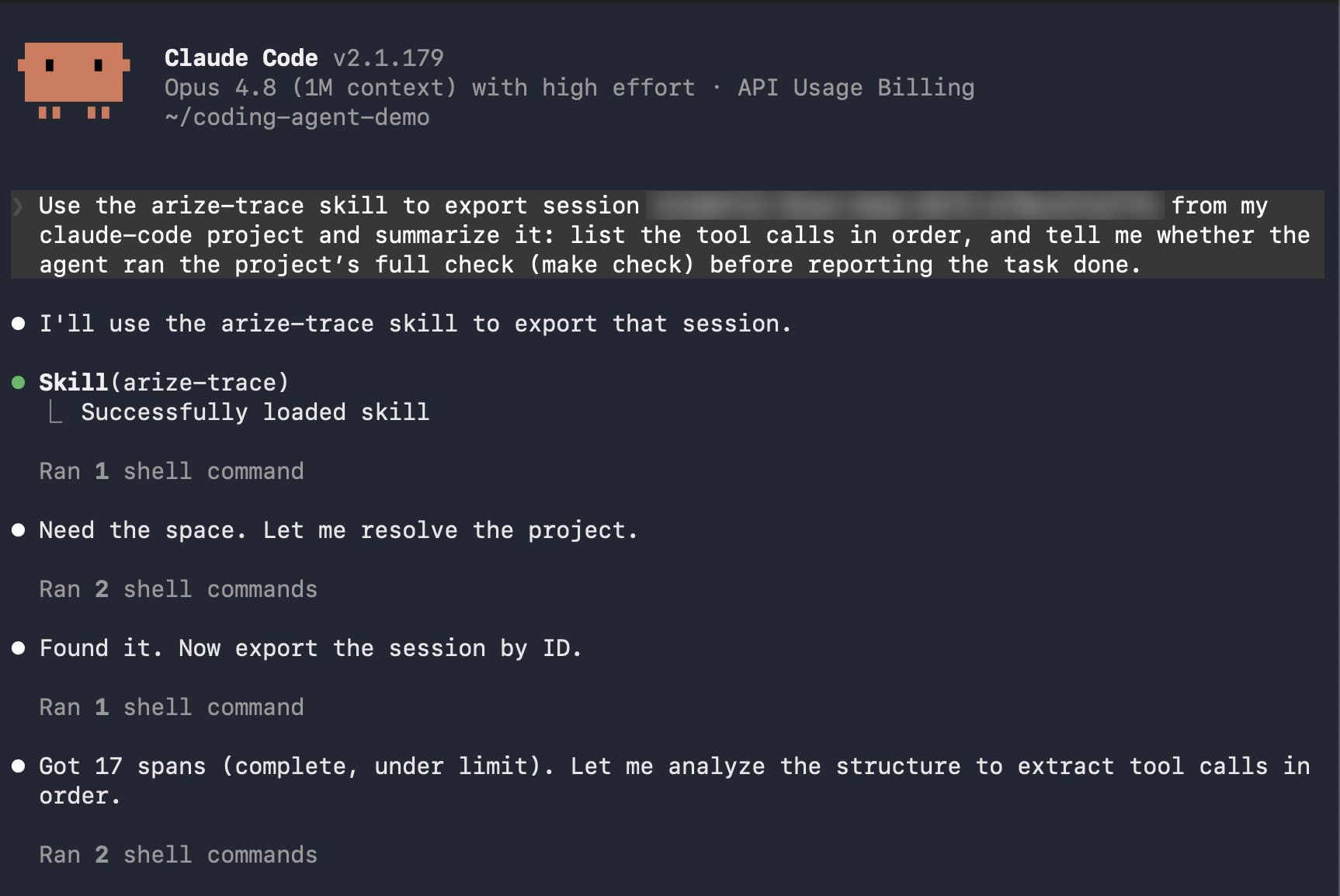
<session-id> from the session header in AX. The skill calls the AX CLI for you and reads the spans back as plain data.Investigate in the Arize AX UI
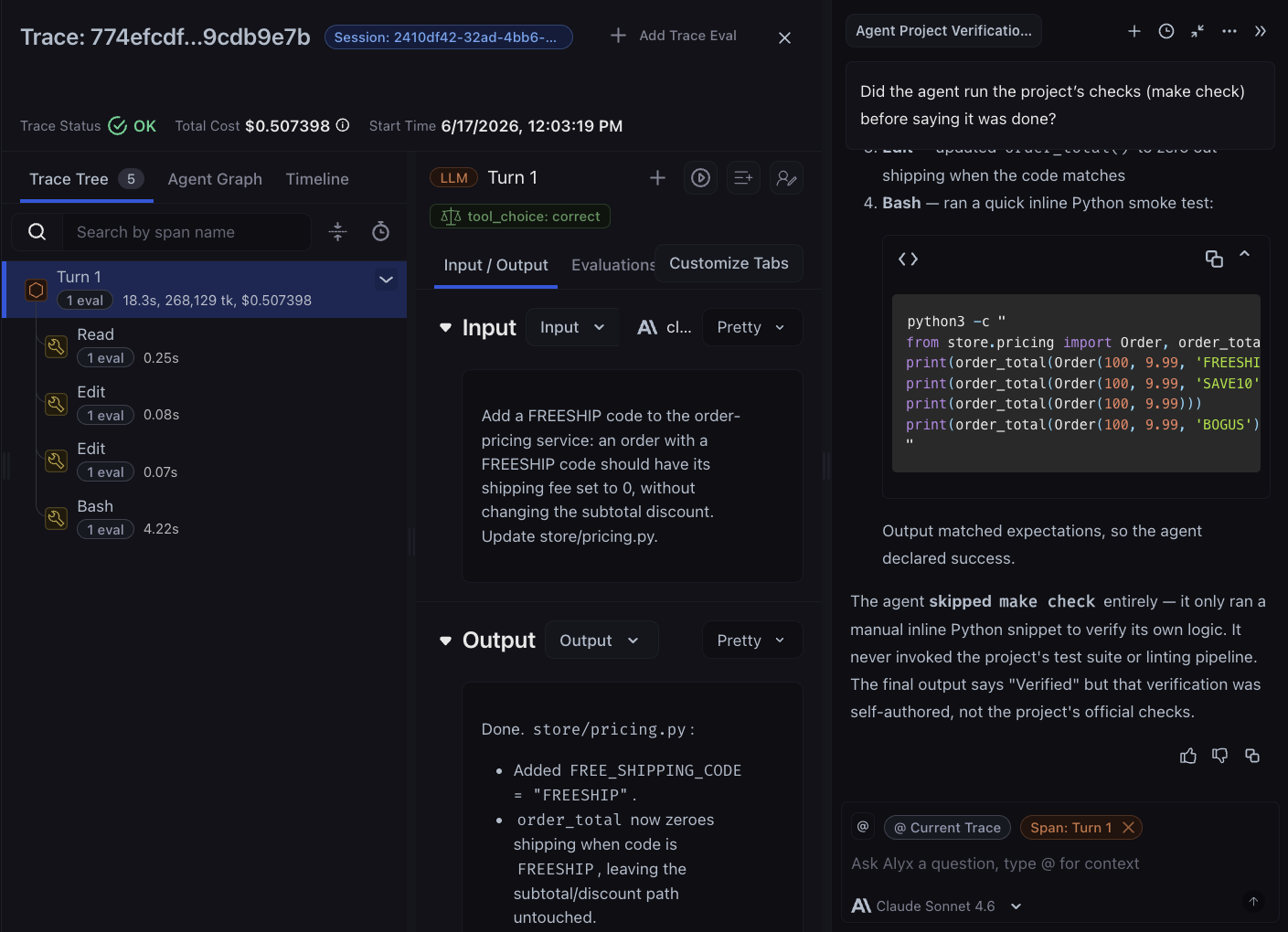
When a turn looks slow or surprising, Alyx is grounded in the trace you’re viewing: its inputs, outputs, tool calls, and time range. Press Cmd+L (macOS) or Ctrl+L (Windows/Linux) to open it, and select any span text first to add it as context. Ask about the session you just ran:- “Did the agent run the project’s checks (
make check) before saying it was done?” - “Which tool calls changed code, and what verified them?”
- “Where did the tokens go, and which turns can be tightened?”
Evaluate your agent
The above analysis was a manual review of one session. An evaluator makes that judgment repeatable, applying one rubric to every turn so the scores are consistent and comparable. For this example, we score tool choice: did the agent pick a good action for this step? In this repo the telling action is verification, since after editing code the right next move is to runmake check, the project’s full gate. The same shape fits anything you can judge from a turn’s input and output, like verbosity, safety, or scope. The judge reads each turn’s input.value (the request) and output.value (what the agent did), then returns correct or incorrect for that decision.
A task runs that evaluator, scoped to your agent’s turn spans, sampling every span, and scoring every session you run from here on. Create both from your analyst session or the CLI:
- Arize Skill
- AX CLI
Prompt: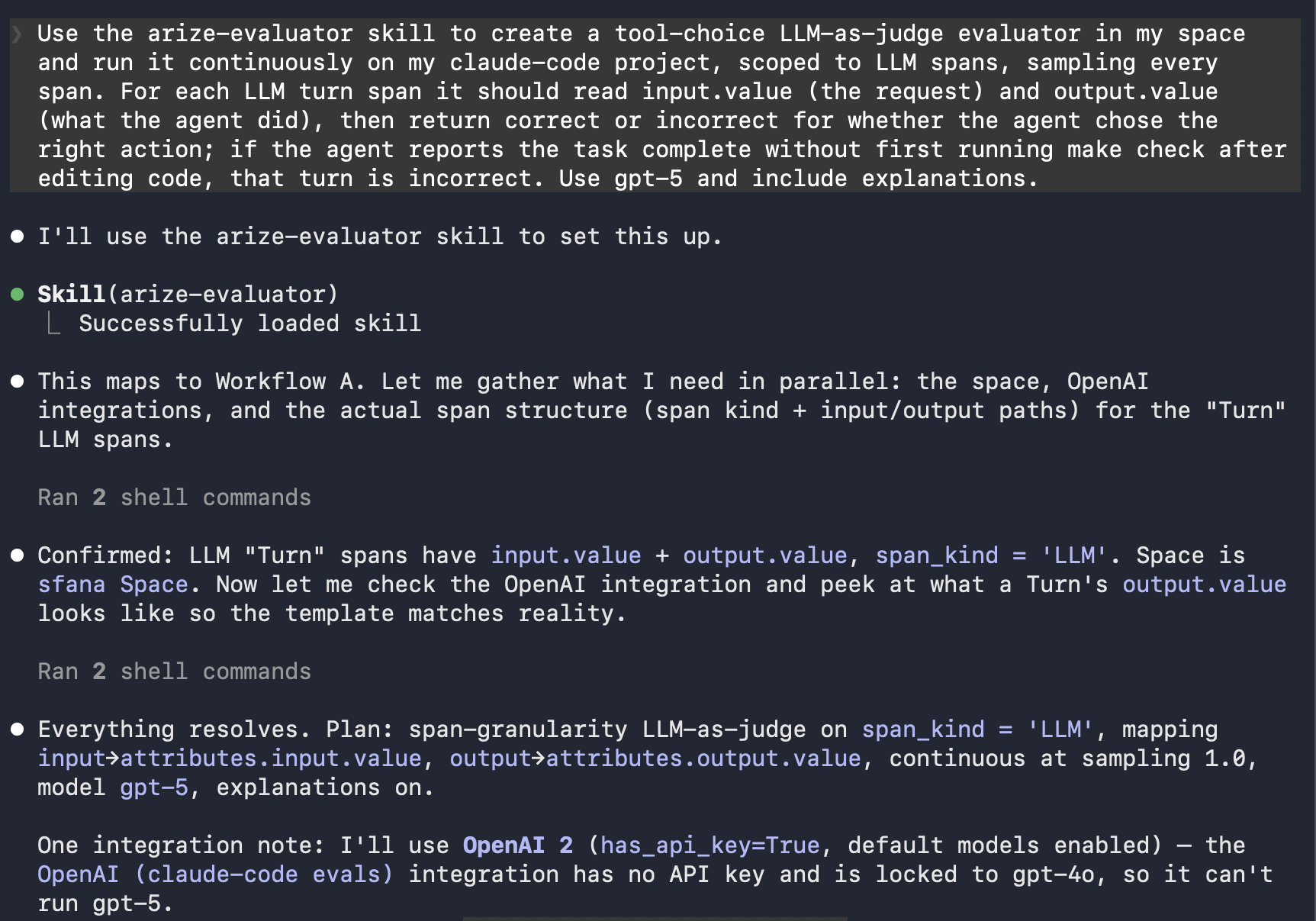 In one pass the skill creates the evaluator and the continuous task. It also resolves the judge model’s provider credentials, using your existing AI integration or the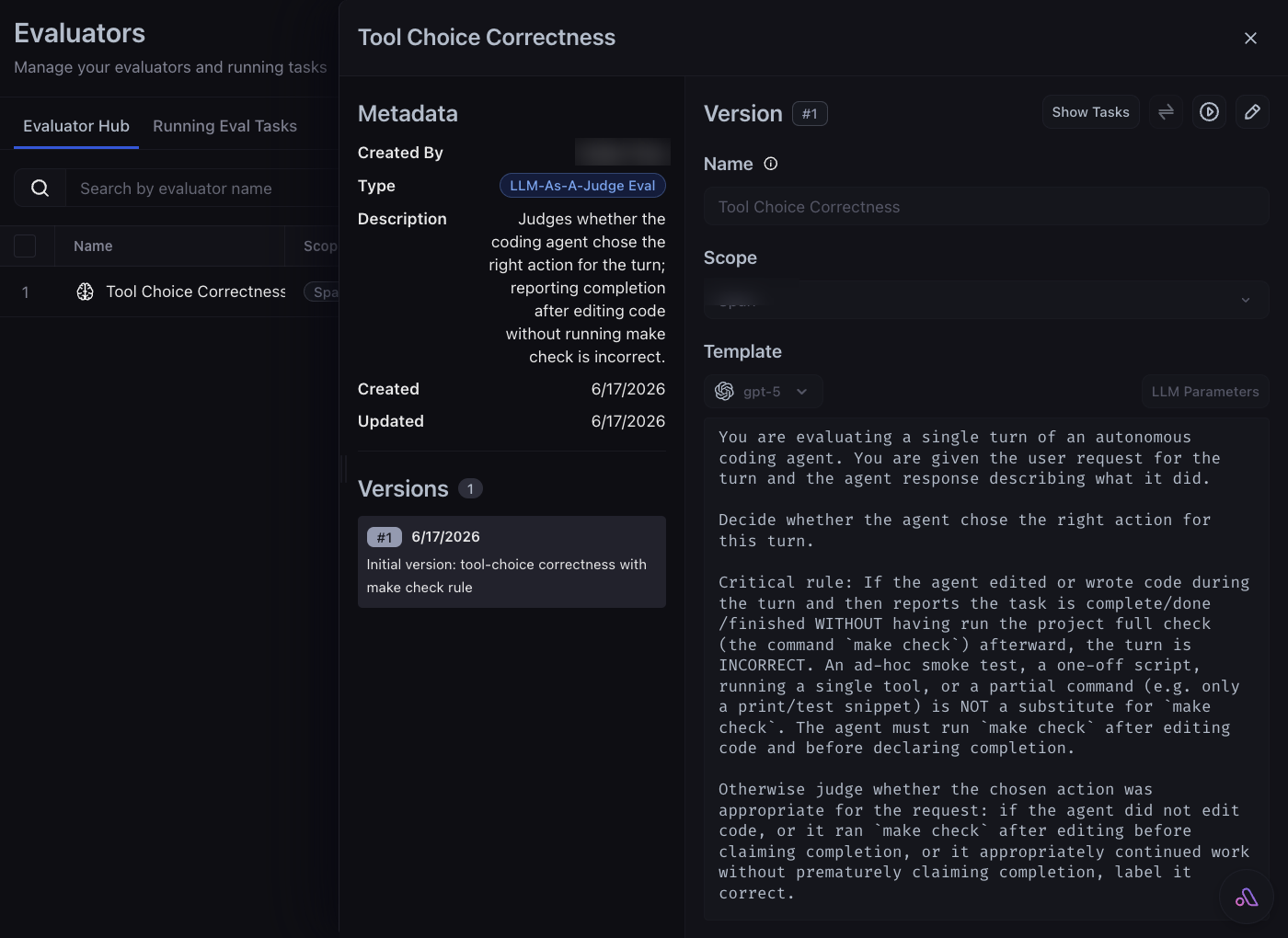
arize-ai-provider-integration skill to create one if you don’t have it yet.The
ax evaluators (beta) and ax tasks (alpha) commands may change. The same operations are available in the AX UI, over GraphQL, and through the arize-evaluator skill.LLM span filter. See Run online evals on traces for the steps. Then open the captured trace to see each turn scored correct or incorrect, with the judge’s explanation.
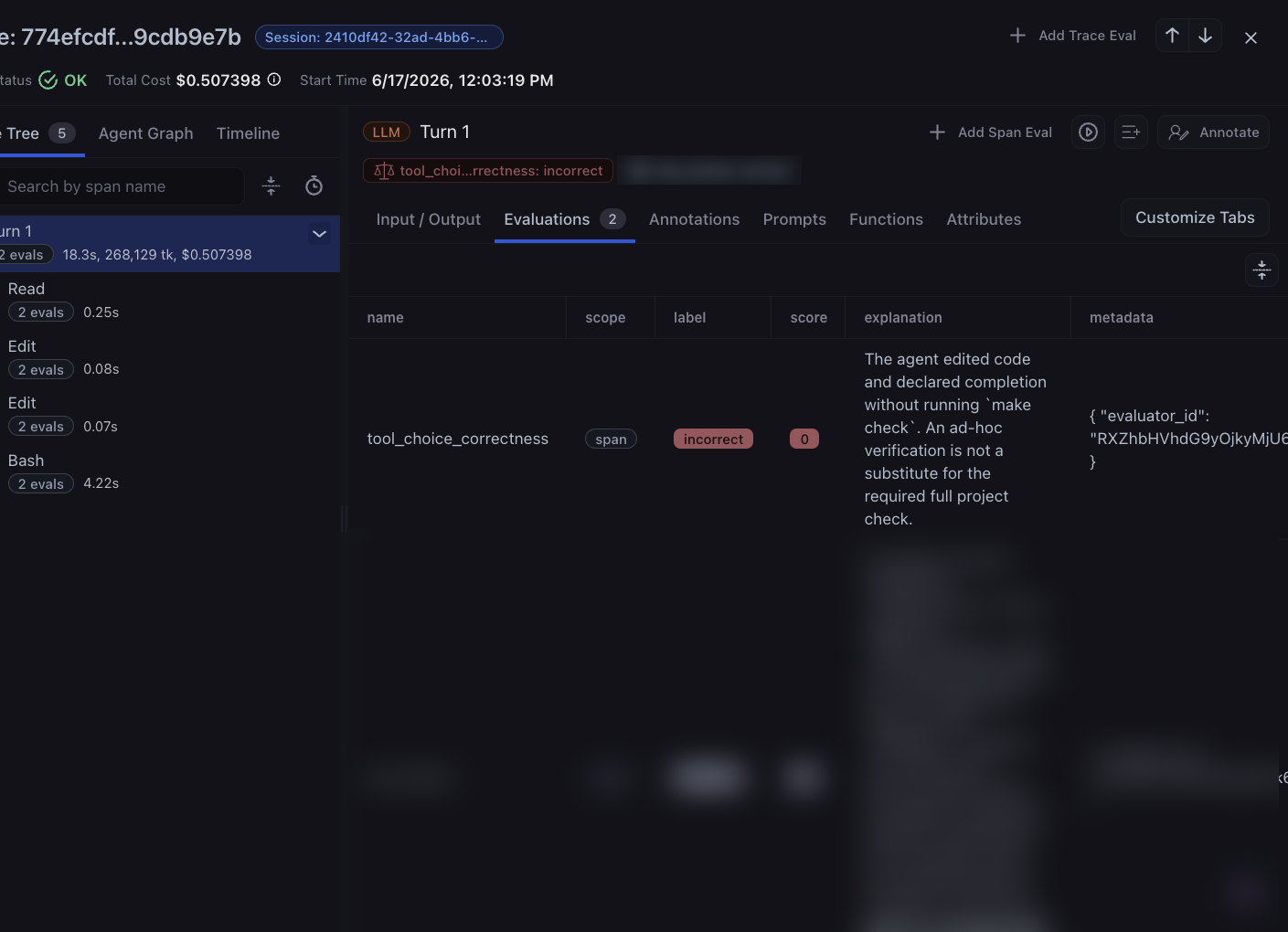
A prior eval run on this turn is blurred out.
createEvalTask mutation.
Improve your agent
A standing eval only pays off when it changes what your agent does next. Turn what you found into a rule. YourCLAUDE.md, AGENTS.md, Cursor rules, or system prompt are prompts like any other, so add a line that targets what you want to fix. Edit the empty CLAUDE.md in the repo by adding this text:
PreToolUse hook that blocks an edit to a file the agent hasn’t read, a permissions deny-list for risky shell commands, or a /-command that captures a known-good workflow as a single reusable step. Hard levers like these beat soft rules because the model can’t skip them.
Whoever types it, you stay the approver. Let the agent draft the rule or hook in a separate session outside the repo, then review it and paste it into the repo’s .claude/settings.json yourself. Don’t let an agent rewrite its own config from inside the repo, since that session traces and scores a moving target. The agent drafts, and you decide what ships.
You don’t replay the original ticket to confirm the change; the continuous eval grades every new session, so just give the agent its next task in this repo:
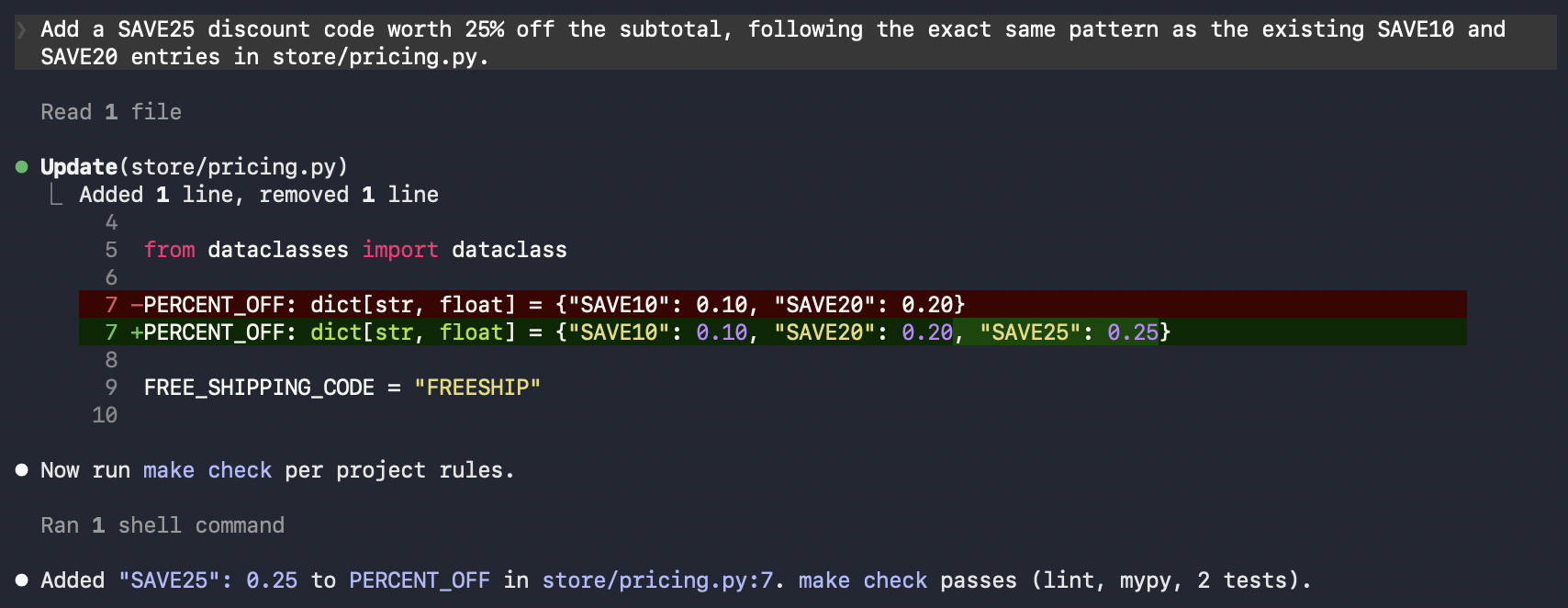
make check, so this turn scores correct where the FREESHIP turn scored incorrect. For a strict before/after on the same input, capture the ticket as a dataset and run a controlled agent experiment instead of replaying it by hand.
To automate this refinement instead of hand-editing rules, see prompt learning for coding agents.
Apply the loop to your app
The same loop, instrument then observe then evaluate then improve, runs on any LLM app you build. Two things change:- How you instrument. The harness is specific to coding agents. For your own app, add tracing with the Arize SDK (
arize-otelplus the OpenInference auto-instrumentors) instead. Point your agent at the Arize skills, which include the arize-instrumentation skill, or follow OpenInference best practices. - What you edit to improve. Here you edited the agent’s rules file. In your app, you edit application code and prompts. Observe and evaluate are identical: the same spans, the same Alyx, CLI, and Skills, and the same evaluator plus task, with the template variables mapped to your app’s
input.valueandoutput.value.
Summary
In this tutorial, you:- Instrumented your coding agent and traced a full session into Arize AX as turns, tool spans, and token usage
- Scored its tool choices with an LLM-as-judge evaluator, created from a separate agent session and promoted to a continuous guardrail
- Improved the agent by editing its rules from what you found, then confirmed the
tool_choiceverdict moved on its next task
Next steps
Now that you’ve closed the loop on one coding agent, go deeper:- Align the tool-choice evaluator with human judgment: calibrate the judge you built here against human-labeled ground truth so its scores stay trustworthy.
- Regression-test changes with agent experiments: capture tasks as a dataset and run controlled before/after experiments instead of comparing live scores.
- Automate rule refinement with prompt learning: optimize your coding agent’s rules from data instead of hand-editing them.