

Chapter summary
Last reviewed September 16, 2026. Arize publishes this guide and develops both Arize Phoenix and Arize AX.
Key takeaways
- Choose Arize Phoenix when your team wants a free, fully open-source platform and can own deployment, scaling, upgrades, and operational support.
- Choose Arize AX when your organization wants a commercially supported production platform, whether managed SaaS or self-hosted in your environment, with enterprise support and SLAs, production monitoring, managed compute, organization-level governance, or workflows that must operate continuously across many teams and projects.
- Use Phoenix and AX together when developers need a fast, self-contained environment for local development or CI while production teams need a centrally operated system of record.
- Treat these mostly as operating models, not a simple maturity ladder. Phoenix can be a permanent production platform and AX can be the day-one architecture. That said, at high volume, or when you need managed services, fine-grained access control, and formal support, AX is the more mature option, and that dimension is a real part of the decision.
Your agent can return 200 OK while still failing the task because it called the wrong tool, retrieved stale context, or completed the wrong workflow with a convincing answer. Arize Phoenix and Arize AX both help you trace that behavior, evaluate it, and test a fix. What differs is not whether you can capture live traffic (both do) but how much of the platform your team wants to operate: who runs the infrastructure, who provides support, and how much is managed for you.
Phoenix gives developers a free, self-hosted platform they can run and adapt in their own environment, including production. AX gives organizations a commercial platform for continuous monitoring, automated issue discovery, governance, and shared improvement workflows. Some teams keep Phoenix as their production platform, some adopt AX from day one, and many use Phoenix close to the code while AX serves as the shared production system.
Both products use OpenTelemetry, so your instrumentation can remain consistent across these setups. This guide focuses on the responsibilities that change: who operates the platform, how production evaluations run, how teams share data and findings, and how a failed trace becomes the next tested improvement.
This guide compares these operating models, explains where each product is strongest, and helps you decide whether Phoenix, AX, or a combination of both best fits your team.
Start with the workflow both products share
Phoenix and AX support the same basic process for improving an AI application:
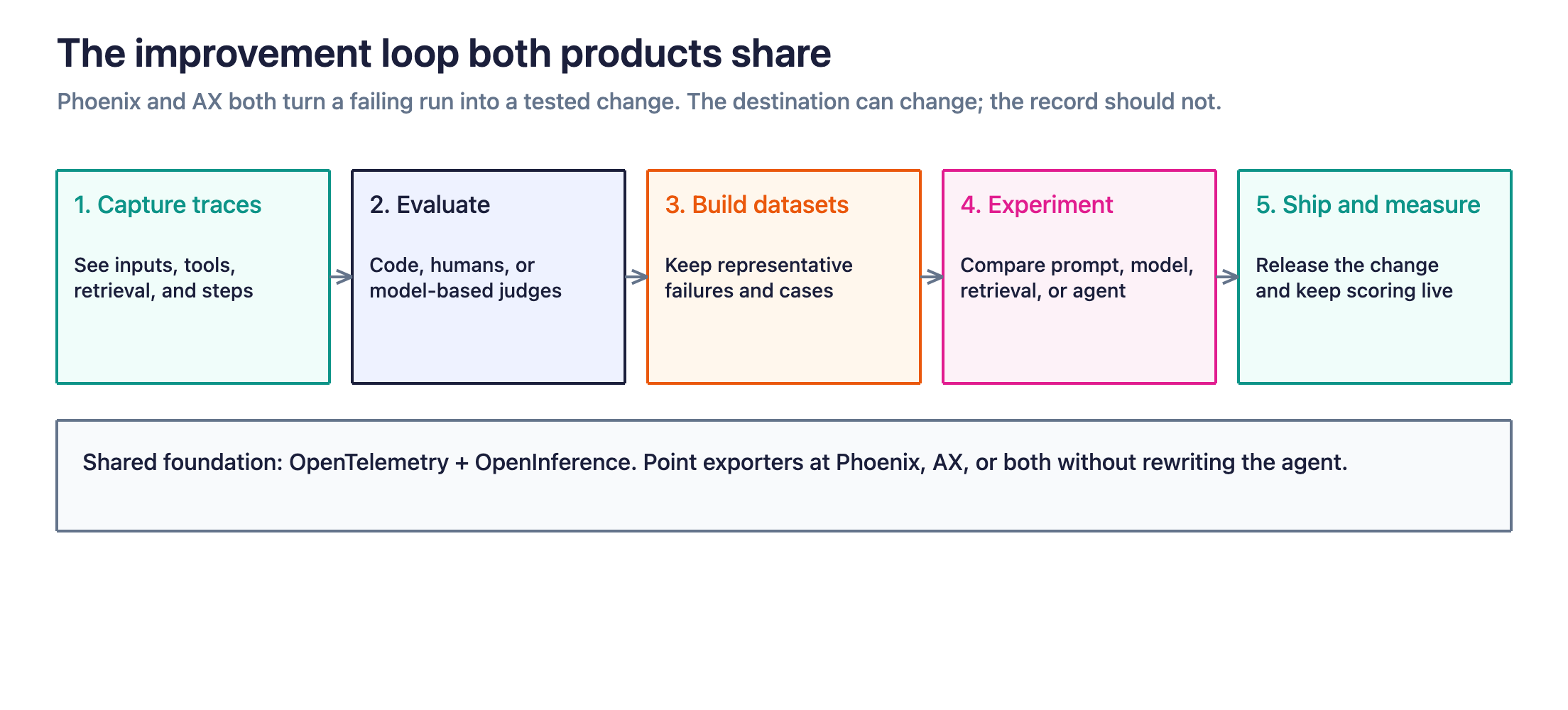
- Capture traces so you can see what the application received, which tools it called, what it retrieved, and how each step behaved.
- Evaluate outputs, traces, or sessions using code, human review, or model-based evaluators. Both products support this, but the experience differs: Phoenix gives you the primitives to define and run evals themselves, while AX adds richer in-product UI eval authoring and managed infrastructure for running continuously on production data.
- Collect representative examples into datasets.
- Run experiments against those datasets to compare prompt, model, retrieval, or agent changes.
- Ship the improvement and continue measuring production behavior.
Phoenix provides tracing, evaluation, prompt management, datasets, experiments, and replay workflows. AX follows a similar observe, evaluate, and improve model, while adding production monitoring and automation around that loop.
Since products use OpenTelemetry, teams can preserve the same trace semantics across environments. An application instrumented for Phoenix can send future telemetry to AX, Phoenix, or both without rewriting the agent itself. Changing destinations generally requires updates to exporters, endpoints, credentials, or tracer-provider configuration.
That portability applies most directly to new telemetry. Historical traces, datasets, prompts, dashboards, users, and other platform state still require an explicit migration plan.
Choose the operating model your team can sustain
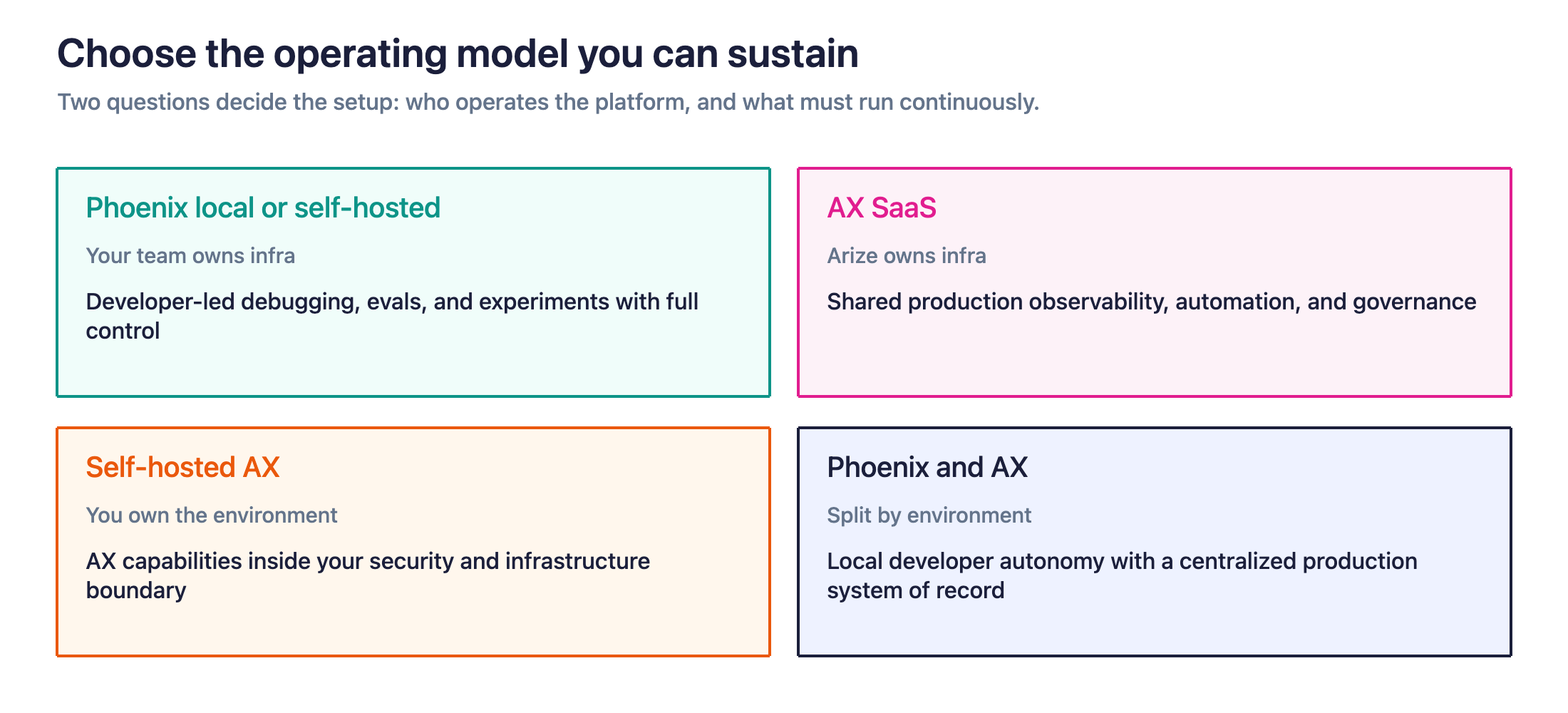
Two questions usually determine the right setup.
Who will operate the platform?
A self-hosted deployment requires someone to own upgrades, capacity planning, database health, backups, network security, availability, and incident response.
A managed service transfers more of that work to a vendor, although your team still owns instrumentation, data policies, evaluation design, and the application itself.
What should the platform do continuously?
Some teams need a place where developers can inspect traces, run evaluations, and test changes.
Other teams need a production system that evaluates live traffic, detects recurring issues, alerts owners, coordinates work across teams, and supports organization-wide access policies.
Deployment and product scope are separate choices. Phoenix can run in production on infrastructure you manage, while AX can also be deployed inside your environment.
| Operating model | Infrastructure ownership | Primary use |
|---|---|---|
| Phoenix local or self-hosted | Your team | Developer-led debugging, evaluation, and experimentation with full control |
| AX SaaS | Arize | Shared production observability, evaluation, automation, and governance |
| Self-hosted AX | Your team owns the environment and uptime | AX capabilities inside your security and infrastructure boundary |
| Phoenix and AX | Split by environment | Local developer autonomy with centralized production operations |
Phoenix and AX Free represent different product models. Phoenix is free, fully open-source software that your team operates. AX Free is the no-cost tier of Arize’s commercial platform. Choose between Phoenix and AX based on the operating model first, then use the pricing page to determine which AX plan fits your usage.
Build better agents with Arize
Trace, evaluate, and learn. Build agents that work with Arize AX and start tracing your runs today.
Prefer open source? Try Arize Phoenix for self-hosted, open source agent observability.

When to use Arize Phoenix as your primary platform
Phoenix is a strong choice for teams that value open-source control and have the engineering capacity to operate the platform.
It can run locally, on Docker, on Kubernetes, or in any cloud or compute environment. A self-hosted Phoenix instance includes tracing, evaluations, datasets, experiments, prompt management, access controls, and retention policies without product feature gates.
Phoenix is fully open. There is no closed core or commercial tier within Phoenix, and its roadmap is not limited to capabilities that AX does not offer.
Choose Phoenix when
Phoenix is likely to fit when:
- Your team prefers an open-source platform that can be deployed and modified within your own environment.
- Your traces, prompts, or evaluation data must remain inside infrastructure you control.
- You need an air-gapped or tightly restricted deployment.
- Your platform or SRE team can operate PostgreSQL, storage, backups, upgrades, authentication, and network controls.
- Your evaluation and alerting workflows can be maintained through your own code, automation, or operational systems.
- Community support and internal expertise provide a sufficient support path.
- Your developers want direct access to the platform and its underlying APIs.
Team size alone does not decide the issue. Phoenix can be a permanent production platform. The deciding question is whether your team wants to operate the service and provide the infrastructure, scaling, upgrades, availability, and support it requires.
What you gain
Phoenix gives your team control over deployment, data, infrastructure, retention, release cadence, and integrations.
That control can be especially valuable when the observability system must fit an existing platform architecture. Your team can place Phoenix behind its own networking controls, connect it to internal identity systems, automate it through APIs, and contribute improvements upstream.
Phoenix also keeps the developer loop close to the code. A developer can run it locally, inspect a trace immediately, turn a failure into a dataset example, and test a change without depending on a separate platform team.
PXI extends that developer workflow with an AI engineering agent built into Phoenix. It can help investigate traces, iterate on prompts, author evaluators, annotate spans, curate datasets, and run experiments. Because PXI operates within the Phoenix environment, teams can use agent-assisted workflows while retaining the deployment and model-provider choices of their Phoenix setup.
PXI is best understood as an interactive AI engineering agent. It helps a developer perform work inside Phoenix. It does not replace the scheduled production issue discovery provided by Signal or the broader managed workflows available in AX.
What your team owns
A production Phoenix deployment introduces a real service that needs to be operated.
The Phoenix production guide covers PostgreSQL sizing, memory and disk capacity, horizontal scaling, automated backups, and network hardening. Those responsibilities remain with the team running the instance.
You will also need to decide:
- How traces are retained or deleted
- How users and API keys are provisioned
- How upgrades and schema changes are tested
- Who responds when ingestion or queries become unreliable
- How recurring production failures generate alerts or engineering work
- How evaluation definitions and datasets move across environments
- How PXI is configured, which model provider it uses, and which actions require approval
Phoenix can remain your production platform for as long as this ownership model continues to serve the team.
When to reconsider the setup
Revisit the decision when operating Phoenix starts consuming time that you would rather spend improving the AI application.
Common signals include a growing infrastructure burden, several teams coordinating through one instance, more complex identity requirements, demand for continuous issue discovery, or a need for a dedicated support path.
These signals reflect a change in operating requirements. They do not invalidate the work already completed in Phoenix.
When to use Arize AX as your primary platform
AX is a strong choice when the AI engineering loop must run continuously across live traffic, production owners, and multiple teams.
It combines tracing, evaluation, datasets, experiments, prompts, dashboards, monitors, and alerting in a shared platform. AX also includes Signal (scheduled discovery of recurring production failures), Agent-as-a-Judge (agentic evaluation that explores traces), Alyx (an in-product AI engineering agent), Managed Agents, and full-agent experiments for teams that want to turn production telemetry into a controlled improvement workflow.
Choose AX when
AX becomes valuable when production telemetry must support work that runs continuously or spans multiple teams:
- Managed compute and infrastructure: Arize operates ingestion, scaling, and compute-intensive workloads in the SaaS deployment.
- Continuous issue discovery: Signal scans production traces on a schedule, groups recurring failure patterns, and turns them into prioritized investigations.
- Custom monitoring and alerting: Define metrics and monitors on production behavior and route alerts to the owners who need them.
- Dashboards for shared visibility: Custom dashboards give non-developer stakeholders a readable view of quality, cost, and trends without exposing them to trace-level detail.
- Large-team organization: Organizations, workspaces, auditability, and access controls help many teams share the same platform without losing project boundaries.
- Managed AI engineering workflows: AX capabilities can support complex evaluation, investigation, experimentation, and review across production systems.
- Enterprise support and compliance: Commercial support, SLAs, deployment choices, and vendor certifications support formal procurement and production requirements.
AX supports online evaluations, custom dashboards, metrics, monitors, labeling workflows, and experiments across its current plans, with more advanced agent, security, and deployment capabilities available at the enterprise level.
Signal: continuous production issue discovery
Signal reviews production traces on a schedule, groups recurring and emerging failure patterns, and produces prioritized investigations with supporting trace evidence and suggested fixes.
This is different from configuring an evaluator or alert for a known problem. Evaluators and monitors measure conditions your team has already defined. Signal helps discover patterns the team did not know to encode in advance.
A Signal investigation can become the starting point for the next engineering step: confirm the failure, create an evaluator, add representative traces to a dataset, test a candidate change, and monitor whether the issue returns.
Agent-as-a-Judge: evaluation that can explore the trace
Traditional LLM-as-a-Judge evaluators work well when the relevant inputs and scoring rubric are known in advance. The evaluator receives mapped fields and applies a repeatable semantic judgment.
Agent-as-a-Judge is designed for criteria that require more exploration. An agentic evaluation harness can inspect trace data at runtime, reason across multiple spans or fields, and evaluate complex trajectory-level behavior such as recovery, tool use, planning, or false completion.
Agent-as-a-Judge complements code evaluators and traditional LLM judges. Code remains the best choice for objective conditions. LLM-as-a-Judge remains useful for stable semantic criteria. Agent-as-a-Judge is appropriate when the evaluator needs to investigate a more variable, multi-step path.
Phoenix can also run agentic evaluators in its own sandboxes; the distinction here is that AX offers this as a managed capability wired directly into the production workflow.
Alyx: an AI engineering agent inside AX
Alyx provides an interactive agent-assisted interface for working with Arize AX. Teams can use natural language to inspect traces, create evaluations, analyze performance, build dashboards, and work with platform data.
PXI and Alyx do the same kind of job in different products: PXI is the agent inside Phoenix, Alyx is the agent inside AX.
Managed Agents: work across the improvement loop
Managed Agents extend beyond interactive assistance inside the product.
They can run one-off or scheduled tasks, investigate failures, use approved skills and connected systems, inspect repository context, create evaluation artifacts, and propose branches or pull requests. Their work can be bounded by permissions, sandboxes, review gates, and human approval.
Signal is the low-friction entry point into this model because it begins with production traces and issue discovery. Managed Agents can carry an investigation further when the task requires repository context, external systems, or recurring automation.
End-to-end experiments: verify the complete system
A prompt change is only one possible agent change. Teams may also change models, retrieval, tools, routing, context assembly, memory, permissions, or orchestration.
An end-to-end experiment evaluates the agent’s complete trajectory across every step, not just one component, and compares a baseline against a candidate version. Teams can inspect outputs, traces, tool use, retrieval, latency, trajectories, and evaluation results before deciding whether a change should ship.
This isn’t unique to AX. Phoenix supports ATIF and is adding Harbor, the emerging industry standard for agent experiments. AX’s contribution is running these experiments as a managed part of the production improvement loop.
What you gain
AX runs the loop for you: it watches live production traffic, flags where the agent is failing, and turns those failures into concrete next steps, whether that’s an evaluator to build, traces to add to a dataset, a fix to test, without your team standing up and maintaining that pipeline itself.
Instead of relying on someone to search through traces after a problem is reported, teams can run evaluations on incoming data, configure monitors, and use Signal to surface patterns across many runs.
Agent-as-a-Judge can evaluate complex trajectories that do not fit a fixed prompt and field mapping. Alyx can help users work with traces, evaluations, dashboards, and experiments. Managed Agents can support recurring investigations, incident workflows, cost analysis, and repository-backed fixes. Full-agent experiments can verify whether the proposed change improved the complete system.
AX also gives multiple roles a shared place to work. Engineers can inspect spans, domain experts can annotate examples, platform teams can manage access, and team leads can review quality or cost trends without building a separate interface for each group.
What AX handles, and what stays yours
AX takes on the heavy operational work (managed compute, scaling, monitoring infrastructure, and the machinery behind Signal, evaluations, and experiments) so your team spends its time on the application, not the platform.
You keep the things only you can define: instrumentation quality, data policies, evaluation criteria, and what “good” means for your application. AX runs the system; you set the standard.
Self-hosted AX keeps that same division of labor inside your own infrastructure. Arize licenses and supports the platform while your team controls the environment, access, and update cadence.
When AX should be the starting architecture
A team does not need to begin with Phoenix before adopting AX. If your first deployment already involves any of these, like several teams, a security review, production service levels, regulated data, organization-wide access, continuous monitoring, or automated production investigation, it’s easiest to start with AX. If you’re still unsure, or you have hard restrictions that rule out a managed platform, start with Phoenix.
When to use Phoenix and AX together
Development and production often place different demands on a platform.
A developer may want a Phoenix instance running beside the application, where traces appear immediately and experiments remain under local control. The production team may need shared telemetry, continuous evaluations, monitors, issue discovery, role-based access, and a defined support path in AX.
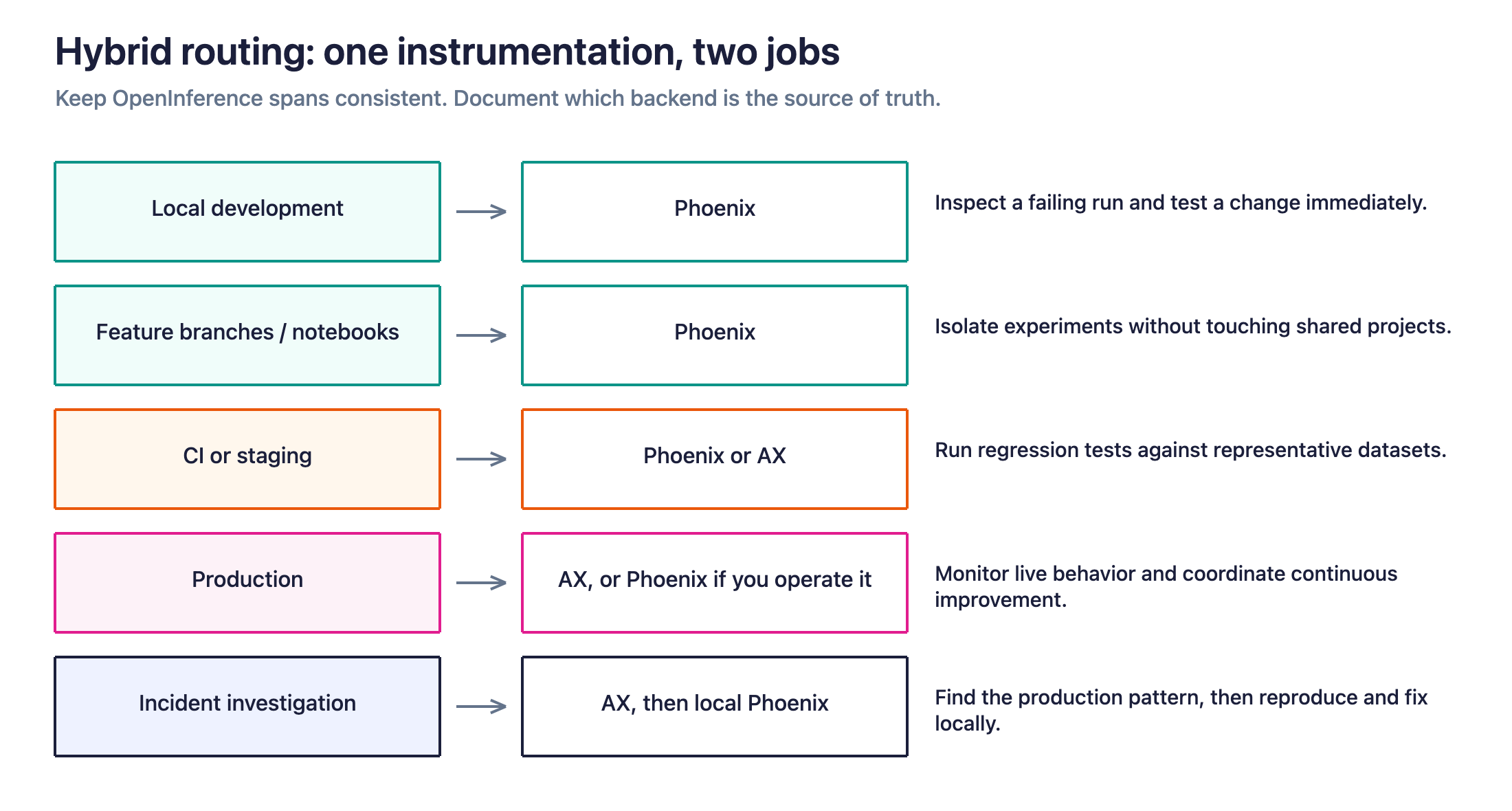
A hybrid architecture can support both workflows:
| Environment | Typical backend | Primary purpose |
|---|---|---|
| Local development | Phoenix | Debug individual runs and test changes quickly |
| Feature branches or notebooks | Phoenix | Run isolated experiments without affecting shared projects |
| CI or staging | Phoenix or AX | Run regression tests against representative datasets |
| Production | AX (or Phoenix, if your team operates it) | Monitor live behavior and coordinate continuous improvement |
| Incident investigation | AX, with local Phoenix as needed | Find production patterns, then reproduce and test fixes |
Because both products support OpenInference and OpenTelemetry, teams can keep consistent trace semantics across environments while routing telemetry to different backends.
Define the boundary before adopting hybrid
A hybrid architecture works best when the team documents which system owns each artifact and workflow.
Decide:
- Which backend is authoritative for production traces
- Where shared datasets are stored
- How evaluation definitions are versioned
- Whether prompt versions are synchronized across systems
- Whether staging traces are duplicated or routed to one destination
- Where incident investigations begin
- How local findings become shared regression tests
- Which system records the final experiment used to approve a release
- Whether Signal, Agent-as-a-Judge, or Managed Agents can act on findings produced in another environment
Without these conventions, two useful tools can create duplicated datasets, inconsistent evaluators, and uncertainty about the source of truth.
With clear boundaries, hybrid can remain the long-term architecture.
Which Arize platform fits your team? Four common scenarios
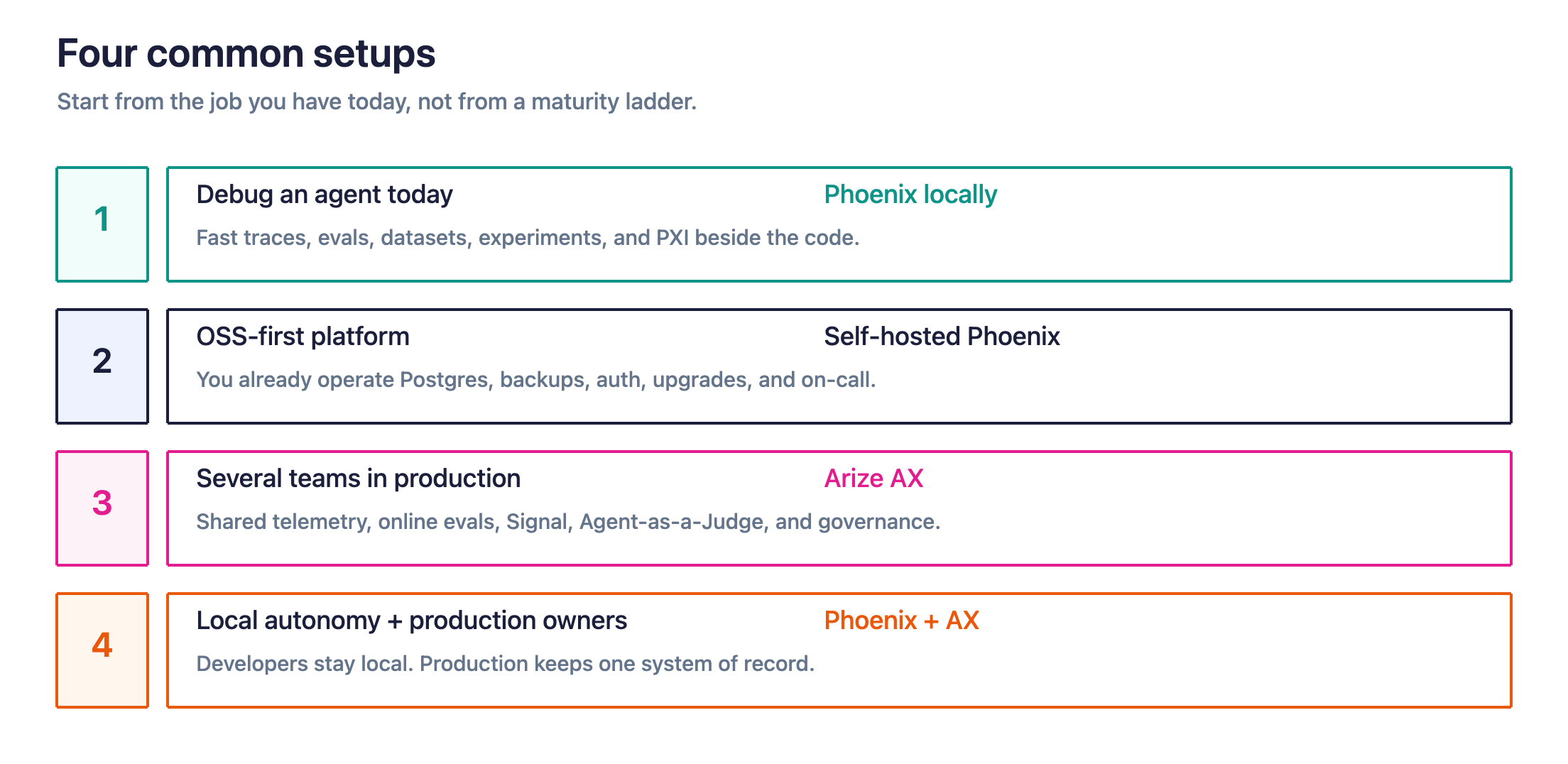
1. A developer needs to debug an agent today
Recommended setup: Phoenix running locally
The developer needs fast feedback and direct access to traces, evaluators, datasets, experiments, and PXI. Infrastructure operations, cross-team access, and production monitoring have not entered the critical path.
Phoenix provides the shortest path from a failing run to a tested change.
2. An OSS-first platform
Recommended setup: Self-hosted Phoenix
The organization has established practices for PostgreSQL, backups, authentication, network policies, upgrades, and on-call ownership. It values open-source control and wants all telemetry to remain inside its infrastructure.
Phoenix can support this team through development and production, provided the team accepts responsibility for operating the service and building the production automation it requires.
3. Several teams are shipping production agents
Recommended setup: Arize AX
Production quality depends on shared telemetry, online evaluations, dashboards, monitors, annotations, and coordinated experiments. The organization also wants Signal for automated issue discovery, Agent-as-a-Judge for complex trajectory evaluation, and Managed Agents for controlled investigation and proposed changes.
AX provides a common production system without requiring the platform team to assemble and maintain each workflow independently.
4. Developers want local autonomy while the platform team owns production
Recommended setup: Phoenix locally and AX in production
Developers use Phoenix and PXI for fast debugging and branch-level experimentation. Shared environments send production telemetry to AX, where monitoring, evaluation, Signal, Agent-as-a-Judge, Alyx, Managed Agents, full-agent experiments, and governance are centralized.
This pattern preserves developer speed while giving production owners one system of record.
Comparison table of Arize AX and Phoenix features
| Decision factor | Arize Phoenix | Arize AX |
|---|---|---|
| Product model | Fully open-source agent development and evaluation platform | Commercial, all-in-one AI engineering platform |
| Deployment | Self-hosted on a laptop, private cloud, Kubernetes cluster, or air-gapped network | Managed SaaS, with self-hosted deployment available under a commercial license |
| Cost model | Free to use; your team pays the infrastructure and engineering costs | Commercial, with a free tier; pricing varies by plan and deployment |
| Infrastructure | Your team provisions, scales, upgrades, secures, and supports the service | Arize operates the SaaS infrastructure; customers operate self-hosted AX infrastructure |
| Support | Community support and internal expertise | Enterprise-grade support and SLAs |
| Production automation | Built and operated through Phoenix APIs, evaluators, and your own infrastructure | Managed compute, monitors, dashboards, Signal, and other managed workflows |
| Governance | Phoenix access controls plus the security and compliance controls of your environment | Organization and workspace controls, auditing, enterprise identity, and commercial deployment options |
| Best fit | Teams prioritizing open-source control, privacy, customization, or isolated deployment | Teams prioritizing managed operations, production scale, shared workflows, and formal support |
| Hybrid role | Local development, CI, isolated workloads, or self-contained experiments | Shared production telemetry, monitoring, investigation, and release evidence |
What changes when you move from Phoenix to AX
Shared instrumentation reduces the amount of application code that needs to change.
If your application already uses OpenInference instrumentors and OpenTelemetry exporters, you can generally route future traces to AX by updating the tracer-provider configuration, endpoint, credentials, and project information. Your existing tool wrappers, agent graph, prompts, and application logic can usually remain intact.
That portability applies most directly to new telemetry. The state accumulated inside a running platform requires separate consideration.
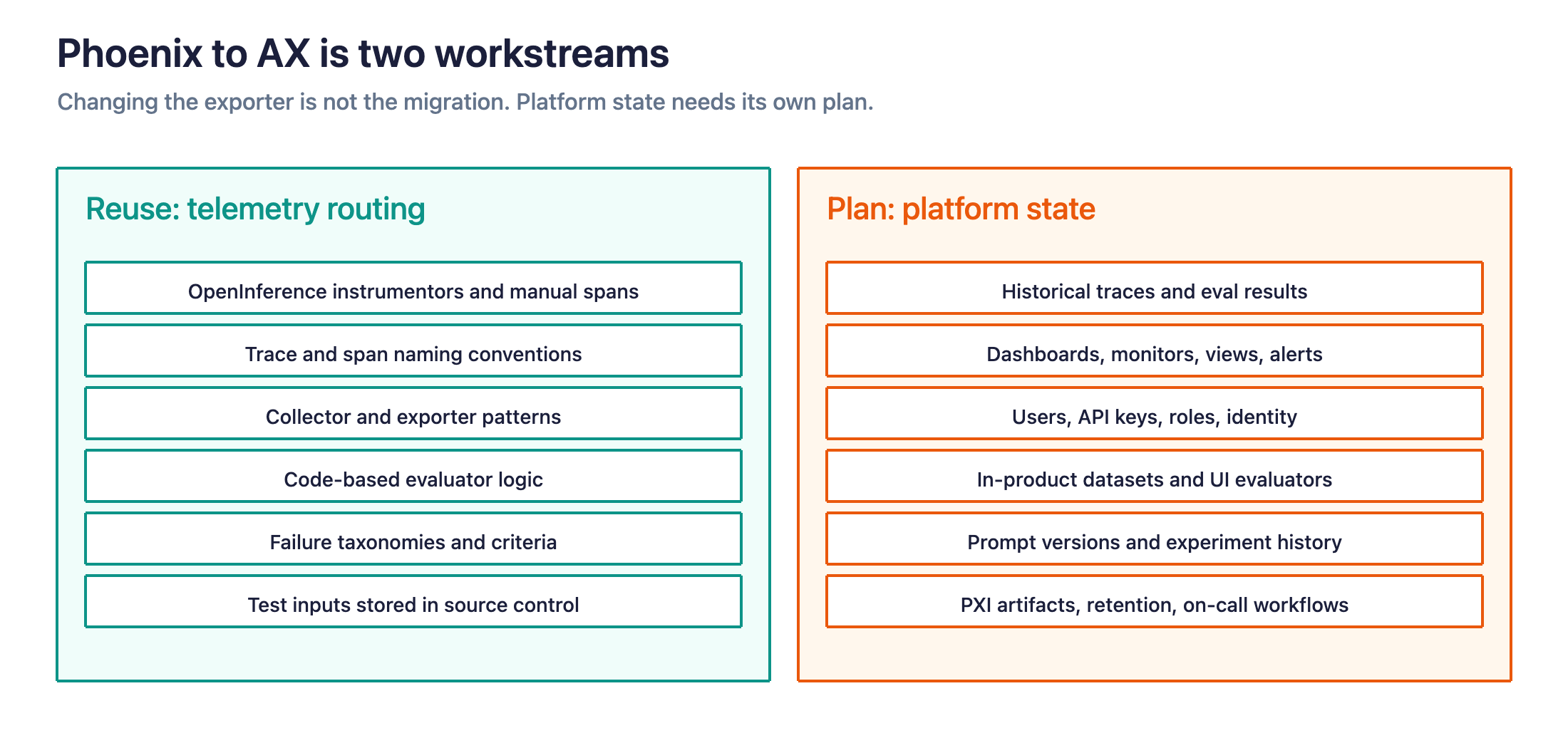
Assets you can often reuse
- OpenInference instrumentors and manually created spans
- Trace and span naming conventions
- OpenTelemetry collector configuration patterns
- Code-based evaluator logic
- Failure taxonomies and evaluation criteria
- Test inputs stored in source control or external systems
- The team’s understanding of traces, datasets, and experiments
- Prompt, evaluator, and investigation techniques developed with PXI
Assets that need an explicit migration plan
- Historical traces and evaluation results
- Dashboards, monitors, custom views, and alerts
- Users, API keys, roles, and identity configuration
- Datasets stored only inside the platform
- Evaluators configured through the UI
- Prompt versions and experiment history
- PXI-specific conversations, settings, or locally generated artifacts
- Data-retention and deletion policies
- Incident, review, and on-call workflows
- Ownership of Signal, Agent-as-a-Judge, and Managed Agent workflows in AX
Some of these assets may be exportable, reproducible through APIs, or supported by migration tooling. Others may need to be recreated to match the AX organization and project structure.
Treat telemetry routing and platform-state migration as two workstreams. This gives the team a more accurate estimate and prevents a small application change from hiding a larger operational transition.
Related reading
- Arize Phoenix or Arize AX (product FAQ)
- Migrate Phoenix data to Arize AX
- Phoenix production guide
- Self-hosted AI observability
- Build vs. buy AI observability
- AI agent tracing and evaluation
- What is an agent observability platform?
- LLM and agent evaluation platforms
- AI observability pricing
- What is AI engineering?
- Arize vs. Langfuse
- Arize vs. LangSmith
- Arize vs. Braintrust
- LLM-as-a-Judge
- Agent evaluation handbook
Frequently asked questions
Can Phoenix run in production?
Yes. Phoenix provides production guidance for telemetry delivery, PostgreSQL, scaling, backups, retention, and network hardening. A production deployment works best when a team explicitly owns those responsibilities.
Is Phoenix mainly a way to try AX?
No. Phoenix is a complete open-source product with its own deployment model, community, APIs, AI engineering agent, and development workflow. It can serve as a local tool, a shared internal platform, or a production system.
Does Phoenix include Signal?
No. Phoenix can be used to inspect traces, build evaluators, and automate production workflows, but Signal is an AX capability that continuously reviews production traces and groups recurring or emerging problems into prioritized investigations.
A Phoenix team can build its own scheduled investigation workflow, although it owns the implementation and operation of that system.
Does Phoenix support Agent-as-a-Judge?
Yes, through a different mechanism. Phoenix can run evaluators in sandboxes, and that includes agentic (agent-as-a-judge) evaluations; PXI can run evaluations too. What Phoenix doesn’t provide is the managed, hosted Agent-as-a-Judge service that AX runs for you. The capability is the same; the operational model differs.
Does Phoenix include Managed Agents?
Partly. Phoenix supports the building blocks (MCP, skills, a CLI, and PXI as an interactive agent) so you can assemble agent-driven workflows yourself. What it doesn’t provide is a hosted Managed Agents service that runs one-off or scheduled work across your systems and repositories the way AX does.
Can AX run inside our environment?
Yes. Self-hosted AX keeps the data, authentication, APIs, and UI inside customer infrastructure. The customer controls infrastructure, uptime, access, and update cadence.
Will starting with Phoenix make an AX rollout harder later?
OpenInference and OpenTelemetry reduce application-side switching costs because the same instrumentation model can send telemetry to either backend. The rollout still needs a plan for historical data, stored artifacts, access policies, dashboards, and team processes.
Should every team begin with Phoenix?
No. Teams with straightforward local development needs often benefit from starting with Phoenix. Teams that already have production monitoring, organizational access, support, automation, or security requirements can begin with AX.
Is a hybrid setup temporary?
It can be temporary, although many teams have durable reasons to keep local development and production operations separate. A clear source of truth for traces, datasets, evaluations, agent-assisted work, and release decisions makes the model sustainable.
Choose the platform that gives every responsibility an owner
Use Phoenix when your team wants to own, operate, and shape the platform. Use AX when your organization wants a supported production system with managed infrastructure, continuous workflows, and organization-level governance. Use both when developers need local control and production teams need a central system of record.
The instrumentation can remain consistent across those operating models. The responsibilities cannot. Before choosing, decide who will scale the service, respond when it fails, manage access, review findings, and turn production evidence into the next tested improvement.

