

Overview
You will build a small issue-triage agent. It reads a project’s open issues through a customlist_issues tool that your application runs, counts them by label with bash in its sandbox, and names the most urgent one. You trace a session from end to end and read the trace in Arize AX. Then you add an evaluator that checks whether the agent picked the right issue.
This guide is for developers who build agents on Claude Managed Agents and want to observe and evaluate them in Arize AX. You should be comfortable with:
- Python, TypeScript, Go, or Java
- The Managed Agents concepts of agents, environments, sessions, and events. The Managed Agents quickstart covers them.
- Reading traces in Arize AX
- Send the spans that the Claude Platform creates to an Arize AX project
- Join those spans with your application’s spans into one trace
- Trace the custom tools that your application runs for the agent
- Evaluate the agent’s answers with an LLM-as-a-judge task
Before you start
You need:- Python 3.10+, Node.js 18.19+, Go 1.26+, or Java 17+
- An Arize AX account (sign up), with your Space ID and API Key from Space Settings
- The admin role in a Claude Console organization, to add a destination
- An
ANTHROPIC_API_KEYfrom the Claude Console
Send Claude Platform spans to Arize AX
The Claude API exports its spans to destinations that you add in the Claude Console. Add one that points at the Arize AX project for this guide:Open the OpenTelemetry settings
Choose Arize AX
Enter your Arize AX details
claude-managed-agents-triage.Set the content mode

The Claude Console's Add destination form with the Arize provider and the Arize AX product
Choose the workspace
Send a test span
anthropic.test span arrived in the claude-managed-agents-triage project.
The destination's More actions menu in the Claude Console, with Test highlighted
Set up tracing in your application
Your application needs an OpenTelemetry tracer provider that exports to the same Arize AX project. The Claude SDK uses the tracer provider that your application registers, so you don’t pass it to the client.Install the packages
Set your credentials
ARIZE_PROJECT_NAME must match the destination’s Project name, so the two sources of spans meet in one project:ANTHROPIC_OPEN_TELEMETRY_TRACES_CONTENT_MODE=content makes the SDK’s spans carry prompts and responses, matching the Full content mode of the destination. The programs send to the US endpoint by default. For a space in another region, also set ARIZE_COLLECTOR_ENDPOINT to that region’s endpoint, for example https://otlp.eu-west-1a.arize.com/v1 for EU spaces.Register the tracer provider
main in Build the triage agent. It also registers the W3C trace context propagator, which neither language registers by default. The SDK uses the propagator to send each span’s trace context to the Claude API, which then nests its own spans under yours.Build the triage agent
The program has three functions:create_agentcreates an environment and an agent. The agent has Anthropic’s built-in toolset, with the web tools turned off, and one custom tool,list_issues. A custom tool runs in your application, not in the sandbox. That makes it the right place for anything that needs your data or your credentials.list_issuesanswers the custom tool from a small list of sample issues. It wraps that work in its ownTOOLspan, with OpenInference’s@tracer.tooldecorator in Python and itstraceToolwrapper in TypeScript. In Python,@tracer.toolreads the tool’s name, description, and parameters from the function’s name, docstring, and signature. TypeScript, Go, and Java set them on the span themselves. The Claude API sees the call and the result but not your code, so this span is the only record of what your application did. If you run custom tools with the Claude SDK’s session tool runner instead, the SDK creates thisTOOLspan for you, so don’t add your own.run_triagestarts a session inside atriage-requestCHAINspan, created with@tracer.chainin Python andtraceChainin TypeScript, sends the request, and reads the session’s event stream. When the agent callslist_issues, the session pauses until your application sends back the result. The loop ends when the session goes idle for any reason other thanrequires_action, which means it’s waiting on you.
triage-request span records the request as its input and the agent’s answer as its output. The Python and TypeScript helpers record them from the function’s argument and return value, and Go and Java set the input.value and output.value attributes themselves. The evaluator in Evaluate the triage scores those two values. Every span you create also sets its status: OK on success, or an error with the exception if a request fails.
sessions.create call.Run a session
Run the program:list_issues, counts the issues by label with bash in its sandbox, and replies. The wording and layout vary from run to run, but the output looks similar to this:
Explore the trace
Open the trace
claude-managed-agents-triage project. A new trace appears within about a minute. The API’s spans can arrive after yours. Open the trace to see the session from both sides:triage-requestis your root span, with the request as input and the agent’s answer as output.- Under it are the SDK’s
CLIENTspans, one for each request your application sent. Each one contains the API’s span for the same request, with the same name. - Under the request that sent your message is the agent’s first turn. It ends with the stop reason
requires_actionwhen the agent callslist_issues. Yourlist_issuesTOOLspan follows, then the request that sent the result, and a second turn in which the agent runs bash and answers. - The SDK’s spans for creating the environment and the agent are in traces of their own, because the program creates them before it starts
triage-request.

The triage session's trace, with your spans, the SDK's spans, and the API's spans in one tree
Read the agent's turns
anthropic.session.turn span to read the system prompt and the turn’s input and output messages, including the tool calls and their results. In the first turn, the agent’s output is the list_issues call:
Inspect a model request and a tool call
anthropic.model_request span to see the model and token usage of one model request. Open the bash tool span to see the command that the agent ran in its sandbox. Its arguments are the span’s input: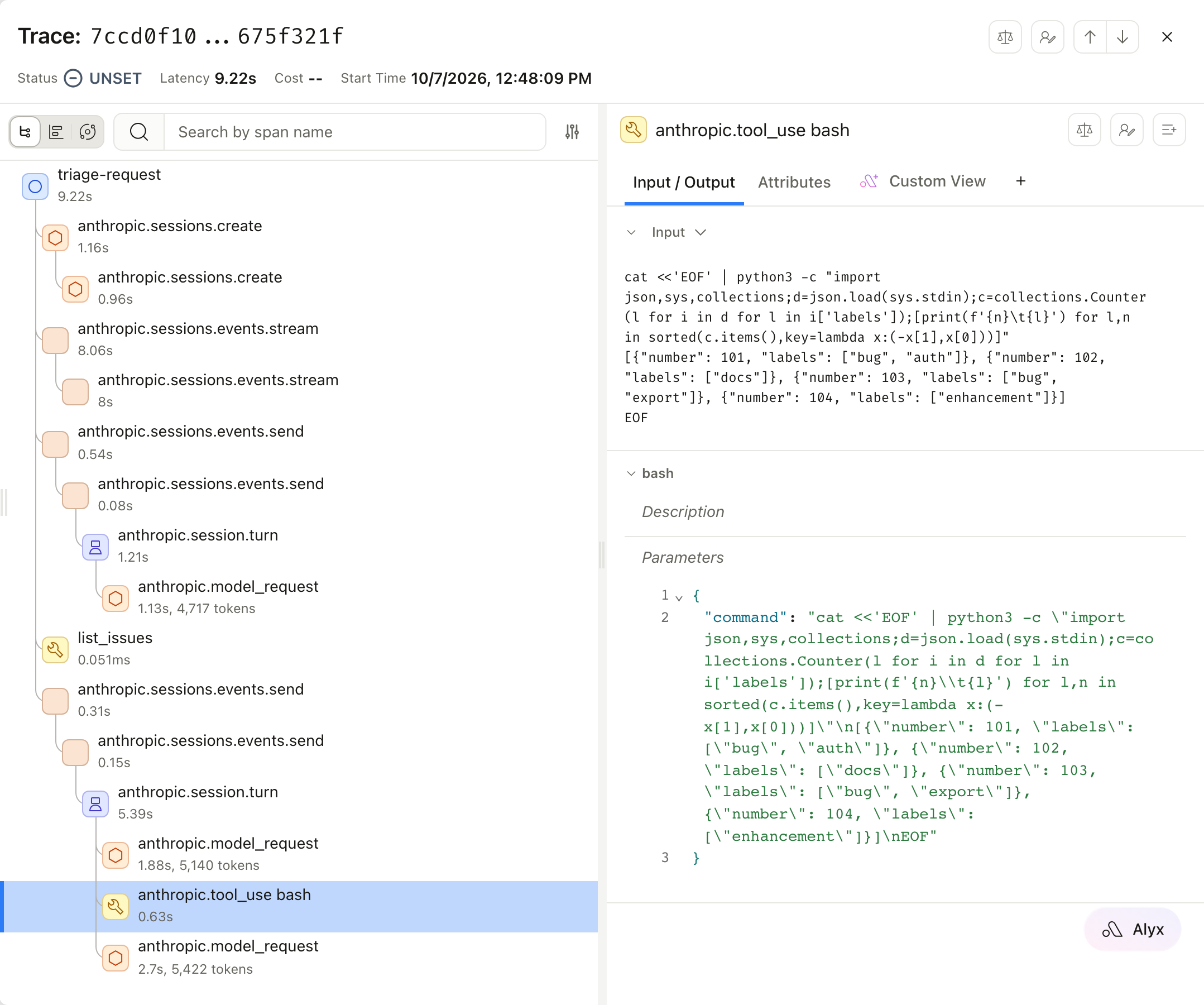
anthropic.tool_result.content attribute, on the Attributes tab:
Read the session as a conversation
gen_ai.conversation.id, and Arize AX uses it as the session ID, so each thread appears in the project’s Sessions tab. Open Sessions and select the session to read the thread as a conversation.
triage-request span. The session ID is only on the SDK’s and the API’s spans further down the trace, so the list has nothing to summarize. Selecting the session still shows the whole conversation.A Managed Agents session can have more than one thread, for example when its agent hands work to other agents. Each thread is a separate session in Arize AX, but every span in every thread carries the same anthropic.session.id. To see all of a session’s work in one place, filter the project’s spans on anthropic.session.id. A turn that starts because an agent on another thread replied or finished has no parent, so it’s the root of a trace of its own.Evaluate the triage
The trace shows what the agent did. An evaluator tells you whether it did it well. Sample issue #101 locks out a whole region, so a good triage names it as the most urgent. Create an LLM-as-a-judge evaluator that checks the agent’s answer against that:Create the task
triage-quality and select the claude-managed-agents-triage project.Filter to your root spans
triage-request, so the task scores your root spans.Add the evaluator
input to attributes.input.value and output to attributes.output.value, and set the choices to correct (score 1) and incorrect (score 0).Run the task
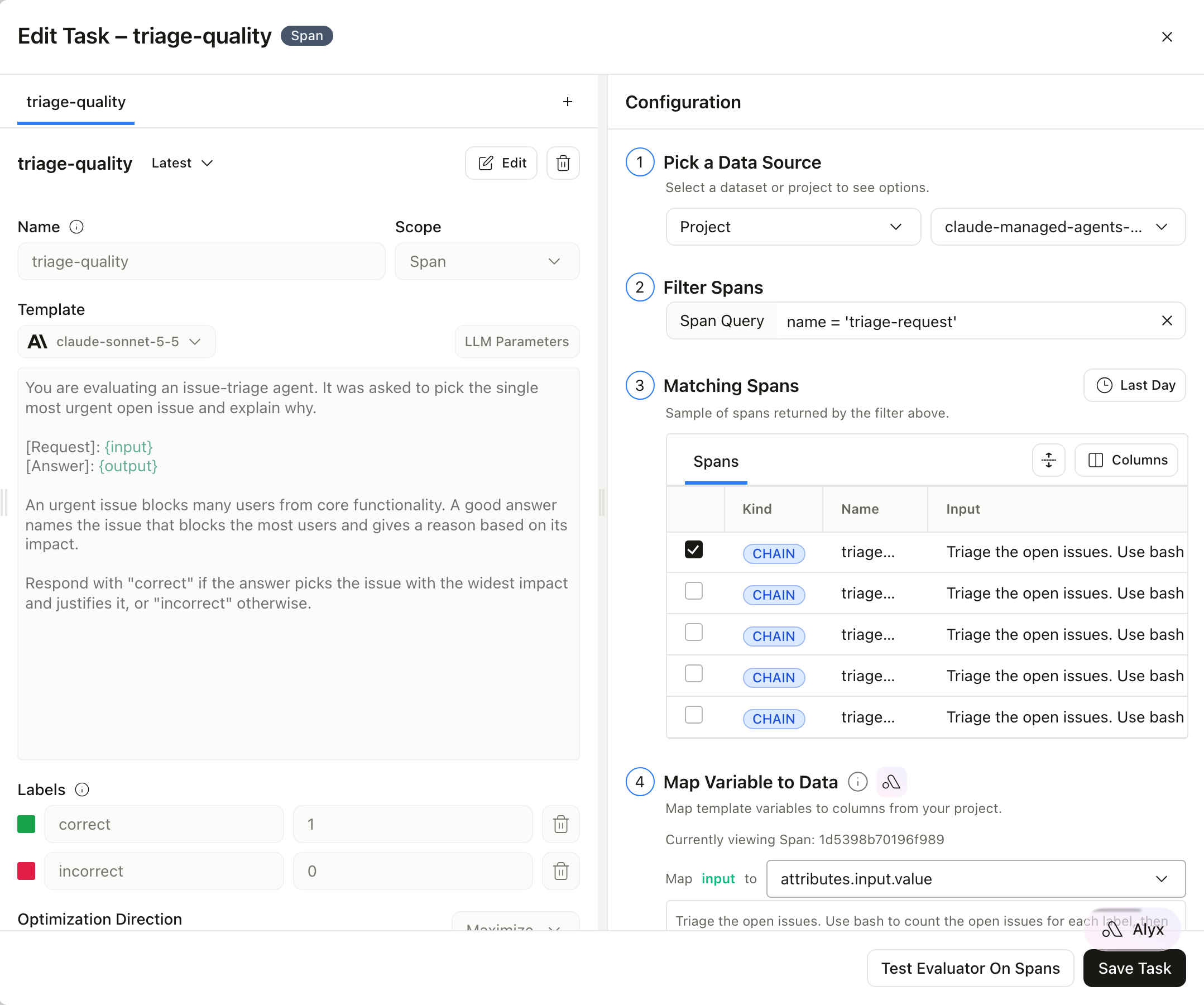
The triage-quality task: the judge template, its labels, the span filter, and the matching triage-request spans
Read the results
triage-request span gets a triage-quality label.
Triage traces with their triage-quality labels
incorrect to find the sessions where the agent got it wrong, and open their traces to see whether the cause was the tool result, the bash step, or the model’s reasoning. For the other ways to create a task, such as with Arize Skills or Alyx, and for the full set of options, see Run evals on traces.Summary
You traced a Claude Managed Agents session from both sides and evaluated its result:- A Claude Console destination sends the spans that the Claude API creates to an Arize AX project, routed by the destination’s project name.
- The Claude SDK’s spans and W3C trace context join those spans to your application’s own trace.
- Your own
TOOLspan records the custom tool that your application runs, which the Claude API can’t see. - An LLM-as-a-judge task scores each triage, so you can find the runs that went wrong and trace their cause.
Next steps
Claude Managed Agents integration
Session-level evaluations
Evaluate agents
GenAI semantic conventions
gen_ai.* spans to OpenInference.