

One-Command MCP Client Setup
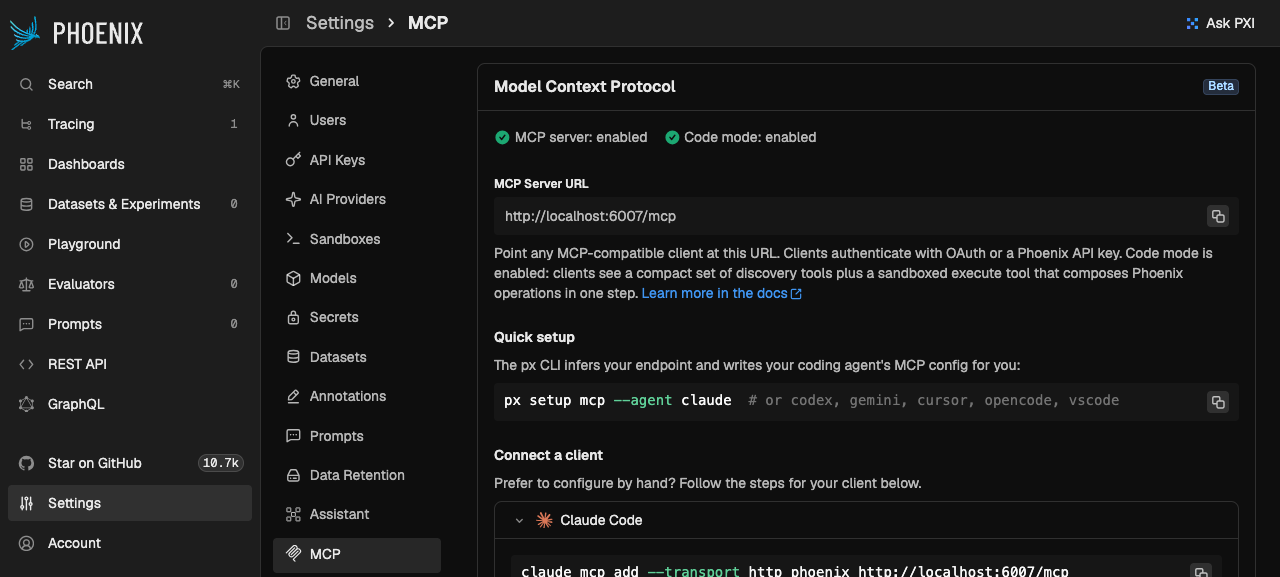
July 18, 2026 Available in arize-phoenix 19.1.0+ (server) and @arizeai/phoenix-cli Following the Remote MCP server, connecting a coding agent to Phoenix is now a single command.px setup mcp writes the Phoenix MCP server into your
agent’s configuration, inferring the endpoint from your active profile and defaulting to OAuth
login — no manual JSON editing.
- Supported agents —
claude(Claude Code),codex,cursor,gemini,opencode, andvscode. - Global or repo-scoped —
--globalwrites user-wide config;--localwrites repo-scoped config in the current git repository. - Endpoint resolution — the target endpoint follows the standard
pxchain (flag →PHOENIX_HOST→ profile → default), and--profileselects which profile to infer it from.
px setup mcp quick-start, and
provides copy-paste connection instructions for each client. As of arize-phoenix 19.2.0, the
client list also includes Antigravity and OpenCode alongside Claude Code, Claude Desktop,
Codex, Cursor, and VS Code.
Remote MCP Server
Connect Claude Code, Cursor, and other MCP clients to your Phoenix instance
Playground Model Picker Scoped to Provisioned Providers
July 20, 2026 Available in arize-phoenix 19.3.0+ The playground model picker now shows only providers that are ready to use — dependencies installed and credentials satisfied, whether stored on the server or in the browser-local credential store — so you no longer scroll past providers you can’t invoke. Custom providers you have added appear automatically. If no provider has been provisioned yet, the picker falls back to the flagship providers (OpenAI, Anthropic, Azure OpenAI, AWS Bedrock, and Google) so it is never empty. Two Playground defaults also changed in this window: new sessions now default to OpenAI’sgpt-5.6-sol, and OpenAI models default to the Responses API (assumed whenever a prompt does
not specify otherwise).
User Friction Evaluator
July 21, 2026 Available in arize-phoenix-evals 3.2.0+ (Python) and @arizeai/phoenix-evals 1.2.0+ (TypeScript) A new built-in classification evaluator detects when a user expresses friction with an assistant’s preceding behavior — corrections, retries after an unsuccessful response, frustration, and challenges to unrequested or unexplained actions. It returns afriction / no_friction label,
making it easy to flag conversational turns worth reviewing and to measure whether product changes
reduce expressed friction.
conversation and
user_message / userMessage) so the judge classifies the target turn without confusing it with
earlier ones.
User Friction
Detect expressed user friction in conversational assistants
AI SDK v7 Tracing
July 22, 2026 Breaking change in @arizeai/phoenix-otel 2.0.0+@arizeai/phoenix-otel now traces Vercel AI SDK v7 applications, upgrading its
OpenInference Vercel integration to v3. Register the OpenInference span processor as before and AI
SDK v7 telemetry is translated into OpenInference spans automatically.
- Breaking: the upgraded integration is ESM-only and targets AI SDK v7. Applications still on
AI SDK v6 or older should stay on
@arizeai/phoenix-otel1.x. - If the processor cannot be loaded (for example, a bundler strips the dynamic import), spans still reach Phoenix through a plain OpenTelemetry processor, but AI SDK telemetry is not converted to OpenInference.